Running an online business today means finding smarter ways to work, and automation plays a big part in that. As AI continues to grow, more businesses are turning to tools that help streamline daily workflows and cut down on manual tasks. Automation has long been a key part of email marketing, making it easier to manage subscribers, deliver content, and schedule campaigns without constant hands-on effort.
Of course, every business is different, and there’s no single solution that fits everyone. That’s why in this post, we’ll take a closer look at several email automation software options designed for different use cases, and highlight what makes each one stand out.
Disclaimer: The information in this post is accurate as of February 2026.
If you’re short on time, this comparison table will give you a quick overview of the email automation tools covered in this post. It breaks down key features, AI capabilities, and pricing, so you can easily find the best email automation platform for your needs.
| Tool |
Automation features |
AI features |
Free plan
+ limits |
Starting price
+ limits |
| SendPulse |
Visual flow builder with tiggers, conditions, delays, and filters, multi-channel messaging, dynamic segmentation, pre-built templates |
ChatGPT-powered AI assistant that helps build automation flows, suggests settings, generates templates, and provides in-flow guidance |
✅
500 contacts, 15k emails, 5 flows, 50 elements |
$8/mo for
500 contacts, ∞ emails, 10 flows, 70 elements |
| MailerLite |
Trigger-based workflows, multi-trigger automations, and conditional branching |
AI-powered email content and subject line generation |
✅
500 contacts, 15k emails, limited automation |
$9/mo for
500 contacts, ∞ emails, 3 triggers per automation |
| AWeber |
Workflow-based automation, welcome series, RSS-to-email, landing page, and signup form triggers |
AI assistant for email content creation |
✅
500 contacts,
3k emails, basic automation |
$12.50/mo for
500 contacts, 5k emails, 3 automations |
| Drip |
Visual workflows, rules, lifecycle events, RSS-to-email, and advanced dynamic segmentation |
Not available |
❌
14-day trial |
$39/mo for
2,5k contacts,∞ emails, 50 workflows |
| Omnisend |
Multi-step automations with conditional splits, delays, event-based and behavior-based triggers, frequency capping, and exit conditions |
AI Campaign Booster, AI Segment Builder, AI subject line and email copy generation |
✅
500 contacts, 500 emails, all automation features |
$16/mo for
500 contacts, 6k emails, all automation features |
| Klaviyo |
Automated workflows based on customer actions, real-time behavior triggers, and pre-built automation templates |
Predictive analytics, smart sending time, AI subject lines and layouts |
✅
250 contacts, 500 emails, advanced automation |
$20/mo for
500 contacts,
5k emails, all automation features |
| Mailchimp |
Automation flows, pre-built templates, behavior-based triggers |
Generative AI, predictive insights, and sending time optimization |
✅
250 contacts, 500 emails; automation not included |
$13/mo for
500 contacts, 5k emails, 4 automation steps |
| ActiveCampaign |
Visual automation builder with triggers, conditions, delays, and branching paths |
Predictive sending, AI actions, AI image and content generation |
❌
14-day trial |
$15/mo for
1k contacts, 10k emails, 5 automation actions |
This comparison should help you quickly narrow down the best email marketing automation tools based on business needs and budget.

Create seamless customer experiences
Set up scenarios to automate your contact management and customer interactions across various communication channels under one roof. Get started for free without any risks.
Get started for free
An email automation builder is a tool that allows businesses to create automated email workflows based on user behavior, triggers, or pre-defined conditions. Instead of sending every message manually, marketers can automate email flows that ensure relevant messages reach the right audience when they’re most likely to engage.
Automation platforms typically use a visual interface where users can drag and drop blocks to build different scenarios. This helps streamline communication, improve engagement, and save time, which is especially valuable for businesses looking to scale their email marketing efforts.
Benefits of using email automation software
The benefits of email automation vary depending on your business model and goals. That said, some advantages are consistent across most industries. Let’s look at the most common ways companies use email automation tools in real-life scenarios.
Marketing
Email automation tools make it easier for marketers to plan and manage campaigns without getting stuck in manual work. Instead of sending one-off emails, teams can automate email flows that react to user behavior and preferences. This approach helps marketers segment their audience more precisely, deliver more relevant messages, and keep communication consistent across campaigns.
eCommerce
For eCommerce businesses, email automation plays a key role at every stage of the customer journey. An email automation platform can automatically send messages based on shopping behavior, such as abandoned carts, completed purchases, or browsing activity. These timely emails highlight relevant products and gently encourage customers to come back and buy again.
Post-purchase emails are just as important. Automated messages can share order updates, ask for feedback, and deliver personalized offers, all of which help build trust and improve customer retention.
SaaS companies
SaaS companies rely on email automation tools to support users from signup to long-term engagement. Automated onboarding emails help new users understand the product and reach their first goals faster. At the same time, behavior-based emails can point users toward key features and actions, making it easier to stay engaged and see ongoing value from the product.
Selecting the best email automation platform isn’t always easy. Every tool offers a different mix of features, and every business has its own needs. Still, there are some key criteria you should consider when making your choice.
- Marketing goals. Start by defining what you want to achieve. Are you planning to send basic newsletters and occasional promotions, or do you need advanced funnels and behavior-based automation? When your goals align with a platform’s strengths, it’s much easier to build an effective email marketing strategy.
- Scalability. Think about the size of your contact list today and how quickly it might grow. Some email automation tools work well for small lists but become expensive as you scale. Others are built to handle larger volumes and more complex use cases. Review pricing models carefully and make sure costs stay reasonable as your business expands.
- Ease of use. Not every team has the same technical background. Some email marketing automation tools are designed for beginners, while others are better suited for experienced marketers. If you’re unsure, a platform with an intuitive interface and solid onboarding resources can save time and reduce mistakes early on.
- Sophisticated automation and segmentation. If you require advanced automation, such as branching workflows, multiple conditions, or lead scoring, make sure your email automation software can handle it. Strong segmentation and personalization are just as important if you want to automate email content for different audiences.
- Integration with your stack. Your email automation software should work smoothly with the tools you already use, such as eCommerce platforms, CRM systems, or website builders. Good integration ensures smooth data transfer and automation based on customer actions.
- AI features. Finally, think about whether AI capabilities fit into your long-term strategy. Features like predictive analytics or content generation can improve your results over time. Choosing an email automation platform that continues to invest in AI helps ensure it stays relevant as technology evolves, even if these features aren’t a priority right now.
- Extra features. Consider whether you want a simple, email-only solution or a broader automation platform that supports other channels like SMS or messaging apps. Managing multiple channels in one place can simplify workflows and give you a more complete view of your customer data.
- Budget and ROI. Compare pricing against the features you actually need and the value they bring. Free plans can be helpful for testing, but paid plans usually unlock essential features for growth. Also consider indirect benefits, like time saved through automation, which can justify a higher upfront cost.
Overall, taking the time to choose the right platform from the start can save you hours of setup and troubleshooting later. More importantly, it allows your team to focus on creating effective campaigns instead of managing tools.
Before you start doing any automation... I advise to visualize first what you want to automate. So start with a quick process diagram.
SourceOlivia Milton
Fractional CMO & AI-powered growth strategist
Let’s take a closer look at some of the best email automation tools available today, with a focus on their features, automation capabilities, and pricing.
SendPulse
SendPulse is a robust multi-channel marketing automation platform that combines email marketing, SMS, automation flows, chatbots, a built-in CRM system, pop-ups, and more. Its Automation tool allows businesses to automate email messages based on customer actions, specific dates, or CRM deal changes, such as registrations, purchases, or abandoned carts.
The platform uses a visual workflow builder that connects directly to the CRM system. This makes it easy to move contacts through different stages of the sales pipeline automatically. Email automation runs with minimal manual effort and doesn’t require any programming skills, which makes SendPulse a strong option for teams of all sizes.
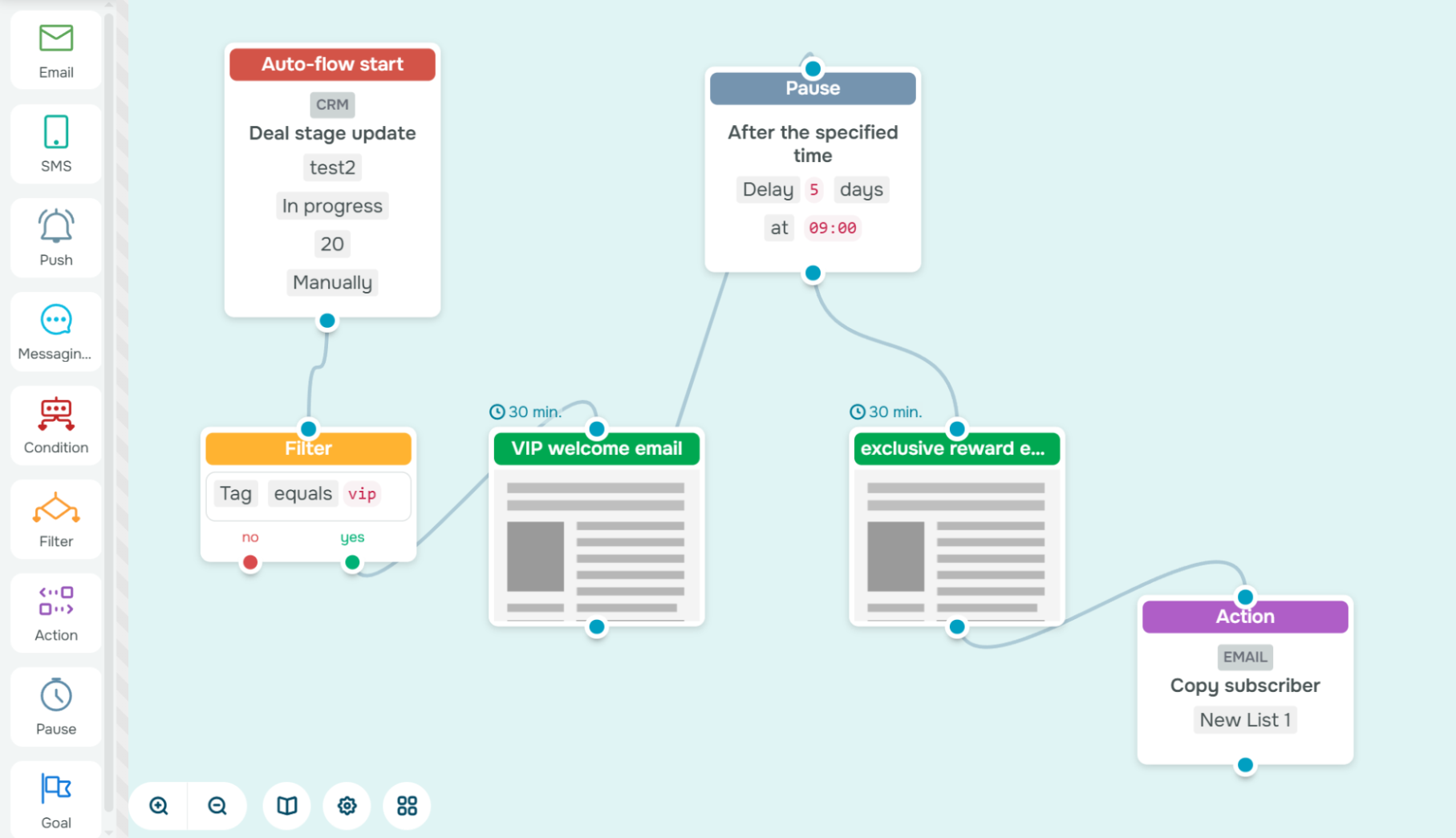 Building a CRM-driven automation in SendPulse
SendPulse Automation also includes an AI assistant. It works directly inside the flow builder and helps users create automation flows, generate email layouts, and configure elements correctly. AI-generated templates speed up setup, while custom events allow businesses to automate email flows based on specific user actions.
SendPulse key automation features include:
- visual email automation builder;
- trigger-based email automation based on events, dates, user actions, etc.;
- AI assistant for generating flows and layouts;
- AI guidance and pre-made templates;
- custom events that trigger automated workflows;
- multi-channel automation, including email, SMS, web push notifications, and messaging apps;
- dynamic conditions, filters, and delays within flows;
- filter elements for advanced audience segmentation;
- dynamic segments that update in real time based on contact behavior and data.
Pricing. Automation is included in SendPulse’s email marketing plan and is available even on the free tier. Free email automation tools include up to 5 automation flows with 50 elements per flow and up to 15,000 emails per month. The paid plans start at $8 per month when billed annually. The cheapest one includes up to 10 automation flows with 70 elements per flow, unlimited emails, and support for up to 500 subscribers. Advanced features, such as dynamic segmentation, are also unlocked.

Create your free SendPulse account
Start using powerful tools to attract, engage, and retain customers — all on one platform. Sign up for free and explore what you can build.
Get started for free
MailerLite
MailerLite is an email marketing and automation platform that helps businesses automate email flows based on subscriber actions, dates, or profile updates. This email automation software supports multi-trigger automations, which means a single flow can start from several entry points.
MailerLite also offers pre-built templates for common use cases, such as welcome sequences, abandoned cart reminders, and post-purchase follow-ups. The platform includes optimization tools like A/B testing for subject lines and email content, along with reporting features to track performance. With conditional branching, users can guide subscribers through different paths within a flow based on custom rules, which makes it easier to build personalized email automation.
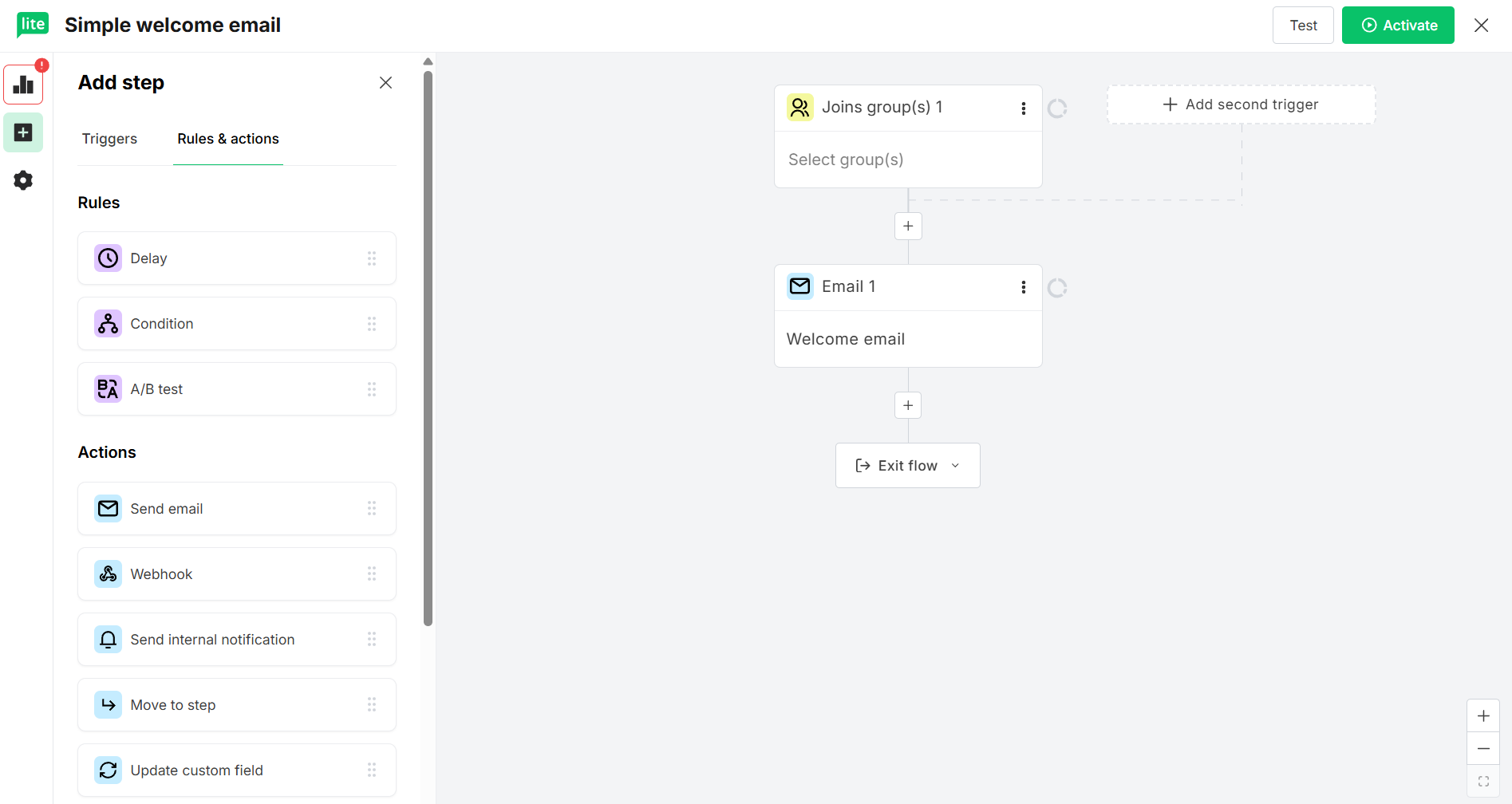 Creating a new email automation flow in MailerLite
This email automation software also allows re-adding subscribers who cancel or fail certain steps, giving you more control over how flows behave. While the platform does provide AI tools for generating email subject lines and copy, these features are limited to content creation, as email automation flows remain fully rule-based.
MailerLite key automation features include:
- email automation builder;
- pre-built email automation templates;
- up to 100 automation steps;
- trigger-based workflows based on subscriber actions, dates, or profile updates;
- multiple entry points for subscribers;
- conditional branching based on custom fields, group membership, or campaign activity;
- full control over email automation flows and logic;
- segmentation support to trigger flows for specific audiences;
- automatic RSS campaigns;
- AI email content and subject line generation;
- insights on subscriber movement, workflow completion, and failed steps;
- A/B testing in workflows.
Pricing. MailerLite offers a free plan for up to 500 subscribers, which includes basic email automation functionality with a limited selection of templates. Paid plans start at $9 per month, billed annually, and include the same core features as the free plan, along with RSS campaigns. To unlock more advanced functionality, users need to upgrade to a higher-tier plan starting at $18 per month, billed annually.
AWeber
AWeber is another email automation platform that allows users to create flow-based campaigns triggered by subscriber behavior. These flows can branch into different paths based on subscriber actions or interests, helping keep messages relevant as people engage. Once a subscriber completes a specific action, they can be automatically removed from a flow, keeping campaigns clean and efficient.
This setup makes it easy to automate common email sequences such as welcome series, product promotions, and re-engagement campaigns without ongoing manual effort. AWeber also provides detailed flow controls for more precise subscriber management. For example, open automations can apply or remove tags when a subscriber opens an email. Split paths allow flows to adapt in real time based on subscriber behavior or characteristics.
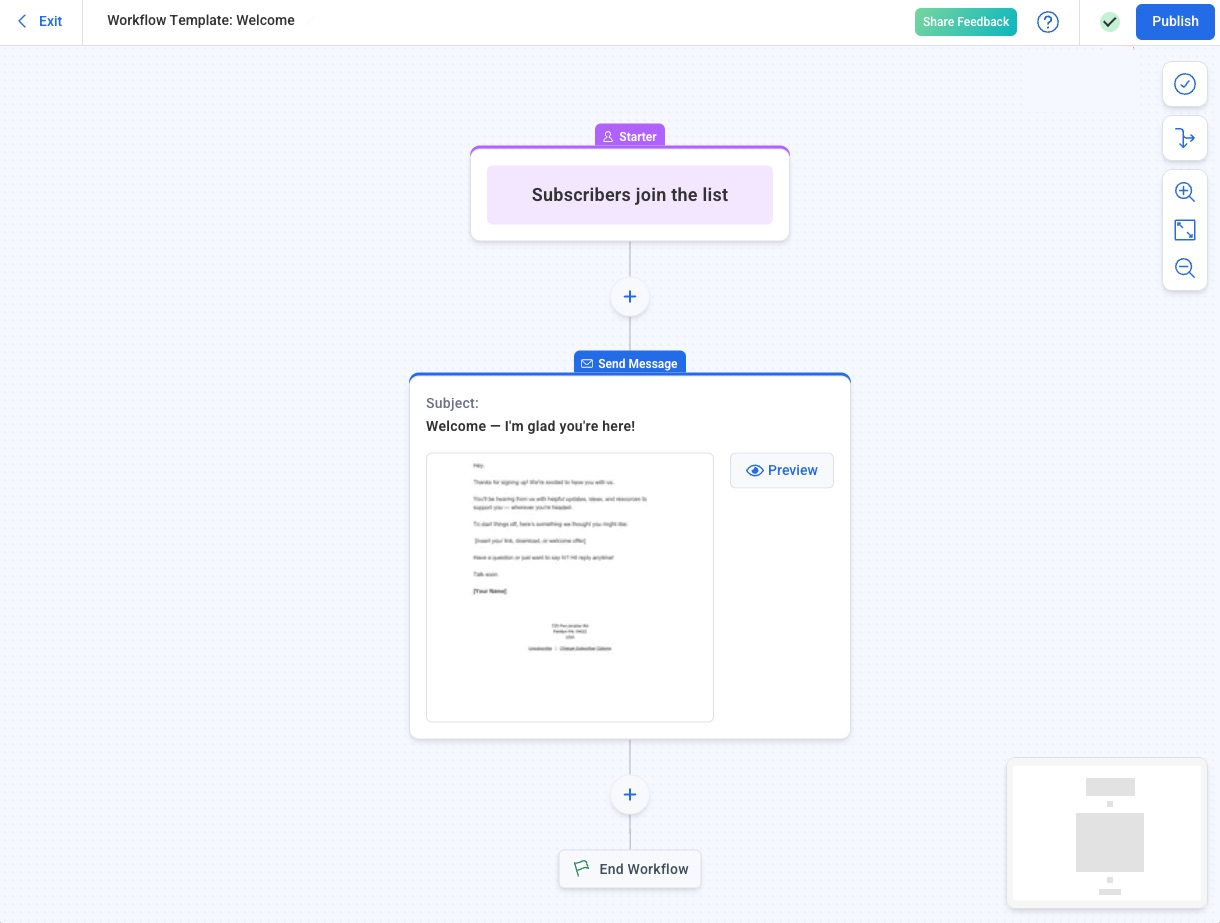 Creating an automated welcome flow; source: AWeber
AWeber key automation features include:
- flow-based email automation;
- welcome series automation;
- RSS-to-email automation;
- landing page and signup form triggers;
- tag-based subscriber segmentation;
- split paths and branching workflows;
- wait steps and scheduling between messages;
- exit automations to remove subscribers after key actions;
- AI-assisted email content creation, not connected to automation logic;
- visual workflow insights for tracking performance and identifying drop-offs.
Pricing. AWeber offers a limited free plan with up to 500 contacts and 3,000 emails. Advanced features can be tested during the 14-day free trial. The cheapest paid plan costs $12.50/month when billed annually and includes 500 subscribers, 5,000 emails, and 3 email automations. To create and launch unlimited automations, an upgrade to a higher-tier plan is required.
Drip
Drip is a comprehensive marketing solution designed to help users automate emails and run multi-channel campaigns on autopilot. By using a simple visual workflow builder, brands can create behavior-based email journeys that engage customers at the right time. With its eCommerce integration, this email automation platform syncs real-time store and order management system data to power highly personalized automations.
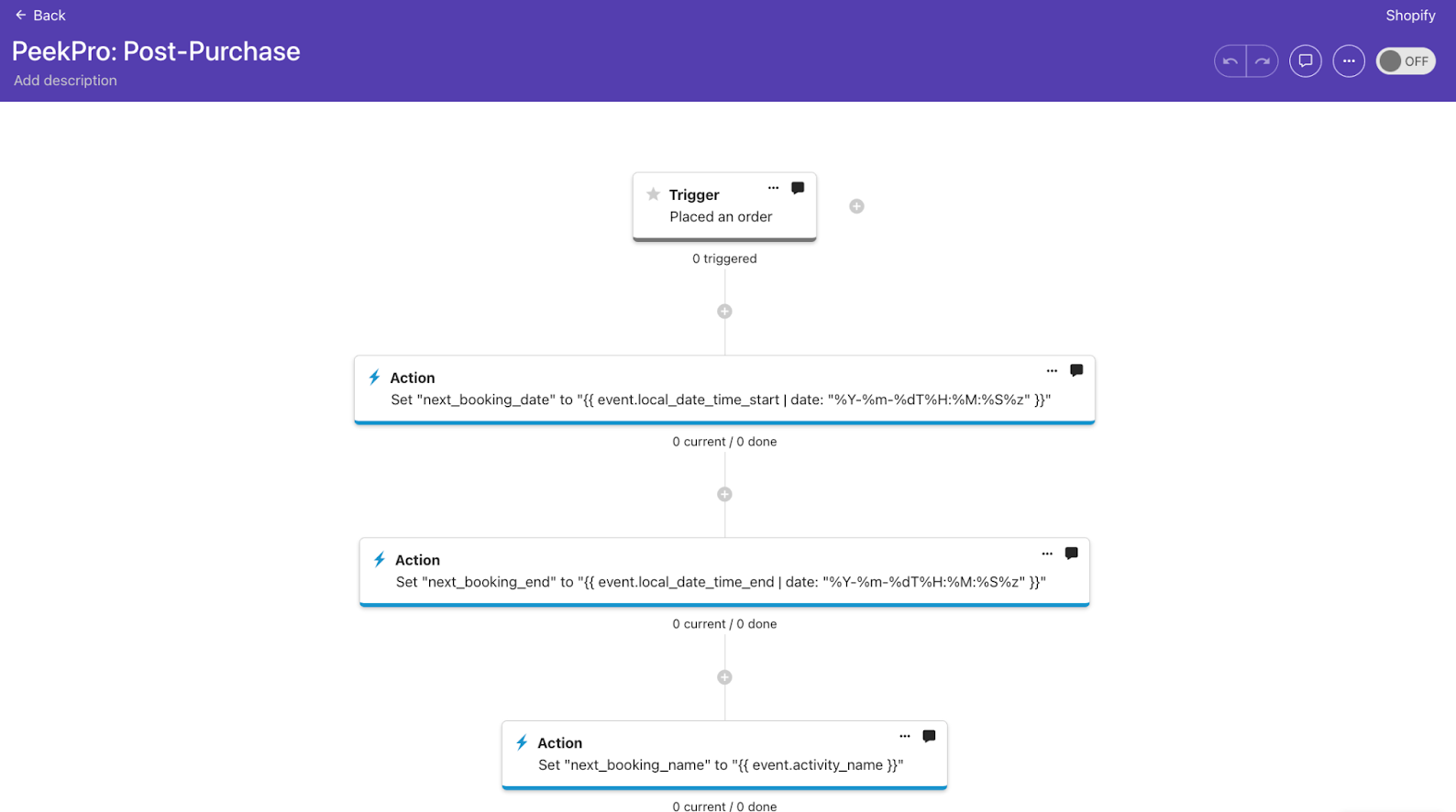 Building a post-purchase email automation; source: Drip
Drip’s email automation is built around real customer behavior, allowing emails to trigger based on specific actions like purchases, milestones, or inactivity. Its “Support All People” feature lets automation flows operate beyond traditional mailing lists. This makes it possible to manage transactional and non-promotional messages across channels while still respecting user preferences.
Drip key automation features include:
- visual workflow builder;
- behavior-based triggers and actions such as purchases, milestones, or inactivity;
- rule-based automation;
- 20+ pre-made automation templates for common eCommerce scenarios;
- email automation management;
- RSS-to-email automation;
- dynamic segmentation that adapts as customer data and behavior change;
- multi-channel automation support;
- email A/B testing;
- 200+ eCommerce integrations, e.g., Shopify, WooCommerce, LoyaltyLion, and more;
- open API for advanced integrations and data-driven triggers.
Pricing. Drip does not offer a free plan, but it provides a 14-day free trial. Pricing is based solely on the size of your mailing list, with all features included on every plan. The entry-level plan starts at $39 per month for up to 2,500 subscribers and includes unlimited email sends, up to 50 automation flows, and dynamic segmentation.
Omnisend
Omnisend is a no-code omnichannel automation platform that allows businesses to create email, SMS, and push notification campaigns from a single visual workflow builder. Using this email automation platform, i-Emails can automate emails and build multi-step campaigns with conditional logic, split paths, delays, and event-based triggers. The platform also includes pre-built templates for common eCommerce scenarios, such as welcome sequences, cart abandonment, product recommendations, and post-purchase follow-ups.
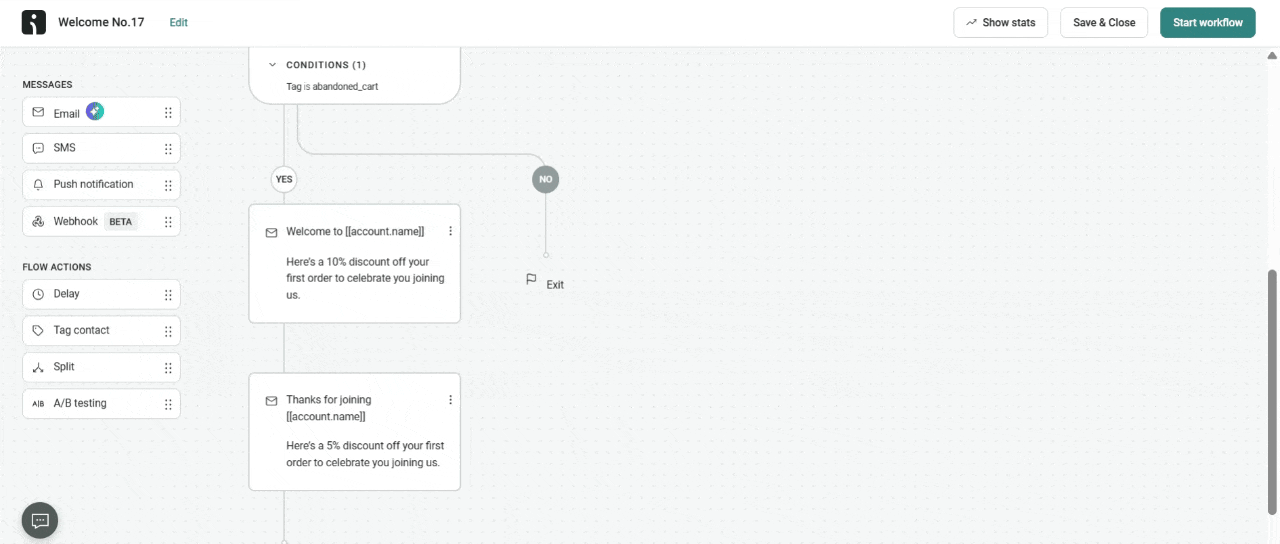 Setting up an email automation with conditional branches; source: Omnisend
To speed up setup and improve targeting, Omnisend offers several AI-powered features. Dynamic product personalization automatically adds product recommendations to emails based on each customer’s behavior and past purchases. The AI Segment Builder lets marketers describe their ideal audience using simple prompts, then turns those inputs into detailed targeting rules. These segments can be applied directly inside email automation flows.
Omnisend key automation features include:
- drag-and-drop automation builder;
- multi-step campaigns with delays, conditional splits, and channel branching;
- omnichannel automation including email, SMS, and web push notifications;
- pre-built automation templates;
- behavior-based triggers such as browsing, cart abandonment, and purchase events;
- real-time data triggers;
- AI-powered product blocks;
- AI Campaign Booster that resends emails with updated subject lines or content;
- AI Segment Builder based on prompts;
- custom events support;
- frequency capping and exit conditions;
- product and lifecycle recommendations;
- pre-built eCommerce integrations;
- A/B testing within workflows;
- insights into opens, clicks, conversions, and revenue.
Pricing. Omnisend offers a free plan that includes up to 500 subscribers, 500 email sends per month, and access to all automation features except personalized product recommendations. The cheapest paid plan starts at $16/month, with an option to pay for the first 3 months upfront at a discounted rate of $11.20/month. This plan also supports 500 contacts but increases the email limitation to 6,000 sends per month.
Klaviyo
Klaviyo is an omnichannel marketing automation platform powered by a built-in customer data platform and AI. Using unified customer data, users can trigger personalized communications across email and other channels based on real-time behavior and lifecycle events. With ready-made templates and a visual flow builder, teams can automate key moments such as welcome series, abandoned carts, review requests, and segment-specific campaigns.
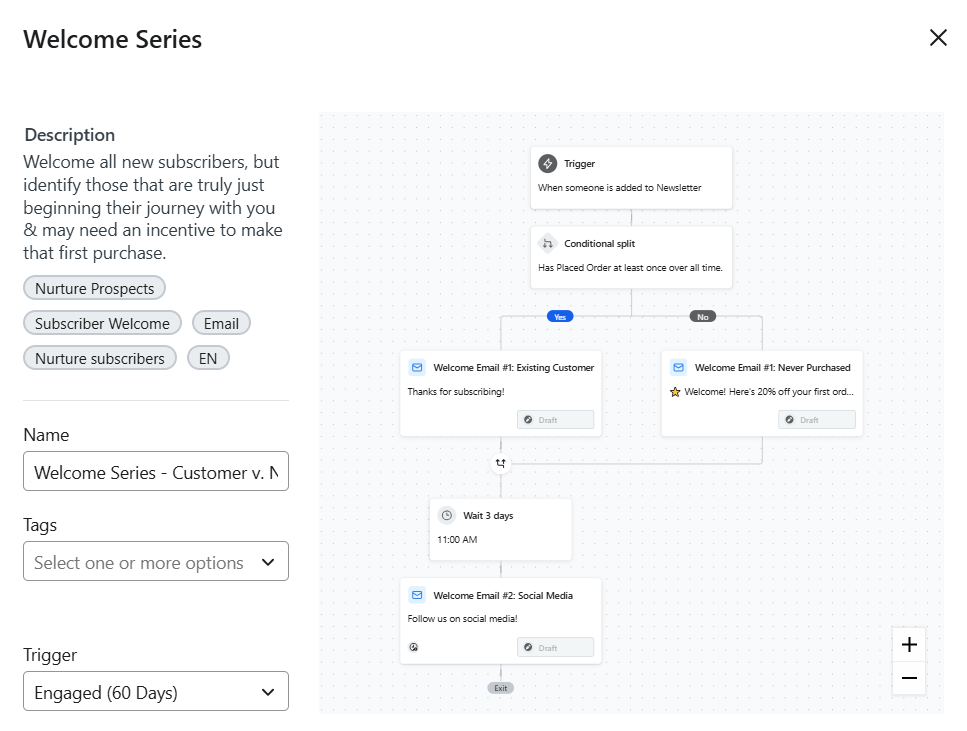 Customizing a welcome flow in Klaviyo
Klaviyo’s Flows AI enables businesses to automate emails using natural language. You can describe the flow you want in plain language, and the AI suggests a trigger, filters, and an overall structure. After reviewing the draft, you can fine-tune the scenario, timing, and content directly in the flow builder.
Klaviyo key automation features include:
- drag-and-drop email flow builder;
- 60+ email and flow templates;
- universal content blocks;
- generative AI for segments, content, flows, and images;
- dynamic product recommendations;
- personalization based on location, lifecycle stage, loyalty tier, or predicted lifetime value;
- real-time behavior triggers driven by live customer actions;
- AI subject line generator;
- omnichannel automation including email, SMS, WhatsApp, mobile push notifications, etc.;
- smart send time;
- A/B testing for timing, content, and targeting;
- predictive analytics.
Pricing. Klaviyo offers a free plan that includes 250 active contacts and 500 emails per month. Its most affordable paid plan costs $20/month for 500 contacts and 5,000 emails per month. The paid plan also unlocks additional capabilities, including advanced generative AI features. Pricing can be customized based on specific business needs.
Mailchimp
Mailchimp is an all-in-one marketing platform that offers email automation capabilities for businesses. With pre-built flow templates, users can quickly set up automations for common scenarios. The software also uses behavioral data from integrations like Shopify to trigger messages based on customer actions. In addition to email, Mailchimp supports omnichannel automation, allowing users to manage campaigns across email, SMS, and social media channels from a single interface.
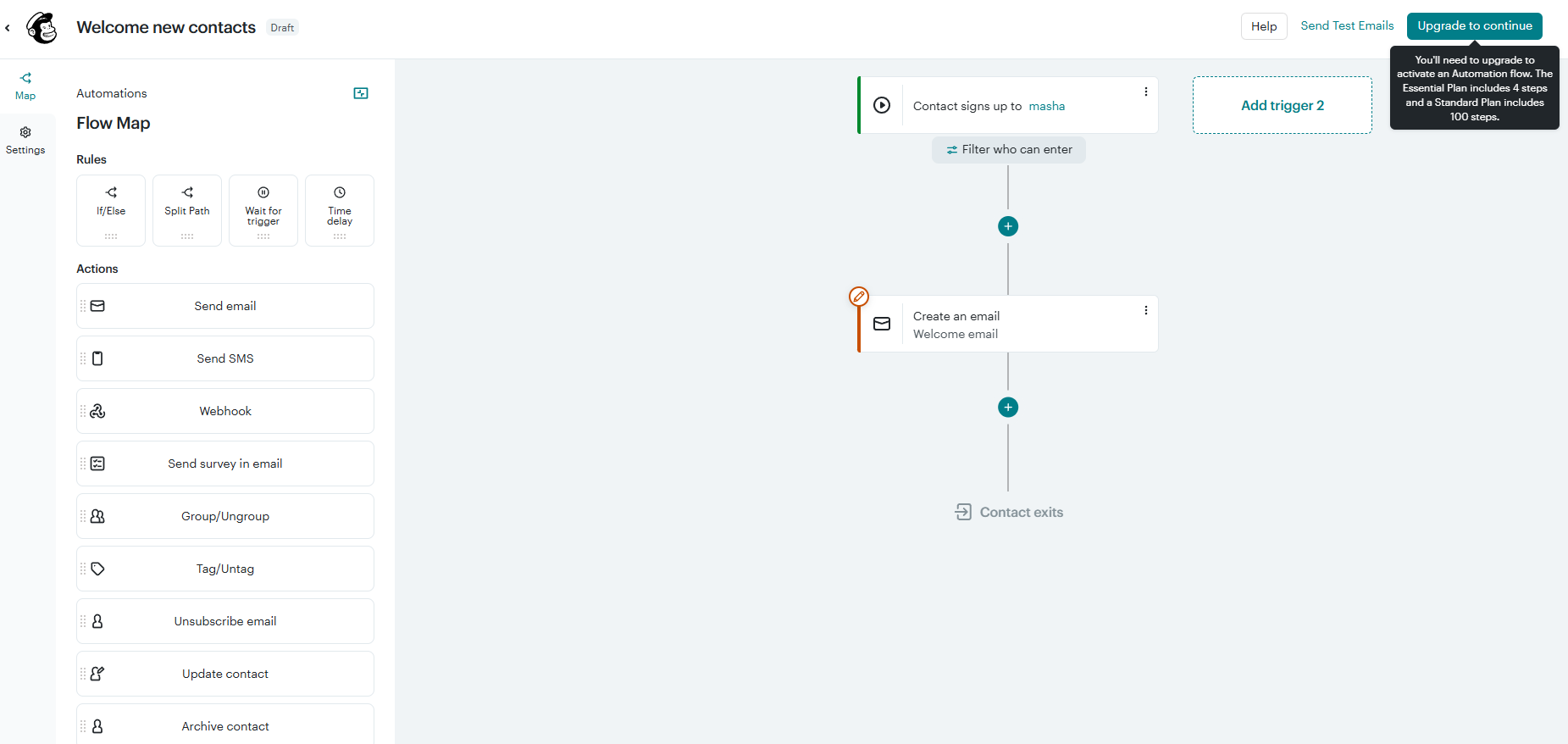 Building a welcome automation flow inside Mailchimp
Mailchimp also offers a suite of AI tools for email creation and automation. Predictive insights and segmentation use machine learning to analyze customer data and anticipate subscriber behavior. This helps identify patterns and group contacts based on factors like purchase likelihood or customer value. Other AI features include send day and time optimization and an AI content generator.
Mailchimp key automation features include:
- drag-and-drop automation builder;
- 30+ ready-made flows for welcome series, abandoned carts, post-purchase, etc.;
- marketing automation flows;
- multiple starting points;
- branching points;
- generative AI features;
- dynamic email content for different audience segments;
- personalized product recommendations;
- delivery by time zone;
- predictive customer segmentation;
- behavioral targeting;
- A/B testing of subject lines, send time, and content;
- reporting on open rates, click-through rates, conversions, etc.
Pricing. Mailchimp offers a free plan that includes up to 250 contacts and 500 email sends per month, but email automation is not available on this tier. To automate email, users need a paid plan, which starts at $13 per month. This plan includes 500 contacts, 5,000 emails per month, and up to four steps in marketing automation flows.
ActiveCampaign
ActiveCampaign is a marketing automation platform designed to help businesses automate customer journeys across multiple channels. Its email automation software focuses on behavior-based automation that triggers emails when users take specific actions, such as subscribing to a list, opening an email, clicking a link, or completing a purchase. Automations are built using a visual builder that supports conditions, delays, and branching paths.
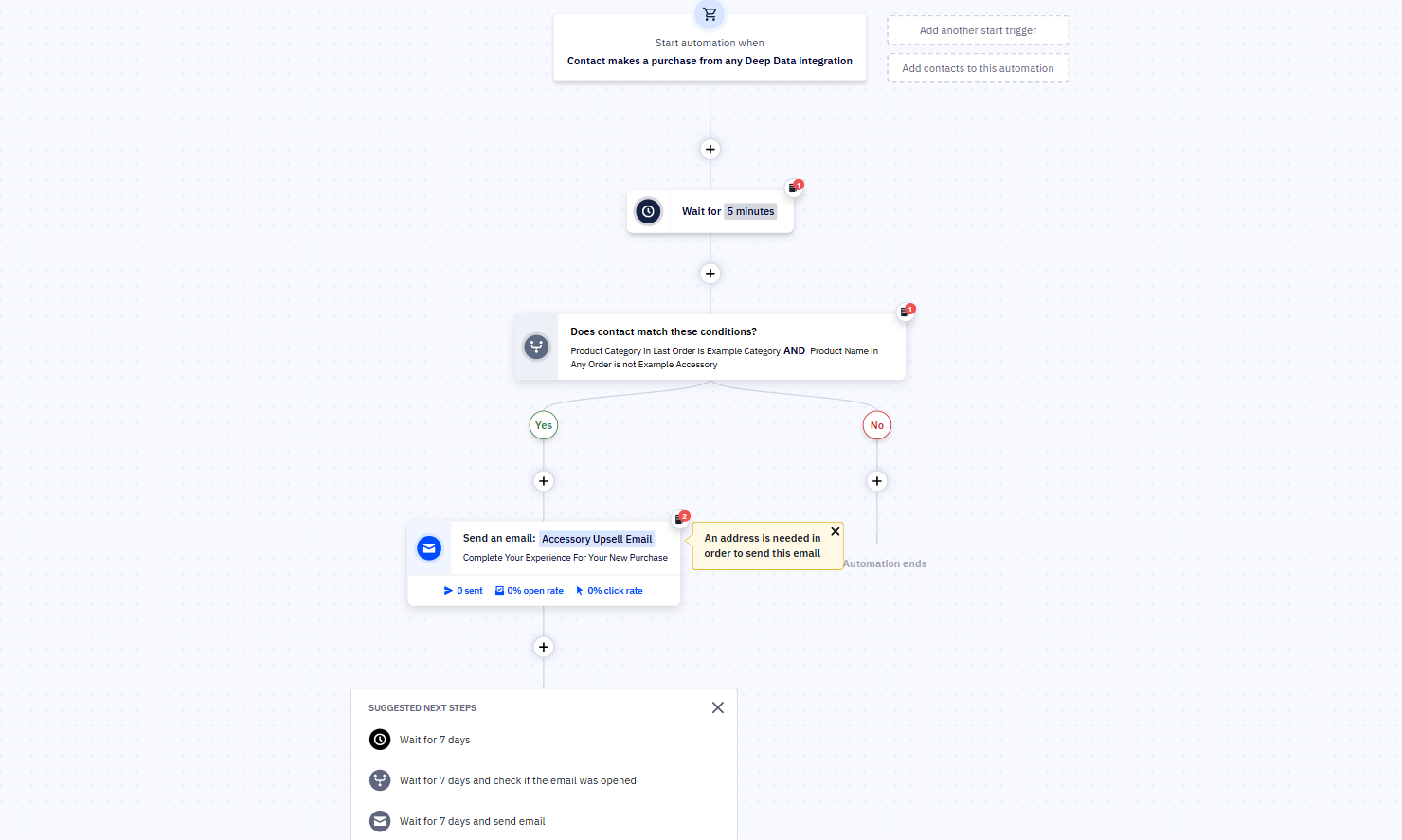 Creating an email automation from a template in ActiveCampaign
The platform also includes AI-powered features that enhance email automation. Predictive sending analyzes engagement data to identify the best time to send emails to each contact. Automated campaign creation helps suggest message sequences based on your goals and audience behavior. Another AI feature is the Actions Library, which applies AI-driven tasks to contact data within automations. These results are saved to contact fields and can then be used for personalization, segmentation, and automated decision-making.
ActiveCampaign key automation features include:
- multi-step marketing automation;
- AI automation builder;
- AI-powered campaign creation;
- AI predictive sending;
- behavior-based email triggers such as opens, link clicks, site activity, and purchases;
- advanced audience segmentation;
- cross-channel automation for email and other channels;
- AI Actions Library for tasks like summarization, translation, and sentiment analysis;
- personalization using contact fields and AI-generated data;
- real-time analytics and reporting.
Pricing. ActiveCampaign does not offer free email marketing automation tools, but it includes a 14-day free trial. Paid plans start at $15 per month (billed annually) for up to 1,000 subscribers and 10,000 emails. This plan includes email automation with up to 5 actions per automation. To unlock unlimited actions, users need to upgrade to a higher-tier plan.
The bottom line
When it comes to personalizing communication and engaging customers at scale, email automation is one of the most effective strategies available. Today’s email marketing automation tools often include powerful AI features, which can make it easier to automate email campaigns, improve targeting, and save time.
One platform that brings all of this together is SendPulse. It allows you to build automated email flows, run email and SMS campaigns, and use additional tools like chatbots, a built-in CRM system, and even an online course builder. This all-in-one approach helps you manage multiple aspects of your marketing strategy from a single platform.
Best of all, SendPulse offers one of the more generous free tiers, with no time limits. This makes it easy to explore its features, test email automation workflows, and see if it fits your needs before committing. If you’re looking for a flexible and practical solution, it’s well worth trying!