Email is still king, but it may soon have to share its coveted place with another contender. For two decades, it was the default channel for reaching customers — reliable, but rather rigid and easy to ignore. Now, WhatsApp is closing that gap fast.
The messaging app has evolved from a family chat app into a serious eCommerce ecosystem. With its brand directory, targeted campaigns, multi-agent inbox, storefronts, calendar integrations, and native AI, WhatsApp clearly shows that it means business. The shift is especially visible in WhatsApp-first regions such as Brazil, India, Indonesia, and Mexico.
Consumer expectations have flipped, too. WhatsApp marketing campaigns satisfy the needs of 73% of customers preferring instant brand interactions that feel like friendly chats. Moreover, the majority of consumers trust the business more if it offers messaging.
Let’s get into the specifics: the good-to-knows, effective formats, recent Meta updates, use cases for AI in WhatsApp campaigns, and how to set them up with SendPulse without writing a line of code. We’ll also look at some examples from popular brands that successfully market, sell, and build thriving communities on WhatsApp.
TL;DR Quick overview of possible WhatsApp marketing campaign setups
A WhatsApp marketing campaign is a business-initiated, opt-in message sent via Meta-approved templates to drive a specific action, such as a click, reply, or purchase.
There are a few ways to actually run one: the free WhatsApp Business App, the Business API on its own, or the API through a Meta Business Partner like SendPulse. Here are the key highlights at a glance.
|
Business App |
Business API (direct) |
Business API via a platform (SendPulse) |
| Best for |
Small local businesses, personal connections |
Teams with developers who want full control |
Businesses and solo pros wanting scale without coding |
| Business-initiated campaigns |
Limited; manual broadcasts only |
Yes, with approved templates |
Yes, with approved templates |
| Automation depth |
Low |
As deep as you build it |
High, via a visual no-code builder |
| AI capabilities |
None (no built-in AI) |
Build or bring your own model |
Built-in AI chatbots; agentic AI via MCP |
| Team access |
Single user / a few linked devices |
Multi-agent, but you build the tooling |
Multi-agent with roles, shared inbox, and stats |
| Cost logic |
Free to use |
Meta’s per-message rates, billed directly |
Published WhatsApp rates (fee included) + a subscription plan |
| Main limitation |
Not built for large-scale campaigns |
Requires development; you handle setup and compliance |
Subscription on top of message rates; one platform’s ecosystem |
Even though Meta keeps rolling out promising AI features, there are still some intrinsic limits when it comes to the built-in AI automation and campaign management on WhatsApp. Ideally, you may want to start with the WhatsApp Business App and begin looking for a Meta Business Partner once you hit its ceiling.
What is a WhatsApp marketing campaign?
A WhatsApp marketing campaign is a planned, goal-driven message or sequence that your business sends to customers who’ve opted in. If you initiate the campaign, it must be based on one of the templates pre-approved by Meta. WhatsApp campaigns have one clear job: get the recipient to click, reply, buy, book, or come back, usually with the help of CTA buttons.
How service, utility, and marketing messages differ
These messages all live in the same WhatsApp thread, but WhatsApp treats them totally differently in terms of who can start them, the consent they need, and the rate they’re billed at.
| Type |
Who starts it |
Consent |
Cost |
Service message
(free-form reply) |
The customer (you reply within 24 hours) |
None, the customer’s first message is the consent |
Free until Oct 1, 2026, then per message |
Utility template
(transactional) |
The business, to confirm a customer-triggered action |
Opt-in, usually captured at the transaction |
Per message; below the marketing rate |
Marketing template
(promotional) |
The business |
Explicit opt-in, sent as an approved template |
Per message; the priciest tier — several times the utility rate, depending on country |
These message types differ in purpose, consent requirements, and cost, and the three generally go hand in hand. The more a message interrupts the customer, the stricter the opt-in requirements and the higher the cost. Starting October 2026, there’s one more detail to factor in: service messages and in-window utility templates will no longer be free.
How WhatsApp Business App and WhatsApp Business API differ
These are two entirely different tools, with their own use cases and limitations. Here’s what you need to know about them from a business owner’s perspective.
| Feature |
WhatsApp Business App |
WhatsApp Business API |
| Cost |
Free to use |
Per delivered message by category and country, plus your provider’s fee or flat plan |
| Setup |
Just download the app; no provider needed |
Requires a WhatsApp Business API provider that handles template approval, delivery, and billing |
| Numbers & devices |
1 number, up to 4 linked devices (10 if Meta Verified) |
No device cap beyond your provider’s tier limits |
| Audience & limits |
Broadcasts capped at 256 saved contacts who must have saved your phone number |
No contact cap, but Meta tiers your business-initiated conversations per 24h (2K → 10K → 100K → unlimited) — rising as you scale, dropping if your quality rating (green / yellow / red) falls |
| Templates |
Not supported |
Meta-approved marketing, utility, and authentication templates |
| Automation |
Manual sends only; no scheduling, segmentation, or conditional logic |
Scheduled sends, segmentation, conditional automation, and AI agents |
| Team & integrations |
Shared access on up to 10 devices with Meta Verified or Meta One; basic native tools |
Omnichannel multi-agent inbox, CRM and eCommerce integrations |
| Best for |
Small or solo businesses managing a handful of conversations |
Growing, medium-sized businesses and enterprises |
If a single human opens the app, taps a contact, and types, the Business App is enough. But the moment you need to schedule a send, segment an audience, trigger a message from an order or cart event, or let more than one agent work the same number without losing history, the WhatsApp Business API is what you’re looking for.
Access the WhatsApp Business API — no setup or extra fees
With SendPulse, you get everything you need, from a visual editor with a library of ready-made chatbot flow templates to user-friendly analytics, to help you effectively engage your customers on WhatsApp.
Get started for free
Why WhatsApp campaigns matter more now
Meta has introduced centralized marketing campaigns, which signals the next phase of ad growth on WhatsApp. And it’s not too late to get ahead of it.
Unlike Facebook or Instagram, where an algorithm quietly decides who sees your post, a WhatsApp broadcast or channel update lands directly in someone’s inbox. That’s really what makes WhatsApp such a rare hybrid. It has email’s directness and guaranteed delivery, with social media’s real-time, conversational feel.
A wave of recent updates makes the shift clear:
- One Ads Manager, three surfaces. Meta now lets businesses build a single campaign (same creative, same setup flow, same budget) and run it across WhatsApp, Facebook, and Instagram simultaneously from Ads Manager.
- Click-to-WhatsApp ads. Facebook or Instagram ads now open straight into a WhatsApp chat when tapped, skipping the landing page entirely and creating a seamless conversational experience for social media users.
- Advantage+ AI ecosystem, not just chatbots. Meta is building AI for business that can optimize campaigns, budgets, and placement, generate tailored creatives, and provide personalized insights. Combined with the Meta Business Agent rollout, this is Meta’s clearest signal yet that AI is meant to run entire customer journeys.
- Native in-chat Flows. WhatsApp Flows let businesses build structured, app-like steps (forms, appointment booking, lead capture, or product selection) right inside the chat, so customers complete an action without ever tapping out to a website.
- Calling and voice for bigger accounts. Larger businesses on the WhatsApp Business Platform can now receive live calls from customers or call customers directly once invited to. A WhatsApp Business call can also be scheduled in advance and shared as a meeting link. Voice messages and video calls are rolling out too, laying the groundwork for AI-driven voice support in the near future.
The hype around these changes is clearly justified. Over 1 million weekly conversations happen between people and Meta’s Business AIs across its messaging platforms in Mexico and the Philippines alone. Paid WhatsApp messaging continues to scale, crossing a $2 billion annualized run-rate in 2025. In addition, based on an experiment conducted by Meta in 2025, campaigns optimized by Advantage+ showed a 20% lower cost than unoptimized campaigns.
Engagement is high as well. According to SendPulse’s study of 1,166 small and medium business accounts, the average read rate for a WhatsApp broadcast is about 63%, much higher than most marketing emails. WhatsApp is especially effective for high-intent, transactional messages.
Not offering WhatsApp as a contact option can be costly as well: up to 67% of consumers feel frustrated if it’s missing, and they are open to AI replies as long as they are useful.
How WhatsApp campaigns work in practice
Meta is intent on keeping every chat thread feeling relevant and welcome to its users. This explains the strict rules surrounding opt-ins, approved templates, quality ratings, and messaging windows — they all exist to stop WhatsApp from turning into a spam folder. Here’s how to make sense of them.
Entry points and opt-in sources
There are a few ways to obtain user consent and grow your WhatsApp subscriber list:
- Click-to-WhatsApp ads. A low-friction ad format that skips extra steps: a Facebook or Instagram ad features a “Send Message” button instead of a link to a landing page. Upon a tap, WhatsApp opens with a pre-filled message the user can edit or send as is.
- Facebook Page “Send Message” button. An organic tap on your Facebook Page opens a WhatsApp chat the same way a Click-to-WhatsApp ad does, and it opens the same 72-hour free entry-point window.
- Website widgets or buttons. A short wa.me click-to-chat link or floating chat button embedded on a site opens WhatsApp directly, skipping contact forms entirely. The visitor initiating the chat counts as consent for that conversation.
- eCommerce opt-in at checkout. A checkbox during checkout (“Get order updates and offers on WhatsApp”) lets your store capture explicit consent right when purchase intent is highest. The checkbox language has to be clear, unticked by default, and specific about what they’re signing up for.
- Email or SMS cross-promotion. A line in an email footer or an SMS (“Reply OK to move this to WhatsApp”) migrates an already-consenting subscriber onto WhatsApp.
- QR codes. These can be displayed in physical stores, on tablets at checkout counters, on packaging, at events, or on other printed assets. A scanned QR code is a wa.me link in visual form. It’s especially useful for physical touchpoints where typing a number is friction.
- Opt-ins submitted in person, by phone, or on paper. Signing a physical document or using other analog channels also counts as valid consent, as long as your business’s name is clearly stated. Your business must also comply with applicable regional data protection laws.
By default, the ad or chat widget click itself only grants consent for that immediate conversation. It does not automatically count as opt-in for future WhatsApp marketing campaigns. However, you can work around that by building the opt-in into the welcome message that is triggered the moment someone starts a chat with your business: “Thanks for reaching out! Reply YES to also get occasional deals and updates from us on WhatsApp.”
WhatsApp recommends obtaining purpose-specific opt-ins and providing clear opt-out flows. When the user understands the types of messages your business will be sending as well as their value, they are less likely to block or report you.
Customer service window and business-initiated messages
When a customer messages or calls you, a 24-hour customer service window opens. Inside it, you can send anything — text, images, documents, interactive buttons — without a template, though each reply will be billed per message from October, 2026. Each new customer message resets the clock to 24 hours.
The moment the window closes without a reply, the free-form conversation ends. From then on, if your business decides to initiate a chat, it is only allowed to do so via a pre-approved message template. Pre-approved formats are reviewed and categorized by Meta. Each of the categories (marketing, utility, authentication) is priced and governed differently.
Exception: If a customer messages you through a Click-to-WhatsApp ad or a Facebook Page CTA button and you respond within 24 hours, Meta opens a 72-hour “free entry point” conversation during which all messages are free to deliver.
Template categories and how they’re classified
Every template you submit gets sorted by Meta into one of three paid categories, according to Meta’s template categorization guidelines. What matters is the actual content, not your intention.
- Marketing templates — cover anything meant to drive a business outcome you initiated: new product announcements, promotions, offers, abandoned cart recovery, or re-engagement.
- Utility templates — handle notifications tied to a specific transaction the customer already triggered, like order confirmations, shipping updates, appointment reminders, or account alerts.
- Authentication templates — cover only one-time passcodes and identity verification, in the strict, minimal format Meta requires.
Misclassifying a promotional message as utility to cut costs is likely to get your template rejected or account flagged. Therefore, always submit templates for what they actually are.
Pricing structure and cost drivers
Meta charges per message, not per conversation, for every message your business delivers, including marketing, utility, and authentication templates, and the free-form service messages you send inside the 24-hour customer service window (starting October 2026).
Here are the four key WhatsApp campaign cost drivers at a glance:
| Cost driver |
What it means |
| Message type |
Marketing costs more than utility or authentication, by a wide margin; service messages match the utility/authentication rate |
| Recipient’s country |
Rates vary by country, and each template category has its own rate card |
| Volume |
Utility and authentication rates drop as monthly volume rises, within tiers; marketing and service messages get no volume discount |
| Business Solution Provider fees |
Your BSP can add their own per-message fee on top or simply charge you a flat monthly fee |
You can check current message rates interactively on the WhatsApp Business website.
With per-message pricing, what you pay comes down to how many messages you send and how well you target them. Blasting unpersonalized broadcasts to your whole list can dramatically increase your bill, bringing little in return; tighter segmentation and fewer, sharper sends keep it down.
AI use cases and human handoff
Whether it’s Meta’s own Business Agent or a third-party chatbot layered on top of the API, AI on WhatsApp tends to earn its keep in five specific jobs:
- FAQ handling. The AI bot answers repetitive “what are your hours,” “where’s my order,” and “do you ship internationally” instantly, 24/7, while pulling knowledge from your assets and website. Meta’s Business Agent and most third-party WhatsApp chatbots both do this well out of the box.
- Lead qualification. AI asks the right two or three questions upfront regarding the customer’s budget, timeline, or needs and scores or tags the lead before handing them off to the team.
- Product recommendations. Meta’s Business Agent is built to pull recommendations from a business’s own website and surface them naturally inside the chat. Third-party tools can do this too by connecting to a store’s catalog or CRM, recommending based on browsing history, past purchases, or what’s currently in stock.
- Content generation. AI is increasingly used on the campaign-creation side too — for generating compliant, on-brand variations and seamlessly translating them into other languages.
- Cross-channel orchestration. This use case requires an omnichannel solution like SendPulse in order to break silos. In it, AI tracks a customer from a Facebook or Instagram ad into a click-to-WhatsApp chat, coordinates the follow-up across email or SMS, and syncs their data into the integrated CRM system.
Lastly, WhatsApp is very clear about setting limits for AI. Your bot should be able to recognize when a conversation needs a real person and hand it off cleanly, preserving context. Explicit and direct escalation paths can be presented in the form of:
- in-chat human agent transfer;
- phone number;
- email channel;
- support via a business website;
- guidance for in-store visits;
- support form.
Both Meta Business Agent and many third-party solutions offer perpetually learning AI bots that can keep improving by analyzing your WhatsApp interactions even when in idle mode.
Note on cost: Meta’s Business Agent is charged per token, while third-party bots are charged per message, so check Meta’s WhatsApp pricing docs to see which is cheaper for your volume.
Running a WhatsApp campaign that actually performs comes down to a handful of best practices applied in the right order. Here’s the step-by-step framework, from where your contacts come from through to measuring what worked. Some steps apply mainly to marketing campaigns, while others hold true across any type of WhatsApp Business communication.
Step #1. Pick your entry points
Decide where contacts will come from — click-to-WhatsApp ads, a website widget, checkout opt-in, QR codes, newsletters, or SMS. Your entry point determines what kind of consent you’re collecting, so this step is the foundation everything else sits on.
Step #2. Lock down consent properly
Receiving a single support question doesn’t mean the customer signed up for promotions down the line. It only opens a 24-hour window for you to respond to what they actually asked in free form. If you want to keep messaging them afterward, build a separate, clearly worded opt-in into the flow. State plainly what they’re agreeing to and which business is sending it, keep the checkbox unticked by default, and log the opt-in with a timestamp.
Step #3. Segment before you send anything
Blasting generic campaigns across your entire list may cost you more money than it makes you. Group contacts by real signals like purchase history, engagement level, funnel stage, or recent activity. On the WhatsApp Business app, you can organize your contacts via labels and lists, but that only takes you so far.
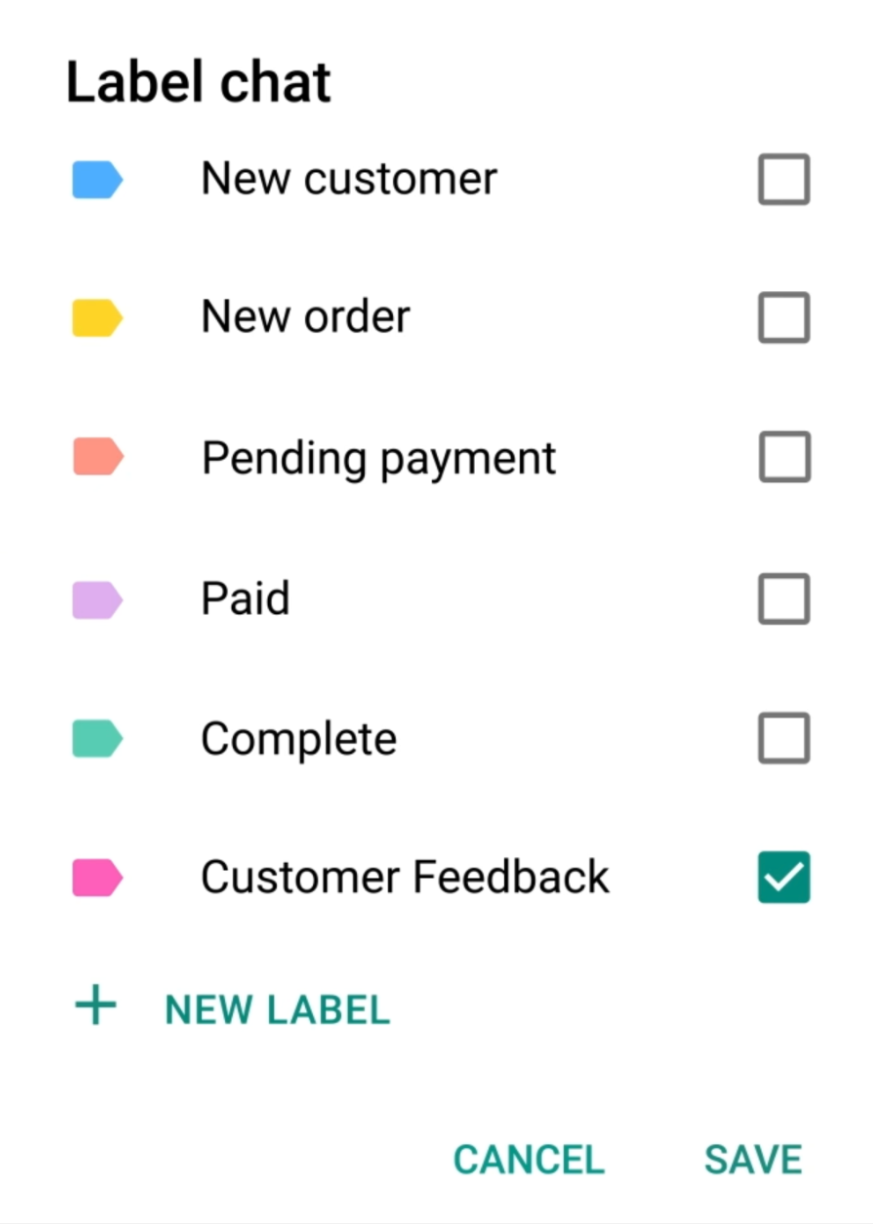 Using labels on WhatsApp
This is another argument for using a Meta-approved Solution Partner like SendPulse. All-in-one platforms give you a single source of truth across platforms, with a CRM system often built in. This way, you can store and manage rich, up-to-date customer data and create dynamic segments that reflect changes in your audience’s behavior or engagement.
Step #4. Build and submit your templates in advance
Draft utility and marketing templates ahead of time and get them through Meta’s approval process before you need them — approval can take up to 24 hours. SendPulse and other WhatsApp Business API providers offer sample templates to make getting started easier. In that case, you can edit, personalize, and submit templates for moderation directly from your workspace. In SendPulse, approved templates can then be used in chatbot flows.
Step #5. Anticipate demand and prepare to handle it
Model how high a response your opt-in collection efforts or click-to-WhatsApp campaigns will generate, and have a Business Agent or third-party chatbot handle the predictable volume while routing anything ambiguous, high-value, or emotionally loaded to a human rep.
For common, predictable journeys like FAQs or order-status checks, rule-based flows without AI are the cheaper option, since they respond instantly and avoid extra AI or token charges. Bear in mind that the reply itself is still a billed service message, so design the flow to resolve in as few messages as possible. In SendPulse, you can build these in a visual builder, defining specific trigger words or events with conditional logic, filters, and delays.
Step #6. Use the free entry-point window
The only timing that still saves you money is the 72-hour free window after a Click-to-WhatsApp ad or Facebook Page CTA click, so reply fast and keep your follow-ups inside it. Landing in the regular 24-hour window no longer helps, since those replies are now billed like any other.
Step #7. Track your performance
Delivery rate, read rate, click-through, reply rate, conversion, and opt-out rate — these are essential metrics for WhatsApp marketing campaigns.
For utility and service chats, it’s crucial to track resolution time, escalation rate, and customer satisfaction scores, since these conversations aren’t judged by clicks or conversions but by how quickly and cleanly a customer’s actual problem got solved.
Engage users on WhatsApp
Use our drag-and-drop builder to create AI-powered WhatsApp chatbots that sell, support, and connect. Run campaigns, share updates, and convert leads hands-free.
Get started for free
WhatsApp campaign examples and use cases to learn from
Here are some of the best WhatsApp campaign ideas, as well as service and utility messages that help guide the subscriber toward a desired action.
Promotions
In this example, an eight-option main menu covers everything from order tracking and store locators to browsing new arrivals. It also drops direct shortcut links for anyone who wants to skip the menu entirely and jump straight to the newest offers.
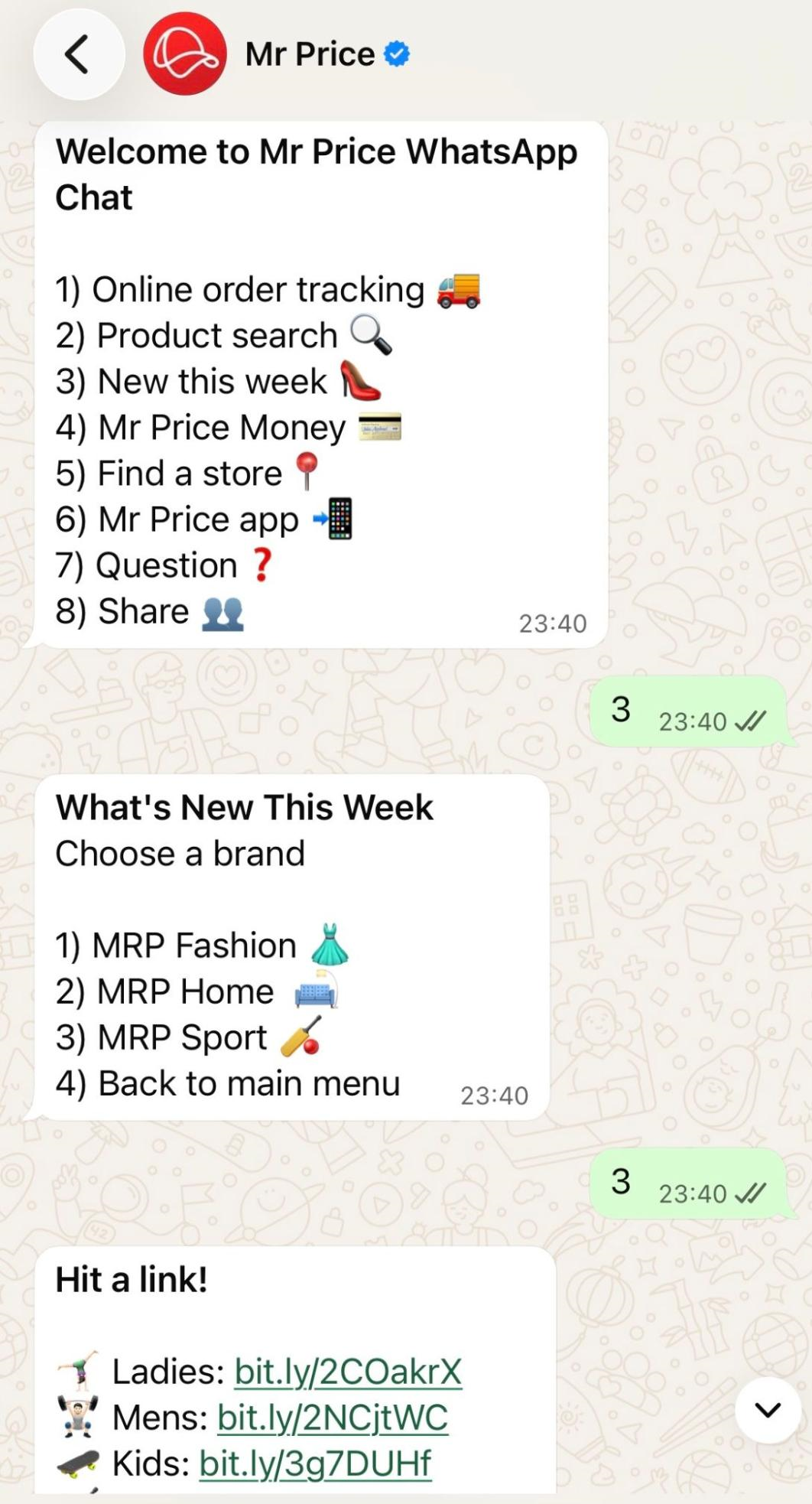 Receiving promotions from the Mr Price chatbot
The bot also offers a conversion-boosting product search. No app download, no clunky site navigation — just an informal text query and an instant, shoppable result, which can be forwarded to friends or family to ask their opinion.
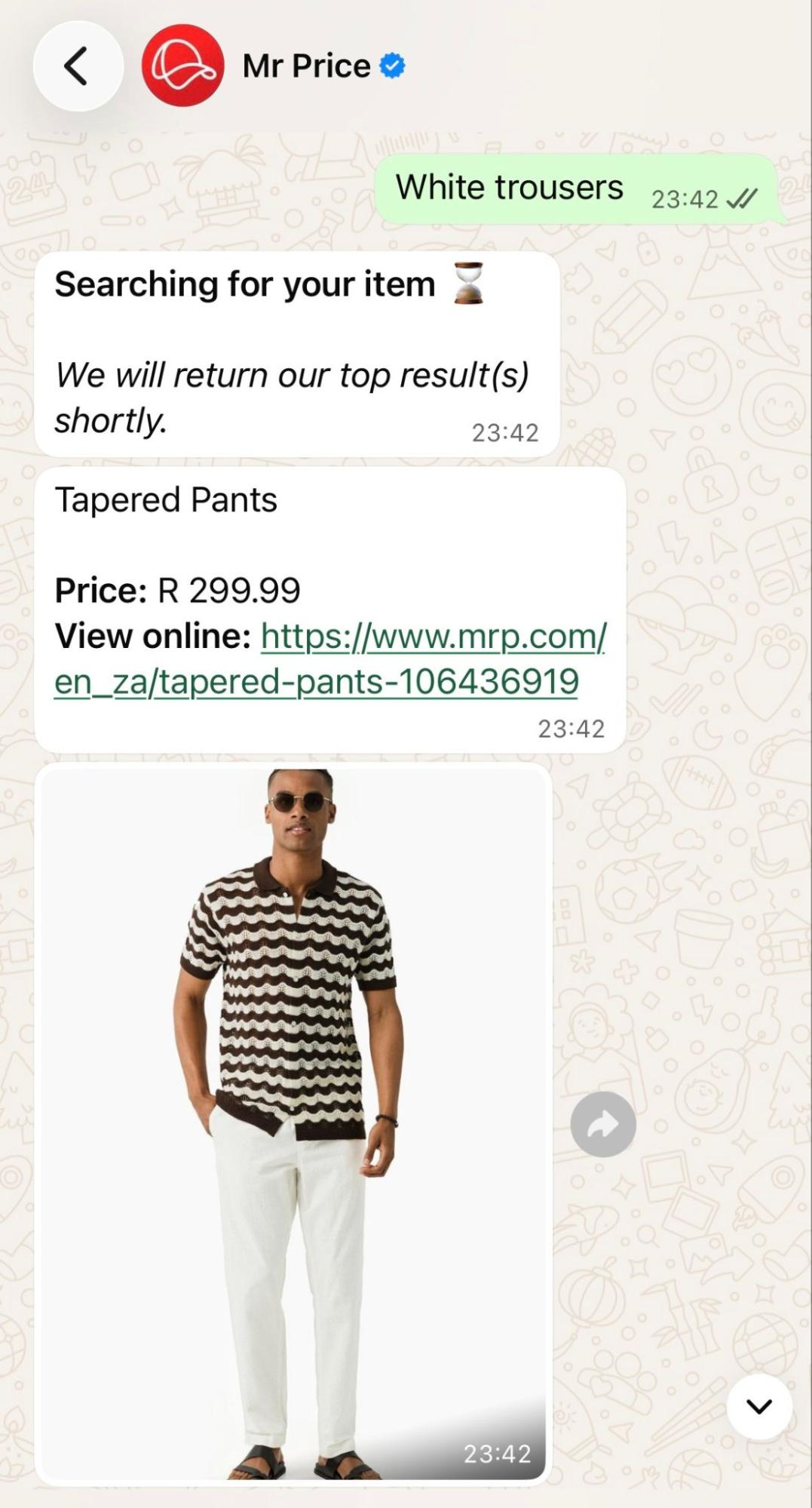 Product search within the Mr Price WhatsApp chatbot
This promotional WhatsApp chatbot doubles as a storefront, eliminating friction in the shopping process. The instant product matching can meet the needs of most subscribers, even without sophisticated AI agents.
AI-powered recommendations
Turkish Airlines’ WhatsApp chatbot opens with a simple menu (“Select a topic”) and a data privacy link. One of the options is “Travel planning.” The AI bot then asks for the user’s destination, trip length, interests, and traveling style.
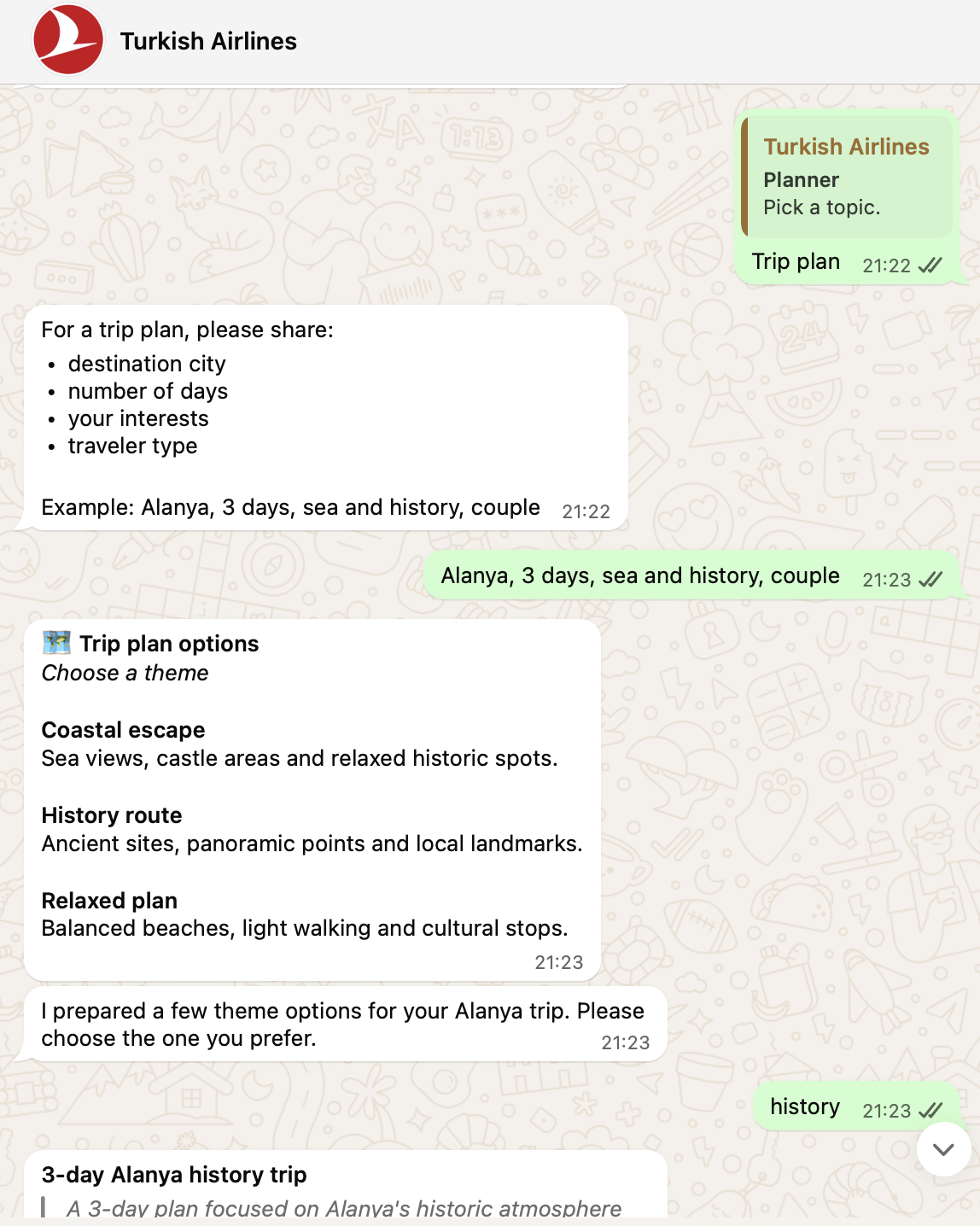 An AI WhatsApp chatbot used by Turkish Airlines
This instantly qualifies them and helps the bot deliver the most relevant content. Once a theme is picked, the bot generates a full day-by-day itinerary with times, activities, and locations for each day, plus a practical tip per day.
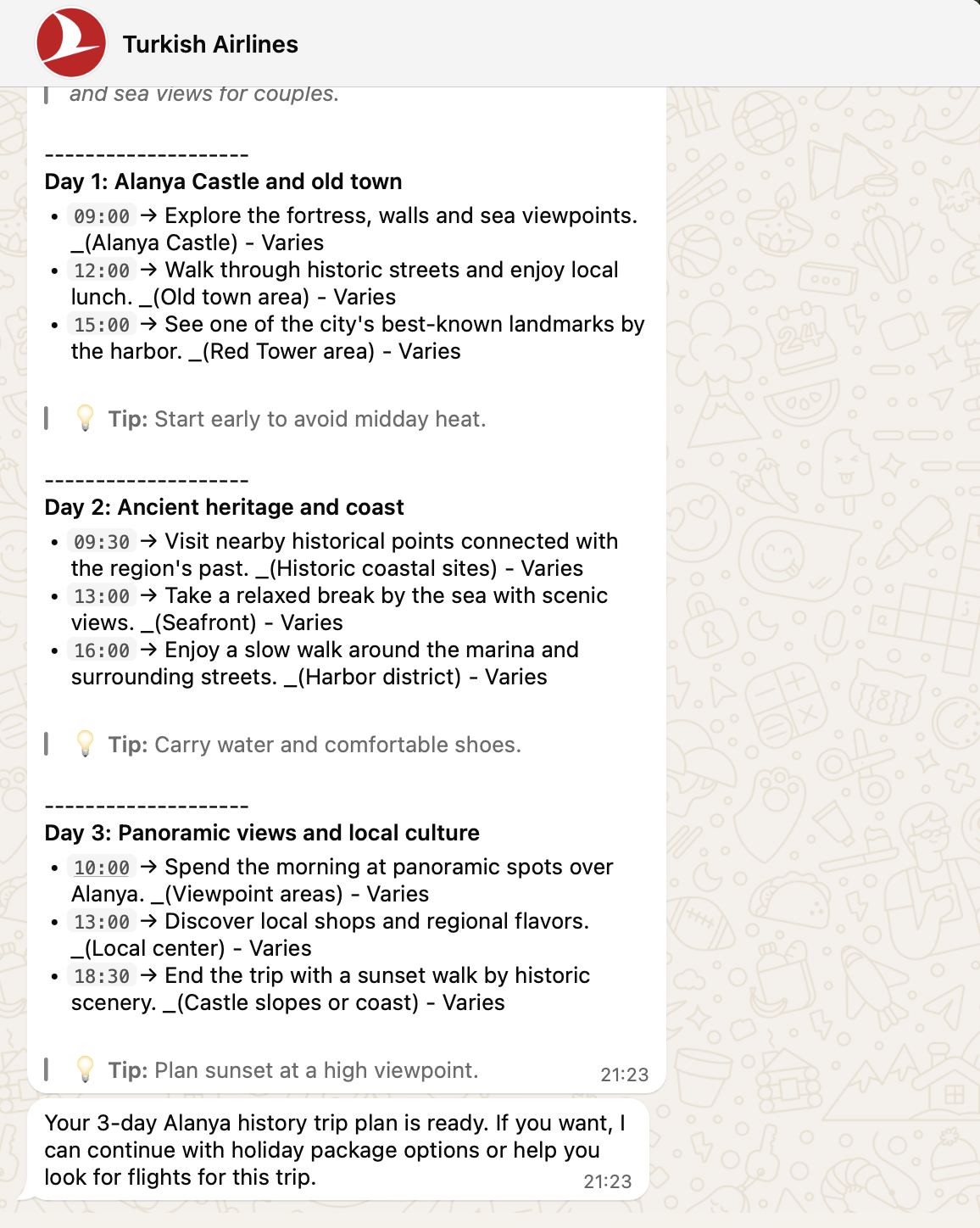 Turkish Airlines’ WhatsApp chatbot qualifies leads
Once the trust is built and the customer’s wanderlust is awakened, the bot closes by offering to continue with holiday packages or flight search. That’s how a discovery conversation can turn directly into a sales opportunity without ever leaving WhatsApp.
Event announcements
Announcements and other time-sensitive messages on WhatsApp are more likely to cut through the noise than formal email blasts due to their near-instant delivery, higher read rates, and actionable format. Just like in this WhatsApp marketing campaign example, there are usually two tap-to-respond buttons: “I’m In” and “I’m Out.”
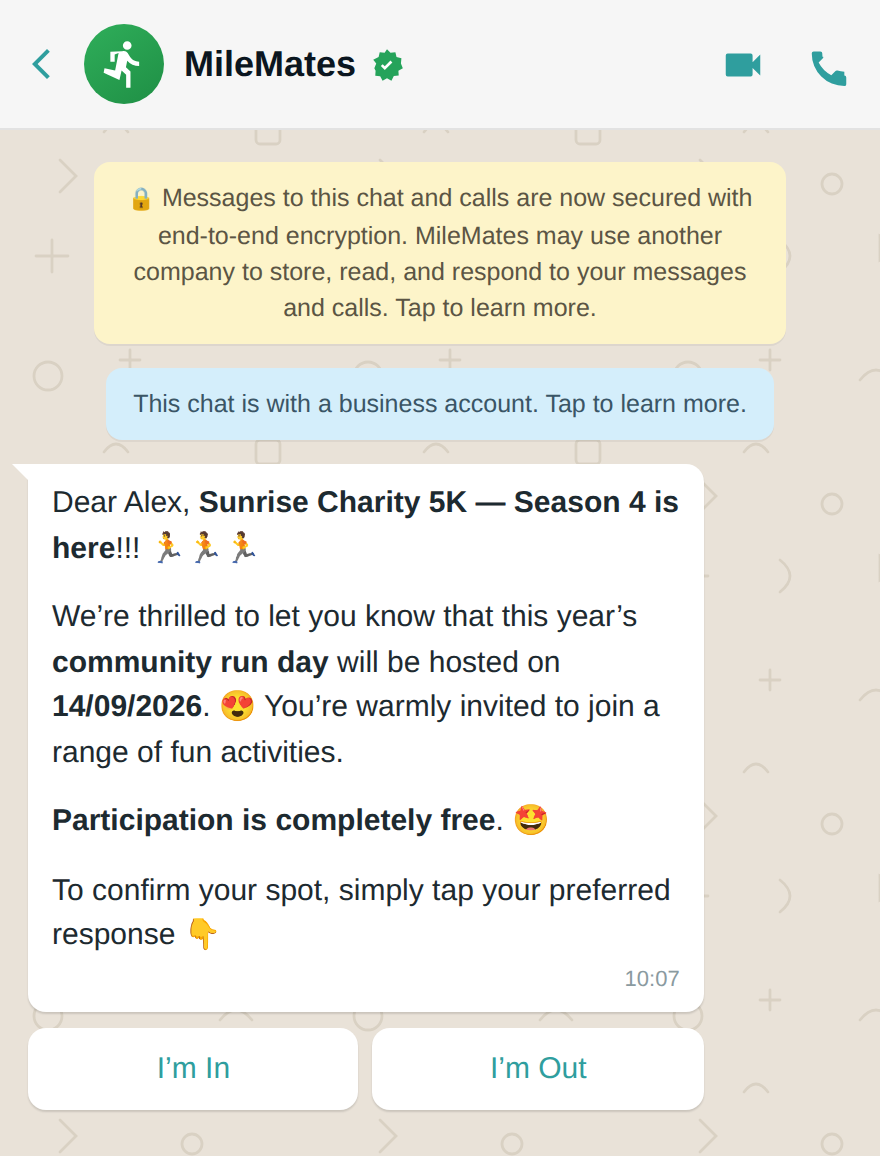 An event announcement WhatsApp campaign example
This binary response also gives the business valuable attendance data back, which is helpful for headcounts, follow-up logistics, and other planning work. Compared to this, an email reply or a separate signup form would pose more of a hurdle for people on the go, making them postpone their response or forget about the event entirely.
Lead qualification
This brand uses WhatsApp marketing campaigns to offer seamless shopping experiences to its Indian and international audiences. The welcome message is season-specific and is followed by a numbered category menu that lets the customer self-select their interest.
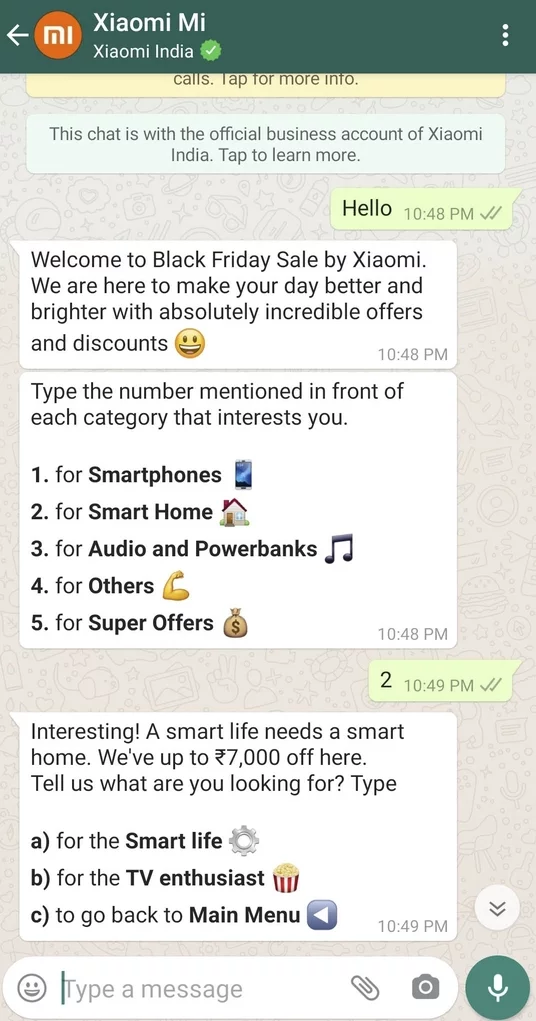 Xiaomi qualifies leads on WhatsApp
Once a category’s picked, the bot drills down further, offering a discount teaser and a second-level menu to narrow the intent even more. Eventually, it routes the user to relevant products or offers. This WhatsApp campaign example demonstrates straightforward lead qualification — no AI needed, just a branching decision tree that filters broad interest into specific segments. Whether or not AI is involved, that same branching logic is what makes it possible to automate lead qualification instead of routing every new contact by hand.
Re-engagement and win-back
Following up on an abandoned product or service inquiry via WhatsApp works for many reasons. Firstly, it can be framed as a personalized, casually worded nudge. The name-drop and playful tone read like a message from a person, not a system, which matters on a communication channel people already associate with friends and family.
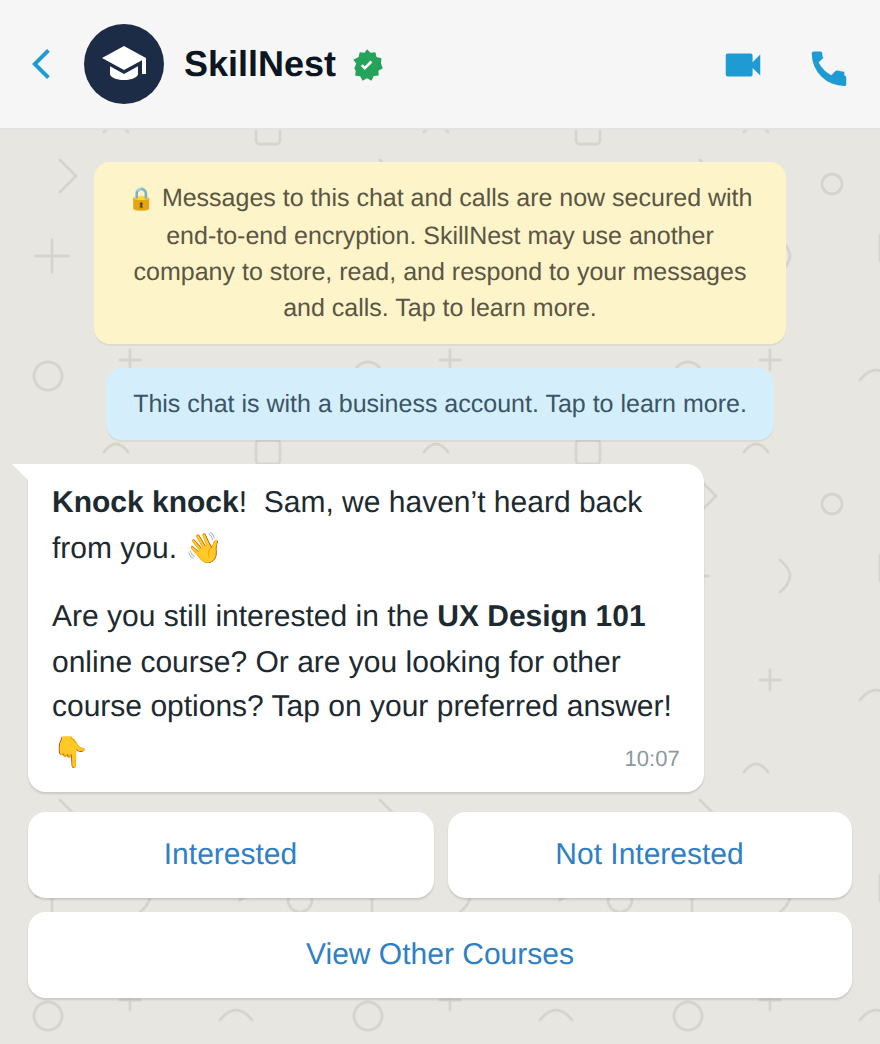 A re-engagement WhatsApp campaign example
Secondly, by offering clear tap-to-respond options, the re-engagement attempt removes any potential friction — there’s no need for the lead to even type anything. This kind of message always runs as an approved template, which is why getting your opt-in and template categorization right is so crucial.
Revenue-driving utility
In this example, a personalized greeting leads into a menu covering both service and revenue-driving options. When the chatbot detects that the user isn’t an existing account holder, it smartly redirects to a conversion opportunity, inviting them to open a bank account via a direct link.
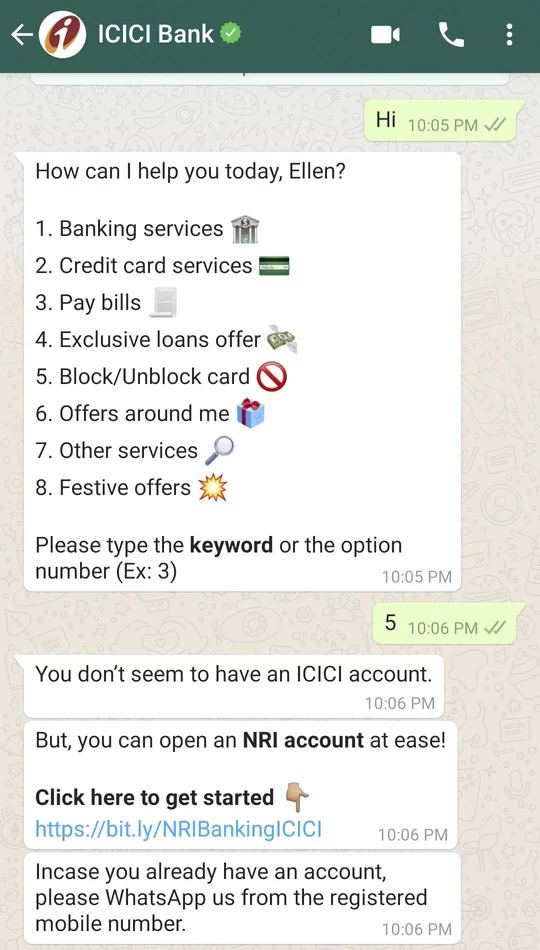 ICICI Bank uses WhatsApp for customer service and lead generation
This is a good example of a utility-first bot that quietly doubles as a lead-gen funnel, using user context to serve the right message instead of dead-ending the conversation.
How to launch and automate WhatsApp campaigns with SendPulse
The native Meta Business Agent has some limitations, or it may not even be available to you yet. If you want sophisticated AI automations, branching logic, an overview of all of your communication channels, multiple agent seats, and sync with a single customer database, you’ll be better off with a marketing platform with WhatsApp campaign tools like SendPulse. Here’s how to get started.
Prepare your account and connect your number
Sign in to your SendPulse account or create one. Open the “Chatbots” section → “Manage bots” → “Add WhatsApp bot.” Click “Continue with Facebook.” You’ll need a Meta/Facebook business setup and a phone number suitable for WhatsApp Business API — either a new number or an existing WhatsApp Business App number you want to migrate.
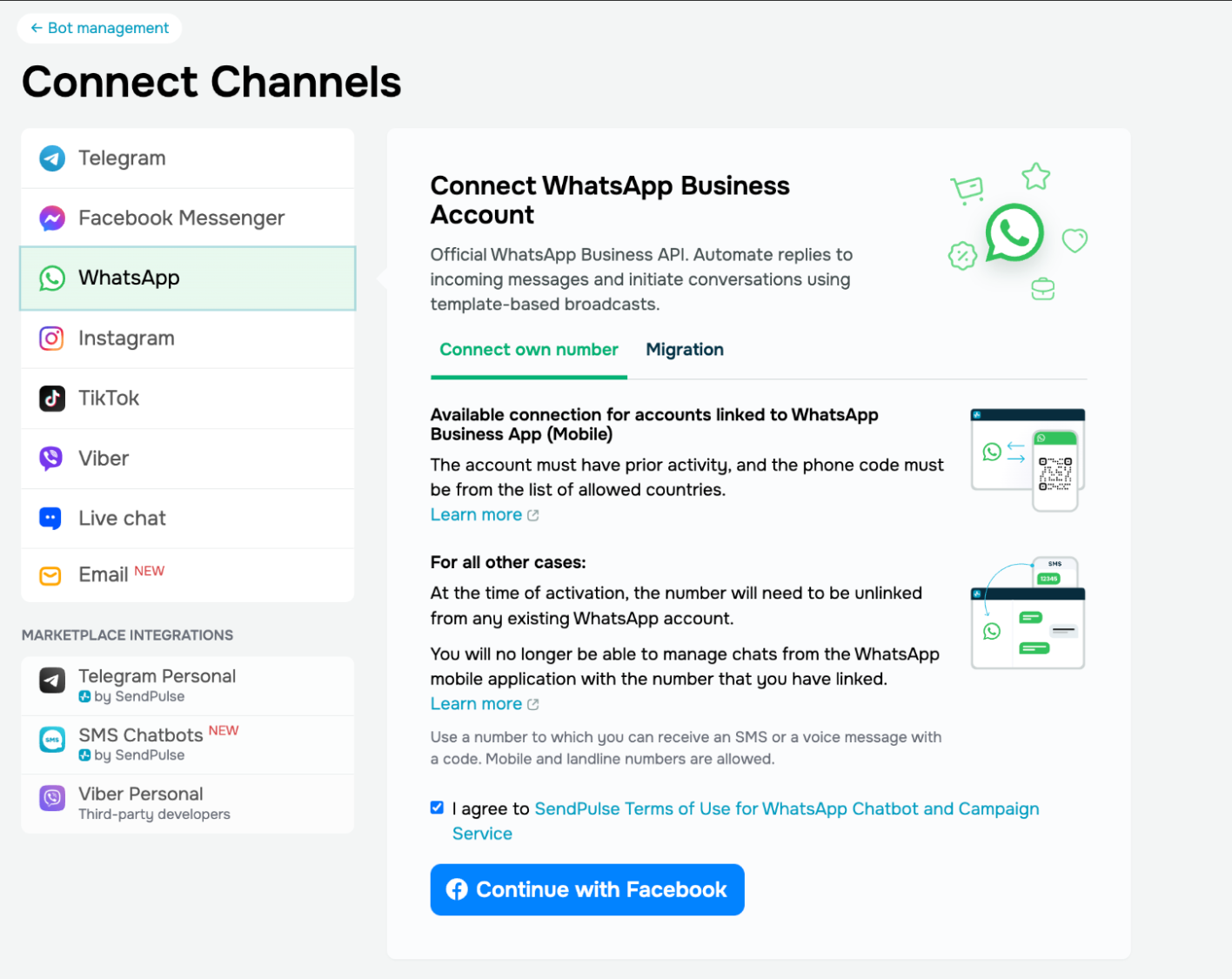 Connecting a new WhatsApp Business account in SendPulse
During setup, you’ll select or create a Meta Business portfolio, enter your business information, and verify your phone number. Once connected, your WhatsApp chatbot will appear in the “Chatbots” dashboard.
Build your opt-in and list-growth sources
With your number connected, start building your subscriber list:
In the same “Chatbots” tab, you can create WhatsApp signup widgets and buttons for your website in floating or embedded format. SendPulse also offers tools to create bio link pages with buttons that link directly to your chatbots.
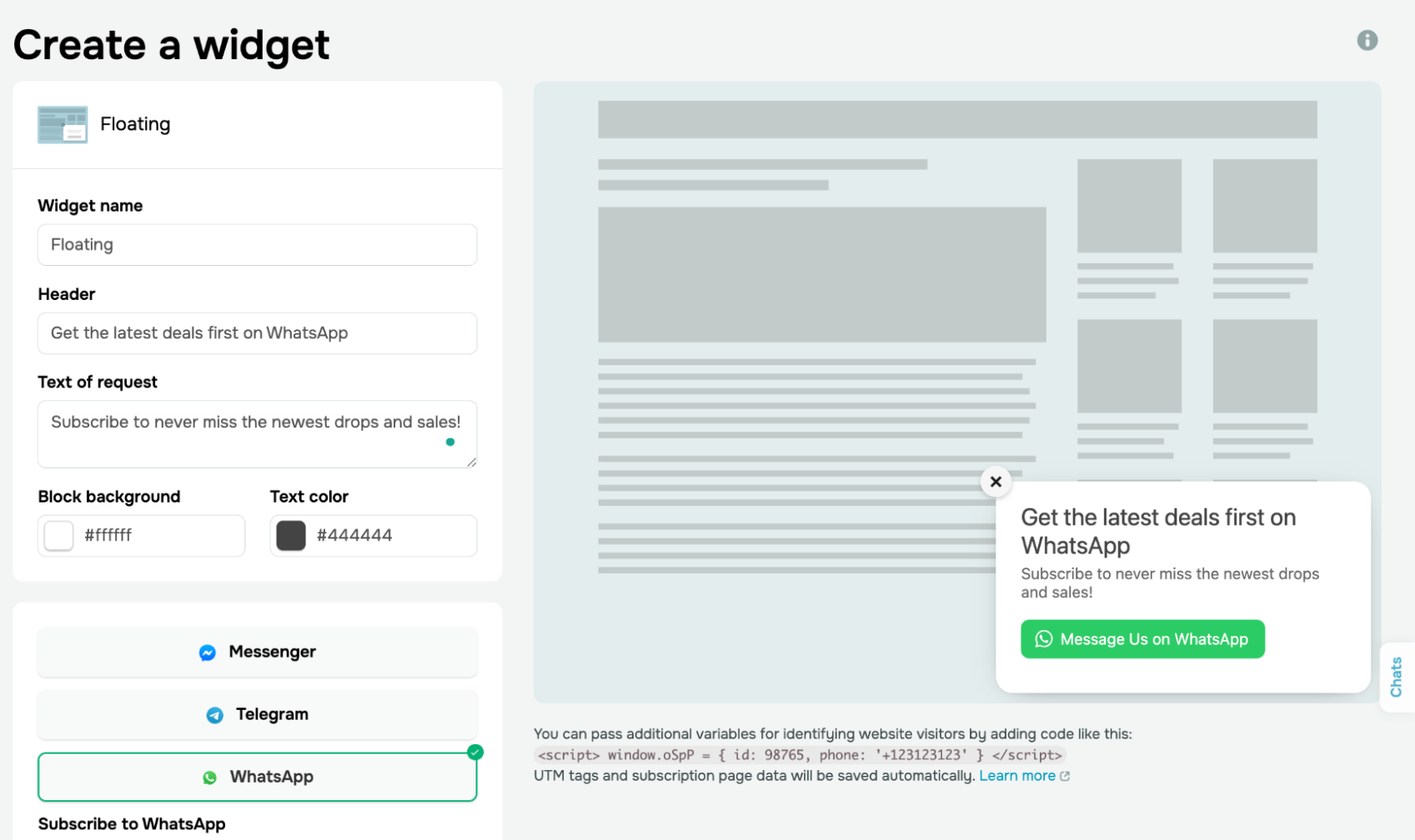 Creating a WhatsApp signup widget in SendPulse
Create and submit your message templates
Go to the “Templates” tab in your WhatsApp chatbot settings. You will see multiple sample templates, which you can easily customize and reuse for your business. To create one from scratch, click “Add template” and fill in the name, content (with variables for personalization), buttons, language, and category (marketing, utility, or authentication).
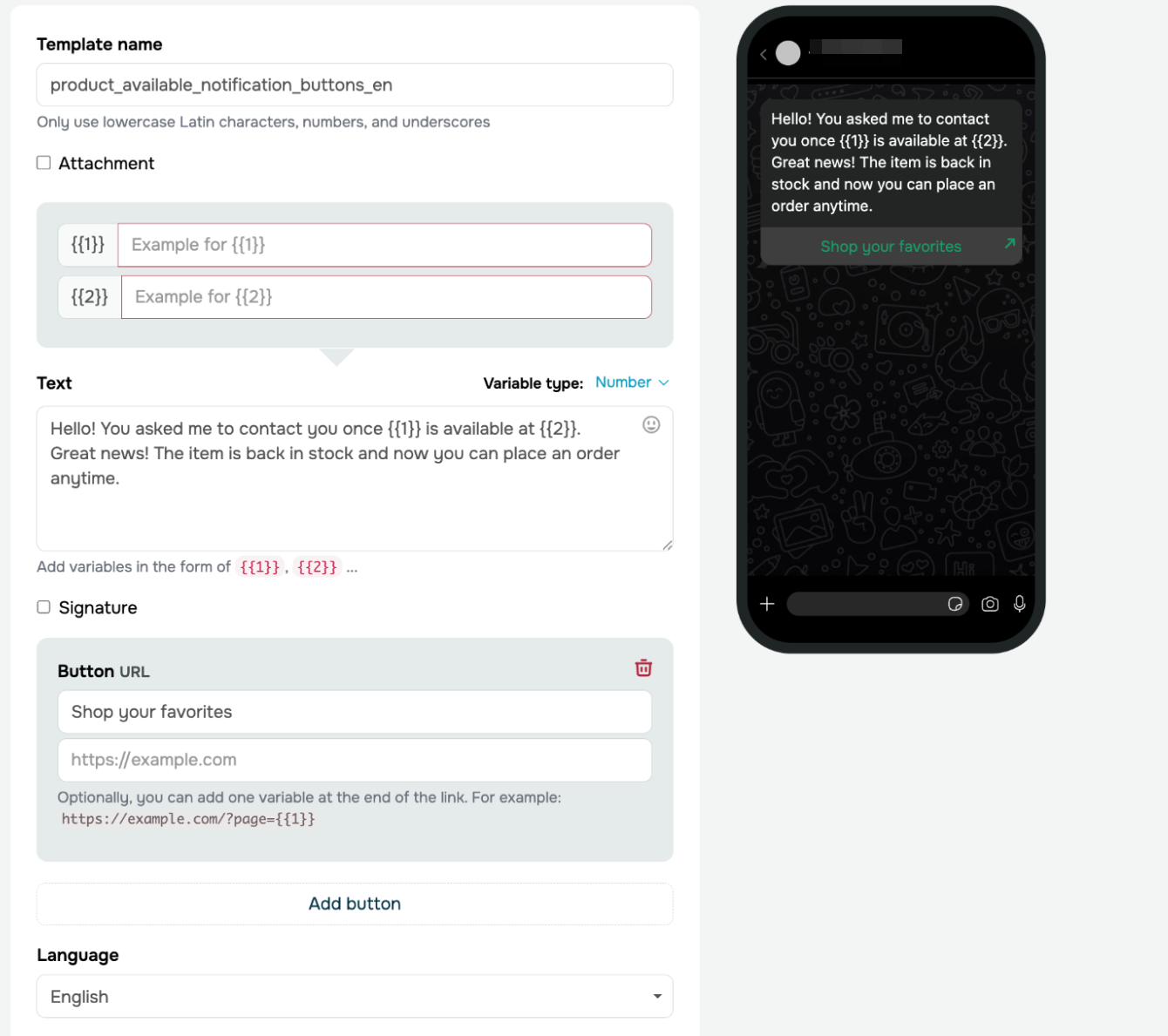 Preparing WhatsApp campaign templates in SendPulse
Write your template as if the recipient will see it on a lock screen with limited attention. Lead with the most important information. The preview will give you an idea of how the final message will look in the chat. Then, submit the template for WhatsApp’s approval. This can take anywhere from a few minutes to 24 hours.
Build automation flows and optional AI support
Use SendPulse’s visual chatbot builder to create automated flows:
- Choose a trigger (a keyword, an external event, a pixel event on your website, or a recurring payment).
- Add a welcome flow, qualification questions, and quick-reply buttons.
- Save lead data to variables and use “Filter” blocks to branch conversations by intent, tags, country, or source.
- Set up an AI assistant to handle free-form questions. SendPulse supports integrations with ChatGPT, Claude, Gemini, and others. Each model can be configured to deliver tailored, on-brand responses based on uploaded content and web search results.
- Add API calls or Google Sheets sync to pull order data or CRM info into the conversation.
- Define handoff logic to route complex queries to human agents.
SendPulse’s MCP server also allows you to add agentic AI to the mix, having autonomous assistants take over entire WhatsApp marketing workflows instead of individual chats.
Segment your audience and send the campaign
Click “Create campaign,” select your WhatsApp chatbot, and choose your recipients. You can send to your entire audience using an approved template, or send free-form messages to users who’ve been active in the last 24 hours.
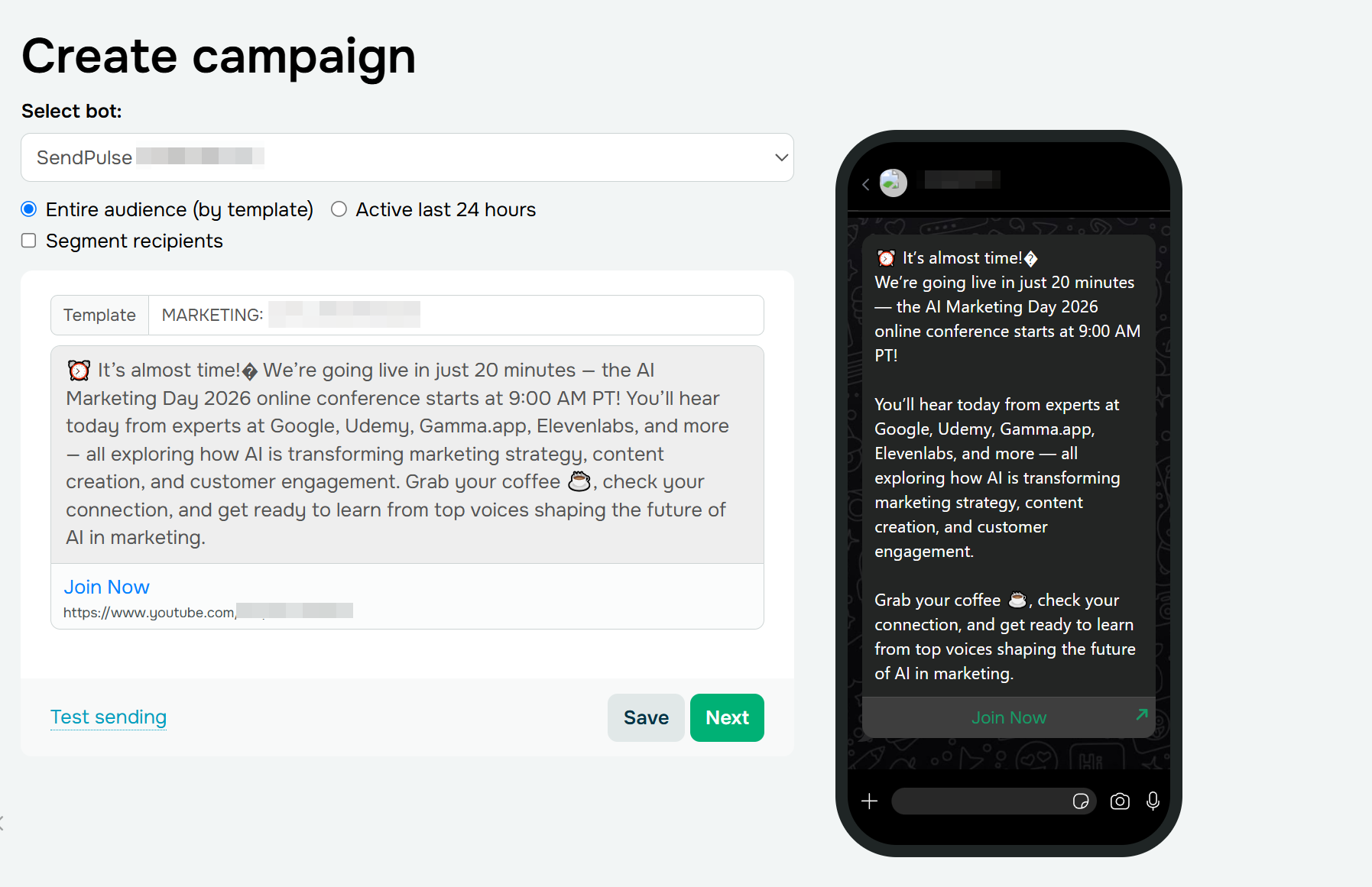 Building a WhatsApp campaign from an approved marketing template in SendPulse
Apply segmentation filters (tags, variables, subscription date, past activity) to target the right group. Personalize template variables, add attachments or product cards if relevant, choose your send time, preview, and launch.
Track performance and optimize
After sending, check your campaign analytics in the SendPulse dashboard. You’ll see the number of sent messages and their cost broken down by message category, delivered and read metrics, replies and new subscribers, the number of users active in the last 24 hours, and audience activity graphs over time.
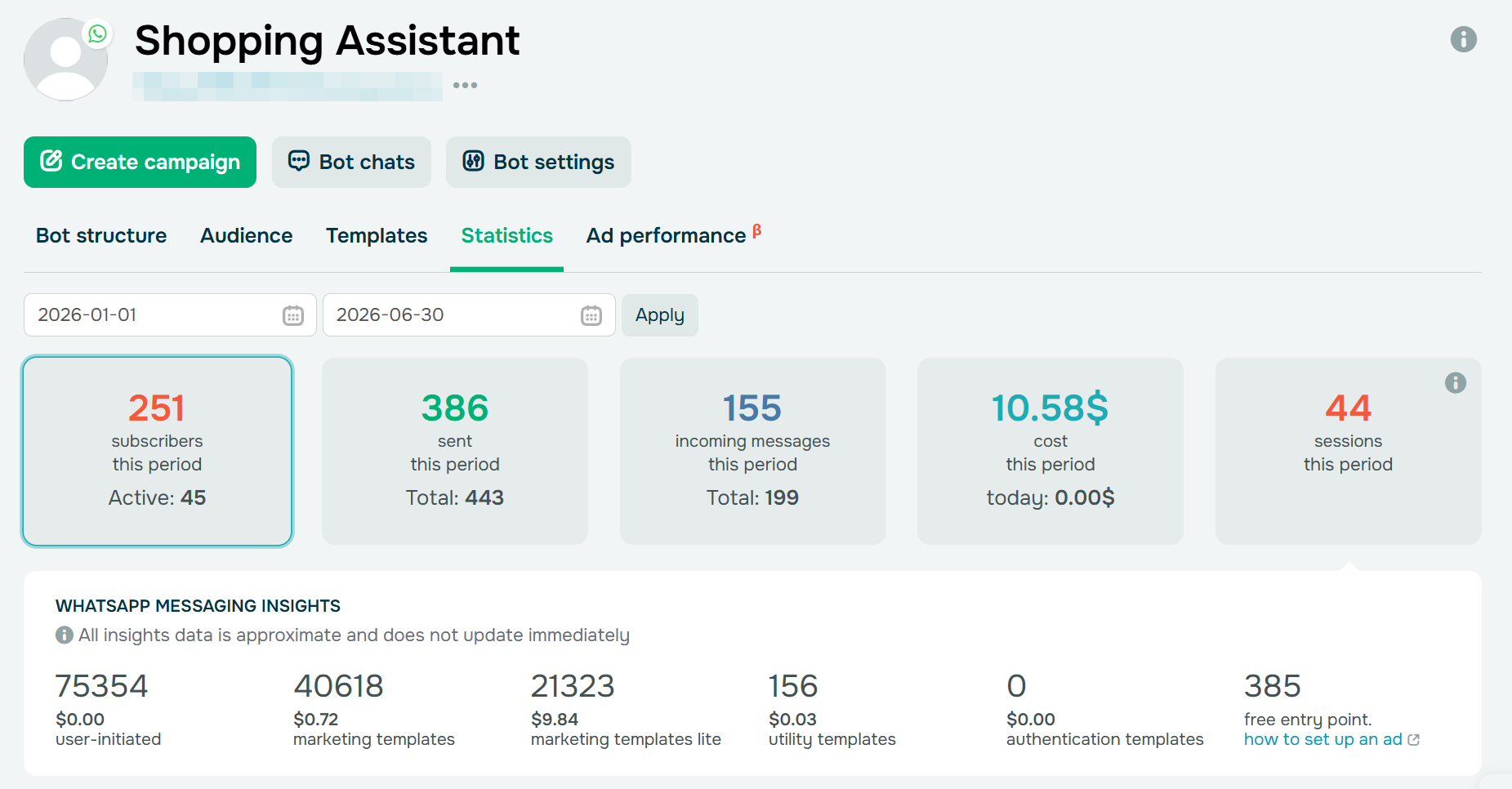 WhatsApp messaging stats and per-category cost breakdown in SendPulse
If you run Click-to-WhatsApp ads, SendPulse’s “Ad performance” tab (beta) connects that spend to leads and purchases in the chatbot and logs the conversion events sent back to Meta.
Use the “Audience” tab to review subscriber statuses, assign tags and variables for future segmentation, and identify which contacts are active, dormant, or unsubscribed.
Wrapping up
WhatsApp Business API is no longer just a customer-support add-on. It’s a full-fledged marketing channel with its own pricing model, automation capabilities, and AI features. The businesses that treat it strategically with clear goals, smart segmentation, well-crafted templates, and an eye on per-message costs are the ones seeing strong ROI.
However, WhatsApp shouldn’t work in isolation. The best results come from an omnichannel approach: combine WhatsApp with email campaigns, SMS, and social messaging to create touchpoints across the entire customer journey.
Ready to launch your first WhatsApp campaign? Get started with SendPulse — connect your number, build your audience, and send your first campaign today.
WhatsApp Campaign FAQ
What is a WhatsApp marketing campaign?
A WhatsApp campaign is a planned, goal-driven message a business sends to opted-in users, usually via Meta-approved templates. These messages typically have a button with a call to action or tappable responses.
How to run a WhatsApp campaign?
Decide where users will sign up and prepare a clear opt-in flow. Segment your list, get your templates approved ahead of time, and put AI or human agents in place to handle responses. Then track delivery, click, and conversion rates, or resolution rates and satisfaction scores for service chats.
How do I start a WhatsApp marketing campaign?
Set up a WhatsApp Business Platform (API) account through a Meta Business Partner, submit your first message template for approval, collect explicit opt-ins, and send your first segmented campaign.
How can I send 1,000 messages on WhatsApp for free?
You can’t. Almost every business-sent message on WhatsApp will be billed per message starting October 2026 — marketing, utility, and authentication templates, and the free-form service replies you send inside the 24-hour window. The only messages that are free to deliver are those sent within the 72-hour entry-point window that opens when a customer reaches you through a Click-to-WhatsApp ad or a Facebook Page CTA.
What is the 24-hour rule for WhatsApp?
When a customer messages your business, a 24-hour customer service window opens, during which you can reply freely without a template. Once that window closes without a new customer message, you can only reach them again using a paid, pre-approved template.