Email is still one of the most reliable ways for eCommerce businesses to drive sales and build lasting customer relationships. It works just as well for small online shops as it does for global brands. The real difference isn’t company size. It’s how you use the channel.
That’s where triggered email campaigns make an impact. Instead of blasting the same message to your entire mailing list, triggered emails react to what customers actually do. When a message reflects what someone just did, it feels timely and relevant, and that’s exactly why it performs better.
In this post, we’ll explore why triggered emails matter for eCommerce, how to implement them, and show real-world examples from brands that use automation to turn customer actions into revenue.
TL;DR
Triggered emails are automated messages sent after specific customer actions — like signing up, viewing a product, abandoning a cart, or making a purchase. Because they respond to real behavior in real time, they consistently outperform scheduled campaigns in engagement and conversions.
For eCommerce brands, the most impactful flows include welcome emails, abandoned cart reminders, browse abandonment nudges, post-purchase follow-ups, replenishment alerts, re-engagement emails, and birthday messages.
To get started, focus on the triggers that directly impact sales. Keep each email simple with one clear next step, and use behavior-based conditions to move customers smoothly from interest to purchase — and from purchase to loyalty.
Create seamless customer experiences
Set up scenarios to automate your contact management and customer interactions across various communication channels under one roof. Get started for free without any risks.
Create a free account
What are triggered emails?
Triggered emails are automated messages sent in response to a specific customer action or event. In eCommerce, that action might be viewing a product, abandoning a cart, completing a purchase, or staying inactive for a while.
Their role in eCommerce email marketing is straightforward: deliver the right message at the exact moment it’s most relevant. Instead of pushing generic offers, triggered emails align communication with user behavior, making emails feel timely. That’s why they outperform scheduled campaigns in both engagement and conversions.
Triggered emails vs drip campaigns
The core difference is logic. Triggered emails are behavior-driven, while drip campaigns are schedule-driven. One reacts to what users do; the other progresses regardless of action.
| Criteria |
Triggered emails |
Drip campaigns |
| Trigger type |
Sent automatically after a specific user action (signup, cart abandonment, purchase) |
Sent on a fixed timeline (Day 1 → Email 1, Day 3 → Email 2) |
| Timing |
Real-time or near real-time |
Predefined intervals, independent of user behavior |
| Primary goal |
Capture active intent and drive immediate action |
Nurture leads over time and builds awareness or trust |
| Personalization level |
High: content adapts to user behavior and data |
Moderate: usually segment-based |
| Content focus |
Contextual: behavioral, promotional, or transactional-adjacent |
Educational or evergreen nurturing content |
| Funnel role |
Works across the full customer lifecycle |
Most effective in top and mid-funnel stages |
| Typical examples |
Abandoned cart, welcome trigger, re-engagement email |
Onboarding series, product education flow |
Triggered emails vs transactional emails
These two are often confused because both are automated, but they serve different purposes. The distinction comes down to marketing intent vs. service obligation.
| Criteria |
Triggered emails |
Transactional emails |
| Core purpose |
Influence behavior and drive engagement or revenue |
Confirm actions and deliver essential information |
| Trigger event |
Marketing-related behavior (browsing, cart abandonment, inactivity) |
System-required actions (purchase, password reset) |
| Content focus |
Persuasive and value-driven |
Informational and factual |
| Design flexibility |
High: branded layouts, CTAs, and personalization allowed |
Low: clarity and functionality come first |
| Compliance requirements |
Must include an unsubscribe option if promotional |
Usually exempt, but must follow transactional compliance rules |
| Common examples |
Abandoned cart, win-back, browse abandonment email |
Order confirmation, shipping update, and account creation email |
Why triggered email campaigns matter in eCommerce
In eCommerce, success doesn’t come from sending more emails. It comes from sending more relevant ones. That’s exactly what triggered email campaigns are designed to do. They turn email from a broadcast channel into a smart response system.
When emails are activated by customer behavior, they arrive at key decision moments — when a shopper is considering a purchase, hesitating, or ready to act. Triggered emails connect timing with context, and that combination makes them far more effective.
Take an abandoned cart email as an example. A reminder sent within an hour of checkout abandonment will almost always outperform a generic promotion sent days later. Why? Because it reaches the customer while the purchase intent is still strong.
Triggered email marketing also enables true personalization at scale. Instead of manually segmenting mailing lists, brands can dynamically tailor messages based on actions, preferences, and lifecycle stages. The result feels one-to-one, even though it’s fully automated. A new subscriber might receive a welcome email with curated products, while a returning customer sees recommendations based on past purchases.
From a growth perspective, triggered emails drive retention and lifetime value, not just first-time conversions. Post-purchase follow-ups, replenishment reminders, and win-back flows keep customers engaged long after the initial sale without increasing operational workload.
Most importantly, triggered email campaigns match modern customer expectations. Shoppers expect brands to respond to their behavior in meaningful ways, not send repetitive, generic offers. In this context, triggered email campaigns are a baseline for effective eCommerce marketing automation.

Connect with your audience at every step of their journey
Our chatbot builder, email and SMS tools, and pop-up builder help businesses automate customer interactions while keeping things personal. Seamlessly save and store data from each conversation in our built-in CRM system. Try it out today!
Create a free account
Types of triggered emails every eCommerce brand should use
The goal isn’t to automate everything at once, but to focus on high-intent moments where a timely message can influence a decision. The triggered emails below are widely used because they map to key stages of the customer journey. Each serves a clear purpose: converting interest into action, reducing friction, or extending customer lifetime value.
Let’s break down the most effective types of triggered emails, explain when they should fire, what they should achieve, and how successful eCommerce brands use them in practice with triggered email examples.
Welcome emails
Primary goal: Set the tone of the relationship and push the first meaningful action, whether that’s a first purchase or product discovery.
Welcome emails are triggered the moment a user subscribes to your list or creates an account. This is one of the few moments in eCommerce when attention is guaranteed, and expectations are being formed.
A strong welcome email does three things:
- Clarifies value: what the subscriber will get and why it’s worth staying.
- Sets expectations: email frequency, content type, and brand promise.
- Guides action: a clear next step CTA.
A high-performing welcome email works as a single, focused conversion unit. Start with a concise value statement that explains why the brand matters to this subscriber, skip company history, and lead with relevance. From there, guide the reader toward one clear action, such as exploring bestsellers, completing a profile, or activating an offer.
If you use an incentive, make it purposeful. A first-order discount, free shipping, or early access should feel like a natural extension of the value you’ve just promised. To reduce hesitation at this early stage, reinforce trust with light social proof like customer counts or recognizable guarantees.
Timing and relevance do the rest. Send the email immediately, personalize it based on how the user signed up, and keep the message tightly action-driven with a single CTA. Finally, test incentive-led versus value-led versions over time to find the balance between conversion lift and long-term margin health.
As an example, consider the welcome email from Filmsupply. The brand briefly explains what the subscriber can now do and immediately presents a clear CTA. This is the core of the message.
Further down the email, Filmsupply reinforces trust with customer testimonials in a video format, followed by an additional CTA. The email then introduces a recommendations block, paired with its own contextual CTA, guiding the subscriber through multiple low-friction next steps without overwhelming them.
 Excerpt of a triggered email to welcome new Filmsupply users
Abandoned cart emails
Primary goal: Recover revenue that’s already close to conversion by removing friction, not by starting a new sales conversation.
Abandoned cart emails are triggered when a shopper starts checkout but leaves before completing the purchase. This is one of the highest-intent moments in eCommerce: product selected, details entered, decision almost made.
An effective abandoned cart email follows a logical structure. It starts by bringing the shopper back to the exact point of hesitation: showing the product left behind with clear pricing and availability. Then you can mention delivery details, returns, payment options, or stock urgency if relevant. The CTA should be direct and unmistakable, usually a single “Return to cart” action.
Incentives can work, but they shouldn’t be the default. Many carts are abandoned due to distraction or uncertainty, not price. Discounts are best reserved for follow-up emails or conditional paths when the first reminder doesn’t convert.
Timing matters as much as content if you create a campaign with a couple of emails. For example:
- First email: within 30-60 minutes to catch fresh intent.
- Second email: 12-24 hours later, focused on reassurance or urgency.
- Optional third email: incentive-based, used selectively to protect margins.
If you’re looking for a minimalist abandoned cart email, the Alo example is a strong reference. The email avoids overloading the subscriber with details about pricing, shipping, or policies. Instead, it simply reminds them of the product left in the cart.
To motivate completion, the brand leverages a subtle FOMO effect by highlighting limited availability. The product image helps the subscriber instantly recall what caught their attention in the first place.
For those who need more information before purchasing, the bottom of the email includes three concise blocks about shipping, returns, and payment. Each is linked to detailed pages, allowing shoppers to get the answers they need without breaking the flow of the message.
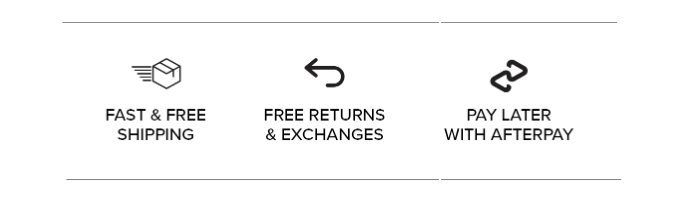 Component of a triggered email to recover abandoned carts by Alo
Browse abandonment emails
Primary goal: Bring the shopper back while interest is still warm and move them one step closer to purchase.
Browse abandonment emails are triggered when a user views a product or category but leaves without adding anything to the cart. This happens earlier in the funnel than cart abandonment, when intent exists but the decision is still forming.
Unlike cart emails, browse abandonment messages shouldn’t push too hard. Their job is to remind and reduce uncertainty, not close the sale immediately. A strong email typically reintroduces the viewed product or category, reinforces its value, and offers a reason to return, such as social proof or alternatives.
What makes browse abandonment emails effective is context-aware personalization. The email reconnects the shopper with what they actually explored, featuring the exact product or category they viewed, supported by similar or complementary items to broaden consideration.
Messaging adapts to browsing depth: a single product view may call for light reassurance, while multiple views signal comparison and benefit-focused content. To match this early-stage intent, CTAs stay soft and exploratory, such as “View details” or “Explore the collection,” keeping the conversation open.
Fiorucci sent a reminder email to a subscriber who browsed products but didn’t make a purchase. The brand invites them to revisit new arrivals, supports the message with visuals of recommended items, and adds motivation through a promo code.
The email stays short, visually bold, and focused, with a clear CTA “Shop new arrivals” that aligns perfectly with the user’s browsing intent.
Post-purchase emails
Primary goal: Turn a completed purchase into the start of a long-term relationship by reinforcing trust, increasing customer lifetime value, and creating clear reasons to return without relying on constant promotions.
Effective post-purchase emails work best when they extend the value of the purchase. Product education is usually the first and most important layer. Showing customers how to use, style, or care for the item helps them get results faster and reduces post-purchase doubt or returns. This is valuable for complex, premium, or lifestyle products where proper usage affects satisfaction.
Once the customer starts using the product, cross-sell and upsell suggestions can be introduced naturally. Instead of generic recommendations, these emails should highlight products that enhance or complete the original purchase. These may be accessories, upgrades, or frequently bought-together items.
Social proof comes next. Review and rating requests work best after delivery and initial use, when customers have formed an opinion. Framing these prompts as a way to help other shoppers or unlock a small benefit often increases response rates while generating valuable UGC for future campaigns.
Finally, brand reinforcement ties everything together. Clear access to support, educational resources, or loyalty programs reassures customers that the relationship doesn’t end at checkout. Over time, these signals build trust and familiarity, making repeat purchases a natural next step.
“Spice up your last haul with something new” is how Forever 21 encourages customers to open a post-purchase email. The subscriber has already made a purchase, which may signal readiness for repeat engagement. The brand simply needs to remind them and do so in a relevant way.
The primary CTA invites the customer to explore the new collection, which aligns with the brand’s current business priority. A follow-up block then brings back products the subscriber previously viewed and adds personalized product recommendations selected specifically for them.
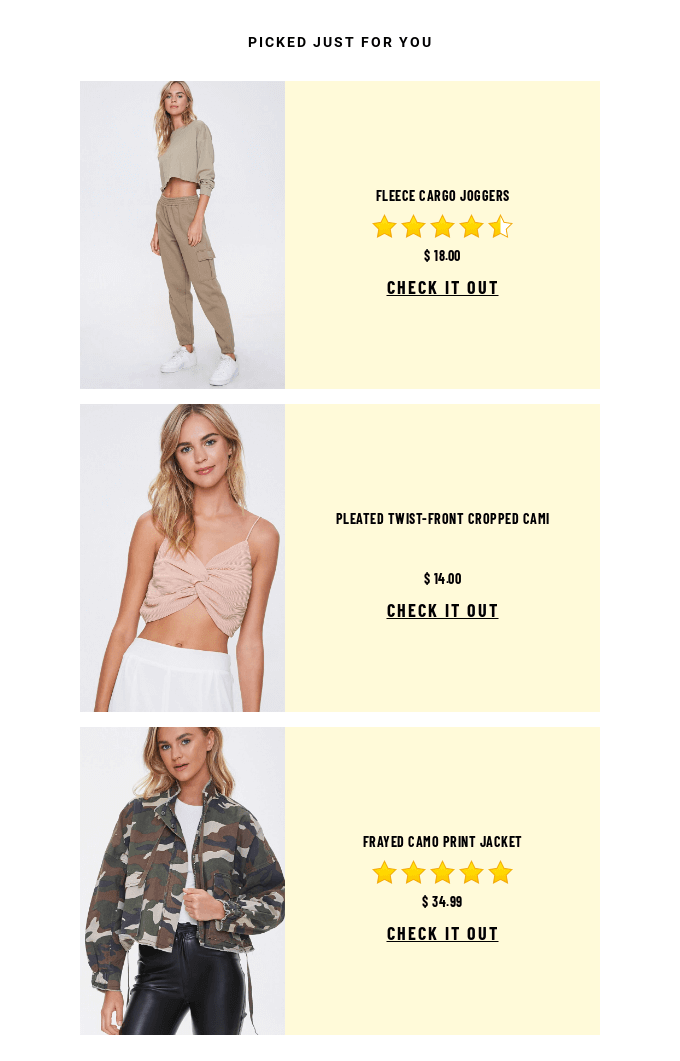 Personalized product recommendation block in a triggered email by Forever 21
The email is highly visual, uses minimal copy, and focuses only on what matters, guiding the customer back to browsing and, potentially, another purchase.
Back-in-stock and replenishment emails
Primary goal: Capture delayed demand and convert intent that already exists, instead of generating new interest from scratch.
Back-in-stock and replenishment emails are triggered by inventory updates or predicted product depletion. In both cases, the customer has already shown intent either by trying to buy an unavailable item or by purchasing something that will need to be replaced over time.
Back-in-stock emails work best when they are direct and time-sensitive. The message should clearly state that the product is available again, show the exact item the customer was waiting for, and remove any friction that might delay action.
Replenishment emails follow a similar logic but rely on timing to reach customers when usage data or purchase history suggests it’s time to restock.
CTAs in back-in-stock and replenishment emails work best when they mirror the customer’s original intent and remove the possible step between desire and action. For back-in-stock alerts, urgency is the main driver. The subscriber already wanted the product and was blocked only by availability. CTAs like “Buy now” or “Get it before it’s gone” reinforce the idea that waiting again could mean missing out.
For replenishment reminders, convenience matters more than urgency. The customer doesn’t need persuasion; they need a shortcut. CTAs such as “Reorder in one click” or “Restock now” emphasize speed and effort reduction, reminding customers that repeating a purchase is easier than starting from scratch. When possible, link CTA directly to a pre-filled cart or product page.
Across both scenarios, remember about clarity. The CTA should clearly answer one question: what happens next if I click? Make that answer obvious and aligned with the customer’s intent.
Consider the back-in-stock email from BYREDO as an example. The brand adds intrigue right in its email subject line: “They’re back. Just as you remember them.” The email itself is intentionally minimal, clearly stating which two products are available again. At the same time, the copy is emotionally charged, appealing to the customer’s sensory memory of the fragrance.
Product visuals reinforce the message, reminding subscribers what they were waiting for. The CTA “Make them yours” is clear and prominently placed, even though it’s not a classic formulation, which works perfectly with the brand’s tone while still driving action.
Re-engagement emails
Primary goal: Reactivate dormant customers before they fully churn and become unreachable.
Re-engagement emails are triggered when a customer hasn’t interacted with your brand for a defined period. This is a critical moment: the relationship isn’t lost yet, but it’s at risk of fading.
The most effective re-engagement emails start by acknowledging the silence. Instead of pushing promotions immediately, they remind subscribers why they joined in the first place: new collections, exclusive access, etc.
There are two common approaches, and the right choice depends on context.
Value-based re-engagement focuses on relevance: curated recommendations, content highlights, or updates tailored to past behavior. This works well when disengagement is caused by noise or timing.
Incentive-led re-engagement introduces a reason to return, like discounts, free shipping, or limited-time perks. It is most effective when hesitation is price-driven or competitive pressure is high.
Strong re-engagement emails offer a single clear action and make it easy for customers to re-enter on their own terms: explore, update preferences, or return to the store.
If your brand voice allows for it, adding a touch of humor can be very effective, just like Popeyes did. They open with a playful subject line: “You Ghosted Us… But We Still Made You Dinner 🍗👻,” then continue the message with a quirky visual and friendly, conversational copy.
Even the CTA “Come back hungry” fits seamlessly into the tone, making the email feel lighthearted while still clearly inviting the subscriber to re-engage.
Birthday and anniversary emails
Primary goal: Build emotional loyalty and encourage a soft, feel-good conversion.
Birthday and anniversary emails are triggered by date-based customer data such as birthday, signup anniversary, or first purchase date. Unlike behavior-based triggers, these emails don’t rely on recent activity.
These emails work because they feel personal by default. An anniversary or birthday message acknowledges the customer as an individual and rewards the relationship. The tone should be celebratory and warm, with the brand taking a “we’re glad you’re here” approach.
Content should stay simple and intentional. A brief personal message, a small perk (discount, free shipping, or early access), and a clear but low-pressure CTA are usually enough. Pairing the offer with relevant product recommendations can gently nudge conversion without breaking the emotional moment.
From an automation standpoint, these flows are lightweight but effective. You can trigger them on the exact date or slightly before, add a limited validity window to encourage action, and reuse the same logic annually with minimal maintenance.
There can be many reasons to celebrate; it all depends on your business model. To give you an idea, Little Beast sends subscribers a birthday email for their pet, which makes perfect sense given that the brand designs and produces high-quality dog apparel.
The email feels bright and joyful, featuring a playful image, a sincere birthday message, and, of course, a gift. The promo code is clearly highlighted, catching the subscriber’s attention even before they read the full message.
The CTA is prominent and easy to understand, while product recommendations with visuals make it easier to act on the offer. To add a subtle FOMO effect, the promo code is valid for just seven days.

Create and send high-performing emails
Use an AI assistant, pre-made templates, advanced segmentation, and feature-rich automation to run campaigns without coding. Start for free with up to 15,000 monthly emails.
Create a free account
How to set up triggered emails for your eCommerce business
Triggered emails deliver results when strategy and execution work together. Choosing the right triggers is important, but just as critical is how easily you can build, test, and scale them.
Now, we’ll walk through the practical steps of setting up triggered email campaigns for eCommerce from defining triggers to launching automated flows.
Step 1. Choose the right email automation platform
Triggered emails are only as effective as the platform behind them. Before thinking about copy or design, you need a tool that can react to user behavior, not just send emails on a schedule.
The first thing to look for is a visual automation builder. It should allow you to map customer journeys clearly without relying on developers. If you can’t see the logic of your flow at a glance, it will be difficult to optimize later.
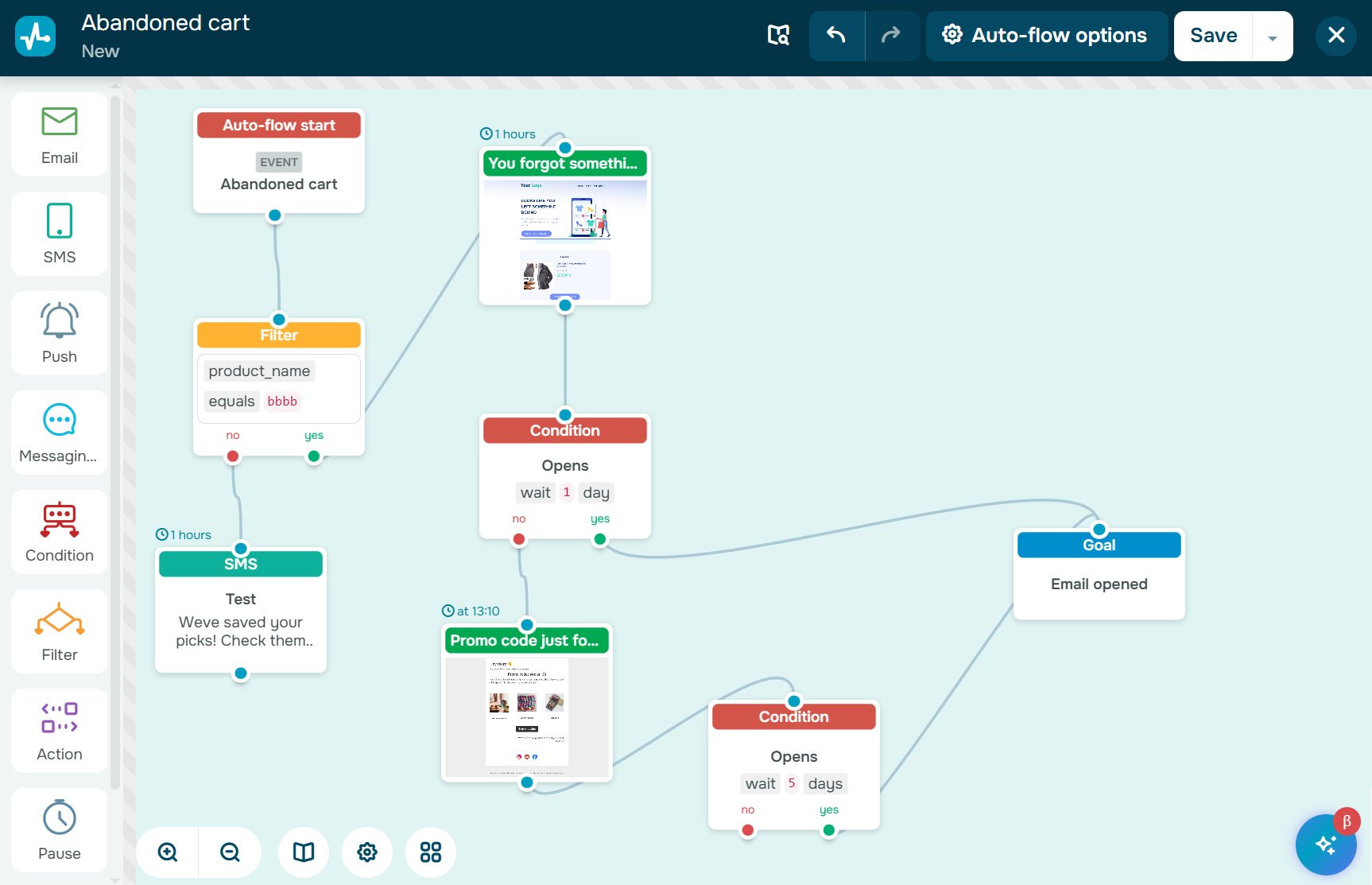 Looking into the visual automation builder in SendPulse
Next, the platform must support event-based email triggers. This includes real-time reactions to actions like product views, cart abandonment, purchases, or inactivity. Without these triggers, true behavioral automation simply isn’t possible.
Finally, integrations matter. A strong automation platform should connect easily with your CRM system and eCommerce stack, so customer data, purchase history, and behavioral signals stay in sync across campaigns.
You can try SendPulse as a platform that meets these requirements and goes a step further. In addition to a visual automation builder and event-based triggers, SendPulse includes built-in CRM functionality, which means there’s no need to connect third-party systems or spend time configuring complex integrations.
Customer data, purchase history, and interactions live in one place, making it easier to build and refine triggered email campaigns. With access to analytics and additional communication channels, marketers can continuously optimize automation flows and expand them beyond email as the strategy matures without increasing technical overhead.
Join 3M+ businesses growing with SendPulse
From solo creators to global brands, millions trust SendPulse to run email campaigns, chatbots, automations, and more — all in one place. Get started for free now!
Create a free account
Step 2. Define your core email triggers
Effective triggered email marketing starts with understanding how customers actually move through your store. Before building flows, map the customer journey from first interaction to repeat purchase and identify moments where hesitation, intent, or drop-off naturally occur.
Before you start doing any automation... I advise to visualize first what you want to automate. So start with a quick process diagram.
SourceOlivia Milton
Fractional CMO & AI-powered growth strategist
From there, focus on 3-5 revenue-critical triggers that directly influence conversions or retention. For most eCommerce businesses, these include welcome, abandoned cart, post-purchase, browse abandonment, and re-engagement. These triggers consistently deliver impact because they align with real customer intent.
It’s important to avoid over-automation early on. Launching too many triggers at once often leads to overlapping messages, diluted results, and harder optimization. Start with a small set of triggers, validate performance, and then expand your automation ecosystem gradually as insights accumulate.
Step 3. Prepare content for triggered emails
Triggered emails don’t need more content. Every element should support the specific action you want the recipient to take at that exact moment.
Start with goal-oriented copywriting. Keep the message focused, remove secondary distractions, and write email copy that reflects the customer’s current intent.
Subject lines deserve special attention because they must match that intent just as closely. A reminder, a notification, or a suggestion should sound like one.
In practice, this means writing subject lines that reflect the trigger behind the email and the mindset of the customer at that moment. Here are a few intent-matched subject line examples.
| Triggered email type |
Subject line |
| Welcome emails |
“Welcome in! Here’s what to start with”
“You’re in. Let’s make your first order easy” |
| Abandoned cart emails |
“Still in your cart — ready when you are”
“One step away from checking out” |
| Browse abandonment emails |
“Thinking it over? Take another look”
“You viewed these — here’s what to know” |
| Post-purchase emails |
“Your order is confirmed. Here’s what’s next”
“Make the most of your purchase” |
| Back-in-stock and replenishment emails |
“It’s back just like you wanted”
“Running low? Time to restock!” |
| Re-engagement emails |
“We saved you a spot”
“Still interested? Let’s catch up” |
| Birthday and anniversary emails |
“A little something to celebrate you”
“It’s your day! enjoy this from us” |
CTAs should be clear, specific, and action-driven, supported by dynamic content wherever possible. Show the exact product viewed, the items left in the cart, or recommendations based on past behavior to shorten the path to action.
Visually, simplicity wins. Use strong product images, clean layouts, and a mobile-first design. Triggered emails work best when visuals support the message, making the next step obvious at a glance.
Step 4. Build triggered email campaigns
Everything starts with events and conditions. An event is what activates the flow; it may be a signup, product view, purchase, or inactivity. Conditions refine that trigger by answering simple questions like “Is this the first purchase?” “Has the customer already received this email?” This ensures the message reaches the right person, not just anyone who meets the trigger.
For example, in SendPulse, a “Condition” block allows you to evaluate what a subscriber does after the trigger fires and adjust the flow accordingly. You can check actions such as email opens, link clicks, or other events within a defined time frame and then split the automation into different paths based on that behavior. This makes triggered campaigns more adaptive, ensuring each next step is driven by real engagement.
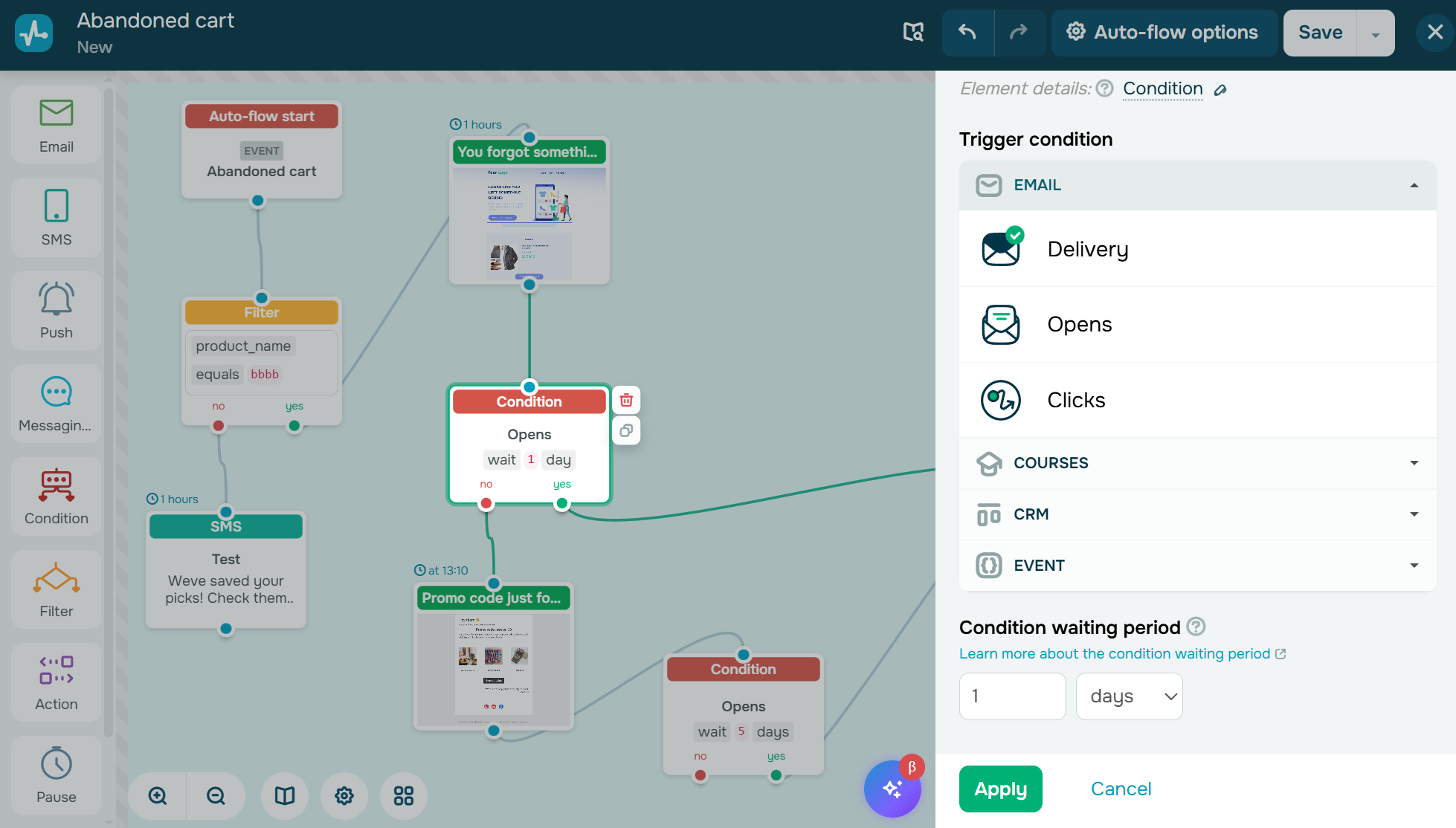 “Condition” block in the SendPulse automation builder
Next come delays, which control timing and frequency. Delays allow you to send emails when they make sense, for example, immediately, after a few hours, or days later.
Finally, effective automation relies on branching scenarios. Different behaviors should lead to different outcomes. If a customer completes a purchase, they exit the cart flow. If they ignore the first reminder, they move to a follow-up path. This branching logic keeps communication relevant and prevents automation from feeling repetitive or tone-deaf.
Final thoughts on triggered email campaigns
Triggered email campaigns do not compete for attention with volume. They win by responding to intent. Every trigger creates an opportunity to deliver a message that feels timely and useful.
The real value of automation lies in precision. By using customer behavior as the guiding signal, brands can shape communication that supports decisions at every stage of the customer lifecycle, from the first interaction to repeat purchases.
With the right approach, triggered emails form a scalable system built on relevance rather than volume. This consistency in timing and messaging fuels long-term engagement, stronger retention, and sustainable revenue growth in eCommerce.
If you’re ready to put this into practice, you can try SendPulse and launch your first triggered email campaign using ready-to-use automation tools, a visual flow builder, and built-in CRM. We have everything you need to turn customer actions into measurable results.