Sending transactional emails at scale — and consistently landing them in the inbox — is harder than it looks. Between authentication protocols, IP reputation management, and deliverability monitoring, there’s a reason most teams outsource this to a dedicated SMTP service provider.
We reviewed pricing pages, evaluated the features, and analyzed thousands of verified user reviews on G2 and Capterra to identify which SMTP servers actually deliver — in both senses of the word. Below, you’ll find what each provider does well, where it falls short, and what real users say after months (or years) of use. If you’re looking for a free SMTP server to get started, several providers on this list offer generous free plans with no credit card required.
Disclosure: This guide is published by SendPulse. Although we cover our own product alongside competitors, we aim to present each tool fairly.
TL;DR Best SMTP servers at a glance
Below, we compare the top SMTP providers for reliable email delivery side by side, including their pricing, pros, cons, and use cases.
| Provider |
Best for |
Free plan |
Starting price |
Price at 100K emails/mo |
Standout feature |
Biggest drawback |
G2 / Capterra rating |
| SendPulse |
Teams that want an affordable all-in-one marketing platform |
✅
12,000/mo |
$7.08/mo for 25K emails |
$59.88/mo |
Multi-channel automation with 24/7 support on all plans |
Hourly and daily sending caps on lower tiers |
4.6 / 4.6 |
| Amazon SES |
AWS teams that need the lowest-cost sending infrastructure |
✅
3,000/mo (first 12 months) |
$0.10 per 1K emails (PAYG) |
~$10 + data transfer fees |
Lowest per-email cost on the market |
Requires developer setup; no free support |
4.3 / 4.7 |
| Twilio SendGrid |
SaaS and developer teams that need proven sending at scale |
❌
60-day trial (100/day) |
$19.95/mo for 50K emails |
$34.95/mo |
Enterprise-scale infrastructure handling 100B+ emails monthly |
No permanent free plan |
4.0 / 4.2 |
| Mailgun |
Developer teams building custom workflows |
✅
100/day |
$15/mo for 10K emails |
$75/mo |
Well-documented API with inbound email parsing |
30-day max log retention even on the highest plan |
4.2 / 4.3 |
| Postmark |
Teams sending high-priority transactional emails |
✅
100/mo |
$15/mo for 10K emails |
$115/mo
(for 125K emails) |
Fast delivery speeds with public deliverability data |
Higher per-email pricing at scale |
4.6 / 4.7 |
| MailerSend |
Teams that want dev tools with a built-in visual editor |
✅
500/mo |
$6.30/mo for 5K emails |
$61.20/mo |
Blocklist monitoring across 11 major blocklists |
Strict account reviews and occasional unexplained suspensions |
4.1 / 4.4 |
| SMTP2GO |
IT teams replacing Microsoft 365 or on-premise mail servers |
✅
1,000/mo (200/day) |
$15/mo for 10K emails |
$75/mo |
Highest Capterra rating in this comparison |
No contact database or A/B testing |
4.7 / 4.9 |
| Brevo |
Teams that want email marketing, CRM, and SMTP in one platform |
✅
300/day |
$8.08/mo for 5K emails |
$62.08/mo |
Marketing, automation, and SMTP combined |
SMTP relay requires manual activation |
4.5 / 4.6 |
| Mailtrap |
Developers who want email testing and sending in one tool |
✅
4,000/mo (150/day) |
$15/mo for 10K emails |
$30/mo |
Deliverability analytics by mailbox provider |
Dedicated IP available only on higher tiers |
4.8 / 4.8 |
| Resend |
JavaScript teams using Next.js or React Email |
✅
3,000/mo |
$20/mo for 50K emails |
$35/mo |
30-day log retention on all plans |
Dedicated IP requires a higher-tier add-on |
4.8 / – |
| Mailjet |
European teams that need GDPR compliance and collaboration tools |
✅
6,000/mo (200/day) |
$8.10/mo for 8K emails |
$94.50/mo |
Real-time collaborative email editing |
Reports of account suspensions without warning |
4.0 / 4.2 |
| Elastic Email |
Budget-focused teams and agencies managing multiple domains |
❌
Limited to testing only |
$19/mo for 50K emails |
$29/mo |
Lowest pricing for mid-volume sending |
Maximum log retention limited to 7 days |
4.4 / 3.9 |
Choosing the best SMTP relay service depends on your email volume, budget, and integration needs. Let’s get into more detail.
What is an SMTP server?
SMTP, or Simple Mail Transfer Protocol, is the standard for sending email between servers. When you connect through an SMTP server, every message is authenticated using credentials (username, password, port, and SSL/TLS encryption) along with domain-level protocols like SPF, DKIM, and DMARC. This authentication helps ensure emails reach the inbox instead of the spam folder.
You’ve probably used SMTP without realizing it, as services like Gmail and Outlook both use this protocol. However, these services cap how many messages you can send daily. For example, Gmail lets you send up to 500 emails, which makes it fine for personal use and a bottleneck for anything transactional.
Why do you need a dedicated SMTP service provider?
Every password reset, order confirmation, shipping notification, and subscription renewal your app sends is a transactional email — and each one your customer expects to arrive instantly. A dedicated SMTP provider exists to make that happen reliably at scale.
Beyond raw deliverability, a dedicated service gives you delivery and engagement tracking (opens, clicks, bounces), high-volume sending quotas without daily limits, sender reputation monitoring so one bad batch doesn’t tank your domain, and professional support from email infrastructure experts. In short, Gmail gets your personal emails delivered; an SMTP relay service gets your business-critical emails delivered.
How to choose a reliable SMTP server
There are plenty of SMTP providers out there, and most of them look similar on the surface. They all offer SMTP relay, API access, deliverability stats, and a free tier. The differences show up in the details. Here’s what to actually evaluate before committing.
Deliverability
Deliverability is the most important factor to consider when choosing an SMTP provider. If your transactional emails don’t reach the inbox, nothing else matters. Look for providers that share real delivery metrics, and check G2 and Capterra reviews for any patterns around inbox placement issues. Better yet, send test emails through your actual domain before committing.
Pricing transparency
Most SMTP services advertise a low starting price, but the real cost depends on how you scale. Before choosing, map out the full picture: what’s included in the base plan, what it costs at 10,000, 50,000, and 100,000 emails per month, what you’ll pay if you go over your limit, and whether extras like dedicated IPs or email validation cost extra. Also, check if the free plan is permanent or just a trial. This makes a big difference when you’re building your infrastructure.
Sender reputation control
Your sender reputation determines whether ISPs route your emails to the inbox or the spam folder. A good SMTP service provider should give you visibility into bounces, spam complaints, and blocklist status — and ideally offer suppression list management so problematic email addresses are automatically excluded from future sends. If you’re on a shared IP, ask how the provider segments senders. One neighbor’s poor practices shouldn’t drag your domain down.
Observability and troubleshooting
When a transactional email doesn’t get to the inbox, you need to know why — fast. The best SMTP relay services offer webhook-based event tracking, searchable delivery logs with reasonable retention windows, stream or domain isolation so you can pinpoint issues without sifting through unrelated traffic, and content-level history so you can see exactly what was sent. Without these tools, every delivery issue becomes a guessing game.
Security and compliance
At the very least, your SMTP provider should enforce TLS encryption across all connections and support SPF, DKIM, and DMARC authentication. If you have European customers, GDPR compliance is a must. Check whether the provider stores data in EU regions and whether their data processing agreements are easy to access. SOC 2 certification is also becoming standard for enterprise customers.
AI and workflow support
Most SMTP providers are still infrastructure-first, but some are starting to stand out with AI features. A few now offer built-in AI tools for content generation, sending time optimization, or template building, including Brevo Aura, Mailjet AI Assistant, SendPulse AI content tools, Mailtrap’s AI-powered builder, and Elastic Email’s AI template tools. Others are enabling AI-driven workflows through MCP integrations, such as SendPulse, Mailtrap, MailerSend, and Resend. And providers like Amazon SES and Postmark remain deliberately focused on reliability over automation.
Ease of use
An SMTP server should simplify sending, not complicate it. The best SMTP providers offer quick setup for developers with clear API documentation, SDKs in major languages, and fast domain verification. They also keep dashboards simple enough for non-technical team members to monitor delivery or troubleshoot issues. If the dashboard requires a developer to interpret, that’s a hidden cost the pricing page won’t show you.
With these criteria in mind, let’s look at how 12 SMTP providers actually stack up.
12 best SMTP servers reviewed
All features, pricing, and positioning below are accurate as of May 25, 2026. Most screenshots are sourced from providers’ official websites and documentation.
We reviewed each SMTP provider’s documentation, current pricing, and feature set, then cross-referenced with verified user reviews on G2 and Capterra to identify real-world performance patterns. Here’s what we found.
SendPulse
Best for: Teams that want transactional email up and running fast, with SMTP and API support, solid deliverability, and a multi-channel ecosystem they can grow into.
SendPulse is a multi-channel marketing automation platform with a built-in transactional email service. You can send via SMTP or API, with SDKs available for PHP, Ruby, Python, Java, Node.js, and Obj-C — so whether you’re connecting a CRM system, a custom app, or a CMS like WordPress, integration is quick and smooth.
The SMTP dashboard shows real-time delivery stats by day, so you can spot and fix issues before they snowball. Email verification is also built in, and webhook support lets you track delivery events automatically through your own apps or workflows.
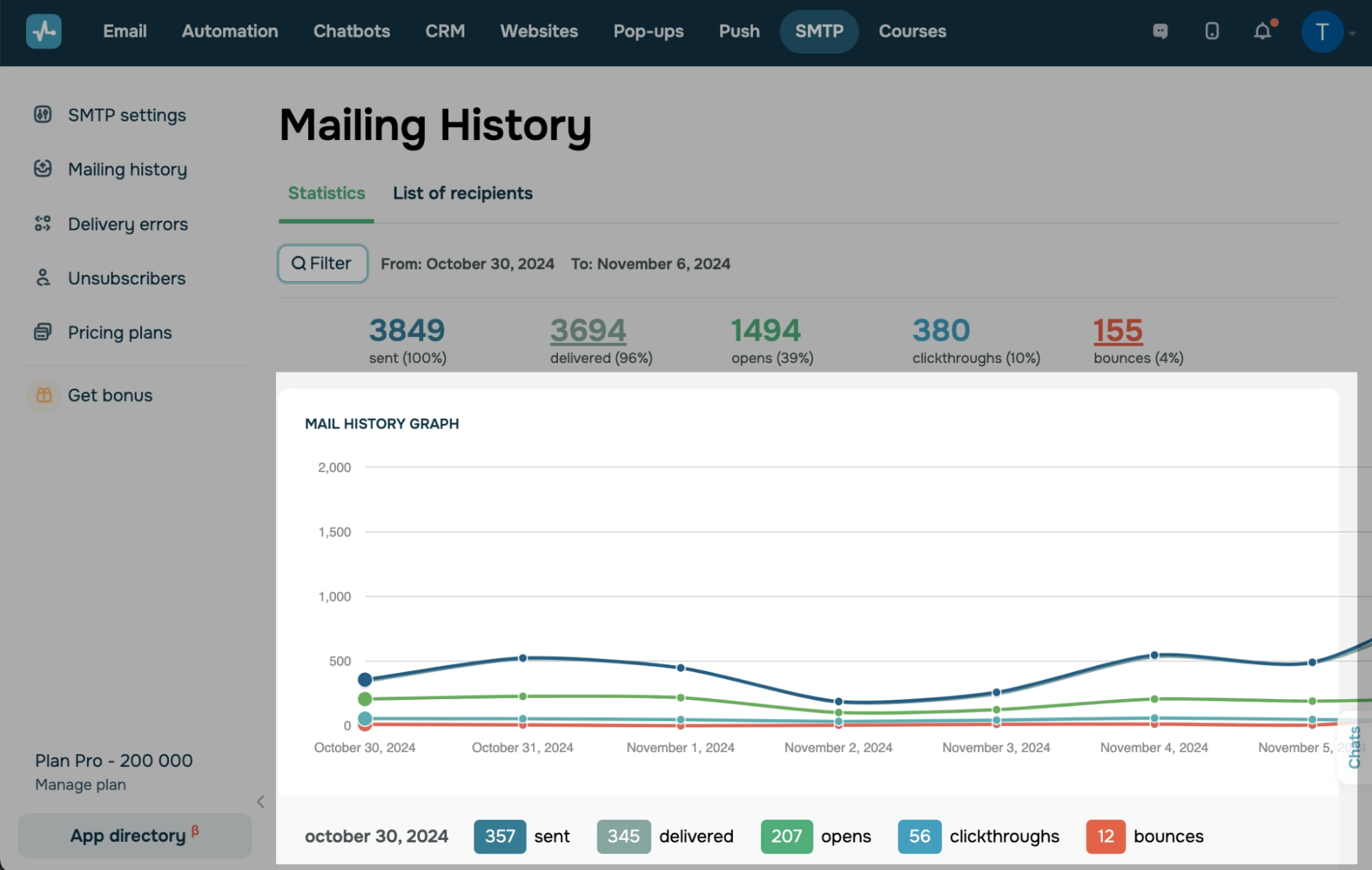 Viewing SMTP mailing history and delivery stats in SendPulse
What stands out about SendPulse’s SMTP service:
- Fast setup with flexible integration. SMTP and API access are available from day one, with webhooks for real-time status tracking on every email sent. Multiple G2 reviewers mention going live within minutes of creating an account.
- SPF, DKIM, and DMARC support. Authentication is built in; combined with automatic suppression of unsubscribed contacts to keep your sending reputation clean without manual list hygiene.
- Custom tracking domain. Removes SendPulse branding from email headers and footers, so your transactional emails come entirely from your domain.
- Multi-channel ecosystem. Beyond SMTP, SendPulse offers email marketing, chatbots, SMS, and a built-in CRM system, so you can start with transactional email and expand without switching platforms.
- AI content tools and MCP support. The platform includes AI-assisted copy generation for email content and a native MCP server for connecting external AI tools and workflows.
- 24/7 support in five languages. Available even on the free plan, this is rare for SMTP providers at this price point. The knowledge base is extensive, too.
What to consider before choosing SendPulse:
- Hourly and daily sending caps on lower tiers. The free plan limits you to 50 emails/hour and 400/day, which can be tight for apps with peak transactional traffic. Higher plans raise these limits significantly, but it’s worth checking whether your sending patterns fit before committing.
- SMTP is part of a larger platform. SendPulse’s core product spans email marketing, chatbots, CRM, and more. The transactional SMTP service is solid, but it doesn’t offer the same depth of transactional-specific tools as dedicated providers like Postmark or Mailgun.
- Interface can feel busy. The dashboard includes multiple sections and tools, making navigation less straightforward than in a single-purpose SMTP tool.
What users say: SendPulse’s SMTP setup is fast — several G2 reviewers report going live within minutes — and the price-to-value ratio on the cheapest paid plan comes up repeatedly. Deliverability reporting, webhook tracking for failed deliveries, and responsive live chat support are the other features that keep getting mentioned.
Pricing. SendPulse offers a free SMTP plan with 12,000 emails per month. Paid plans start at $7.08/month (billed annually) for 25,000 emails/month, capped at 2,500 emails/hour. A pay-as-you-go option is also available, starting at $15 for 10,000 emails.

Set up reliable SMTP in minutes
Get a free plan with 12,000 monthly emails, API access, and 24/7 support — perfect for your transactional email needs.
Get started for free
Amazon SES
Best for: AWS-native teams that want the cheapest possible email infrastructure and have the technical resources to configure it themselves.
Amazon SES (Simple Email Service) is AWS’s cloud-based email platform — and at $0.10 for every 1,000 emails you send or receive, it’s the lowest-cost option on this list. The trade-off is that SES is infrastructure, so there’s no drag-and-drop template builder, no built-in team collaboration, and no visual campaign tools. What you get is raw sending power, tight AWS integration (CloudWatch, SNS, Lambda), and granular control over every aspect of your email setup.
SES invests in deliverability monitoring tools. The Virtual Deliverability Manager dashboard breaks down bounce rates and complaints by ISP, tracks sending volume trends, and flags reputation issues before they escalate.
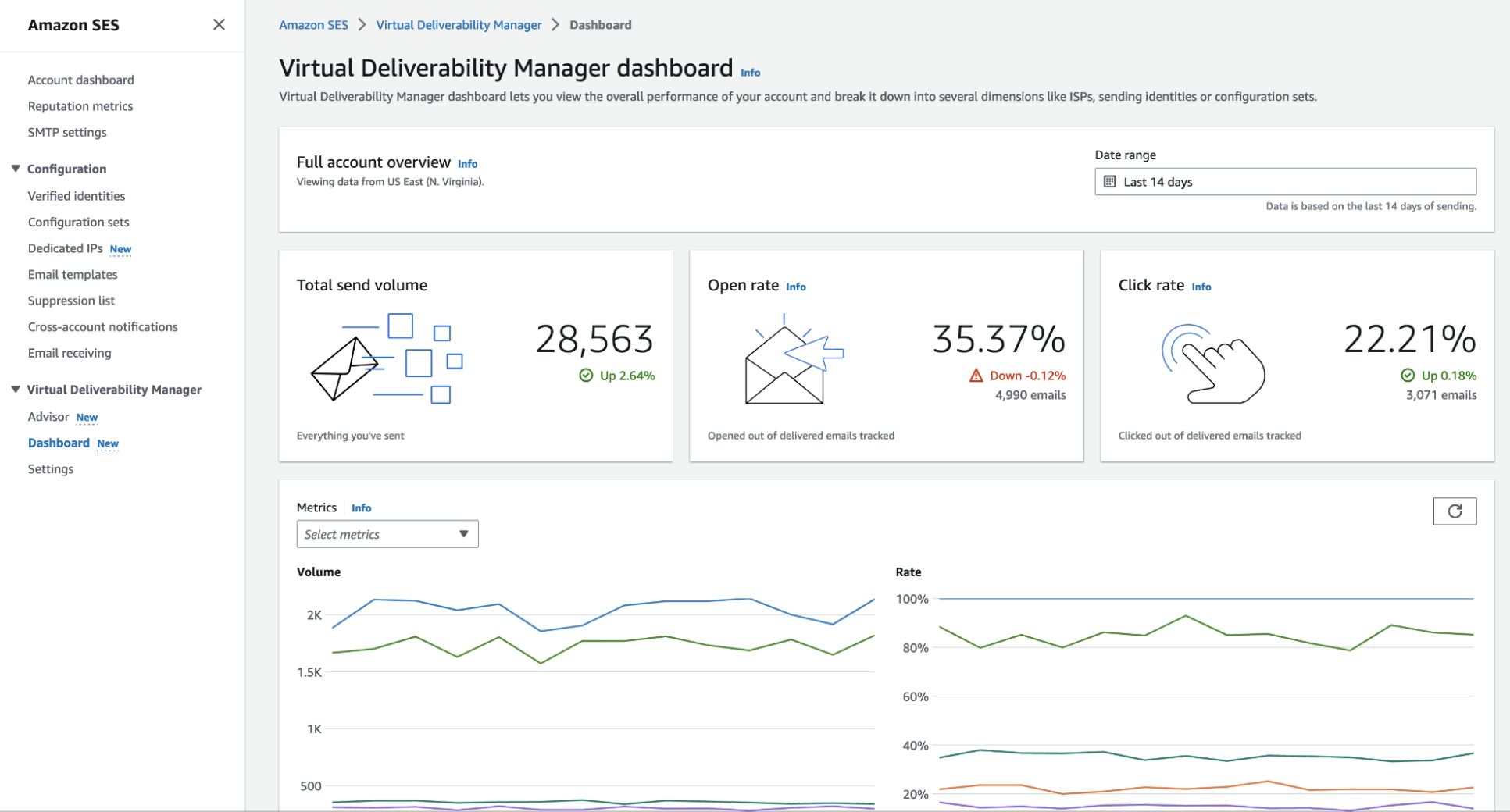 Virtual Deliverability Manager dashboard showing send volume, open rate, and click rate metrics; source: Amazon Web Services
What stands out about Amazon SES as a transactional SMTP service:
- Exceptional cost efficiency. You pay as you go at $0.10 per 1,000 emails, with no minimum commitment. For example, sending 100,000 emails in a month costs about $10.
- Virtual Deliverability Manager. It tracks bounce rates, complaints, and engagement by ISP in a single dashboard. This is the kind of reputation visibility that usually comes with premium tiers elsewhere.
- Flexible IP options. Shared, dedicated, or customer-owned IPs, depending on your sending volume and reputation needs. Dedicated IPs start at $24.95/month each.
- Complete authentication support. SES supports SPF, DKIM, and DMARC, and includes a Mailbox Simulator so you can test delivery scenarios without risking your sender reputation.
- 12-month free tier. Up to 3,000 message charges per month for the first year — useful for testing, though note that enabling features like Virtual Deliverability Manager can double your message charge count.
What to consider before choosing Amazon SES:
- Developer-required setup. There’s no visual interface for building or managing email content. If your team doesn’t include someone familiar with the AWS console, IAM roles, and API configuration, onboarding will be slow and frustrating.
- No built-in collaboration. SES does not support team roles, shared dashboards, or collaborative email management. It is designed as a single-user infrastructure tool rather than a team workspace.
- Billing complexity. The base rate is simple, but total costs add up: $0.12/GB for outgoing data, separate charges for attachments, and additional fees for optional services like dedicated IPs or Virtual Deliverability Manager. Without careful tracking, the bill can surprise you.
- Support costs money. AWS support plans start at $29 per month for each account and become much more expensive for Business and Enterprise tiers.
What users say: Reliability and cost-effectiveness dominate the G2 feedback for Amazon SES. It’s been called “the best for transactional and system-generated emails,” with users highlighting control over sending limits and reputation monitoring. The Virtual Deliverability Manager dashboard — which tracks bounce rates and complaints by ISP — gets frequent positive mentions from tech-savvy users.
Pricing. Amazon SES offers a free tier of 3,000 message charges/month for the first 12 months. After that, pricing is $0.10 per 1,000 emails on a pay-as-you-go basis, plus $0.12/GB for outgoing data and optional add-on fees for dedicated IPs and deliverability tools.
Twilio SendGrid
Best for: SaaS companies and developer teams that need a battle-tested email API and SMTP relay they can scale without switching providers.
Twilio SendGrid processes over 100 billion emails monthly for brands like Uber, Spotify, and Airbnb, which makes it one of the best SMTP services if raw scale and proven infrastructure are your top priorities. The platform offers both a Mail/Send API and standard SMTP relay, so you can pick whichever integration path fits your stack. Dynamic templates, event webhooks, email validation, and built-in suppression management round out a feature set that covers most transactional email needs out of the box.
Twilio SendGrid is known for its deliverability tools. The platform includes automated IP warmup, proactive ISP outreach, spam monitoring, and real-time analytics.
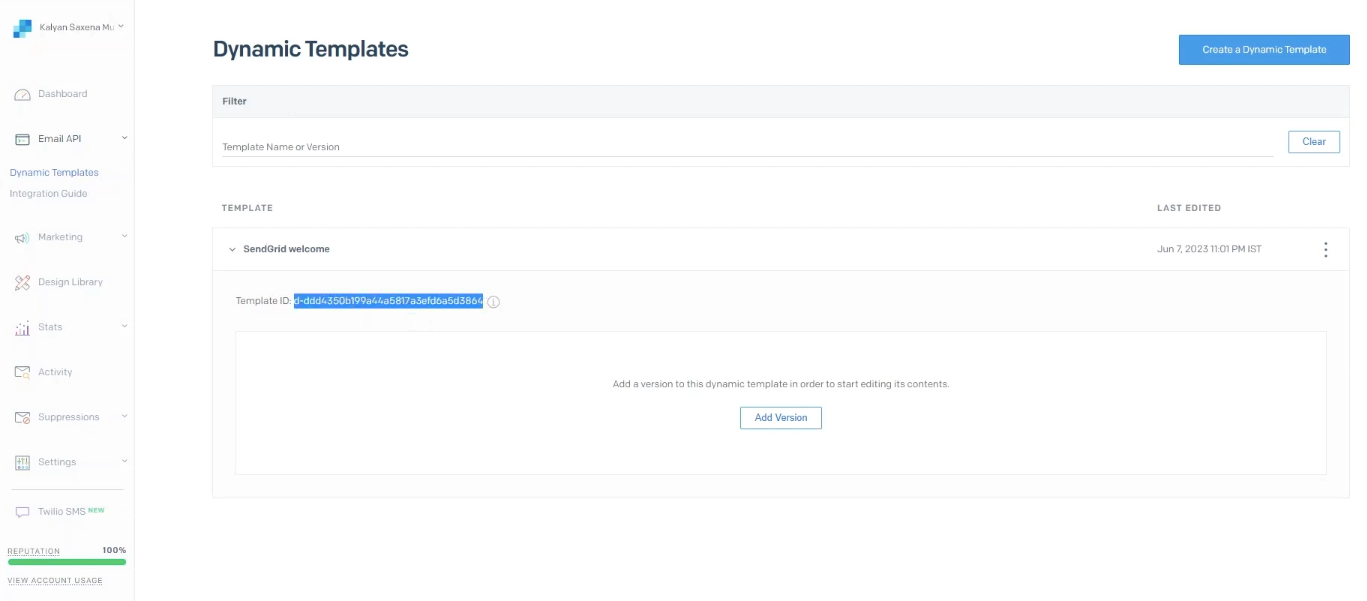 Dynamic Templates view in Twilio SendGrid showing template versioning and ID; source: YouTube
What stands out about Twilio SendGrid’s SMTP service:
- Proven infrastructure at scale. SendGrid’s proprietary MTA handles billions of emails monthly with 99.99% reported uptime. If you’re worried about outgrowing your provider, this isn’t the one you’ll outgrow.
- Dual API and SMTP relay. You can easily connect SendGrid to any stack, whether you need a simple SMTP setup for WordPress or a full API integration for a custom Node.js app.
- Advanced deliverability tools built in. Automated IP warmup, dedicated IP options, custom DKIM, domain authentication, and proactive ISP outreach help keep inbox placement high at volume.
- Dynamic templates with versioning. You can create, version, and manage transactional email templates directly in the dashboard; it’s useful for teams iterating on onboarding sequences or receipt formats.
- Real-time event webhooks. Delivery, open, click, bounce, and spam report events are available via webhook or API, giving you full visibility into what happens after every send.
- 24/7 global support. Available across all paid plans, with ticket-based, phone, and chat support options.
What to consider before choosing Twilio SendGrid:
- Pricing escalates at volume. The $19.95/month entry point covers up to 100,000 emails, but costs climb steeply as you scale into higher tiers with dedicated IPs and advanced features.
- The free plan is a trial. You can send 100 emails per day for 60 days, after which the trial ends. Unlike SendPulse or SMTP2GO, which have permanent free plans, SendGrid requires a paid plan to keep using the service.
- Support quality is inconsistent. Reviews on G2 and Capterra show that while deliverability is strong, support response times and helpfulness vary. Some users report slow ticket resolution, especially on lower-tier plans.
What users say: Deliverability is the word that shows up most in SendGrid’s G2 reviews — one goes as far as “since using the API on our website, deliverability has been 100%.” The dual API/SMTP setup appeals to developers, while the interface stays straightforward enough for non-technical team members.
Pricing. SendGrid offers a 60-day trial with 100 emails/day. Paid plans start at $19.95/month for up to 100,000 emails, with volume-based pricing as you scale. Dedicated IPs and advanced features are available as add-ons.
Mailgun
Best for: Developer teams building high-volume transactional email systems who want granular API control and don’t need a visual interface.
Mailgun is built for developers who prefer working with API calls instead of drag-and-drop editors. It offers both SMTP relay and a RESTful Email API with thorough documentation, which is why it consistently shows up in “best SMTP services for developers” conversations. The platform is optimized for transactional email: routing logic, batch sending, sending time optimization, and inbound email parsing are all native features.
Where Mailgun differentiates from infrastructure-only tools like Amazon SES is usability. The dashboard provides email logs, delivery analytics, and webhook management in a clean interface, though it’s still firmly developer territory. If your team doesn’t include someone familiar with reading API docs, Mailgun will feel steep.
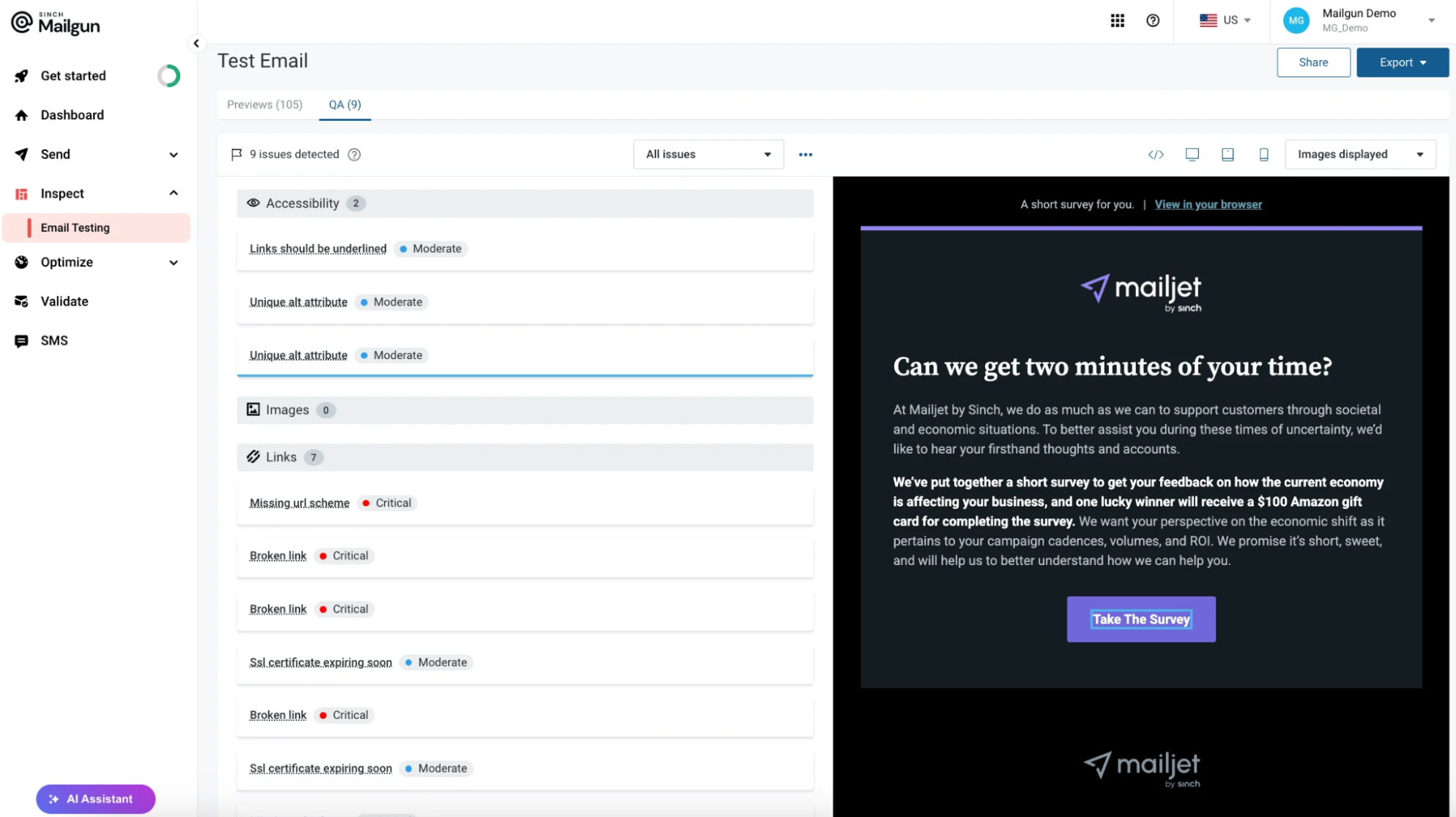 Email QA testing view in Mailgun showing accessibility, link, and image checks alongside an email preview; source: G2
What stands out about Mailgun’s SMTP service:
- Thoroughly documented API. The RESTful API supports every sending operation, from single transactional messages to high-throughput batch sends, with detailed docs that developers consistently single out in reviews as best-in-class.
- Inbound email processing. Mailgun parses incoming emails into structured JSON data, enabling automation workflows like support ticket creation or reply detection. Most SMTP providers on this list don’t offer inbound parsing at all.
- Email Verification API. Built-in verification catches invalid email addresses before you send, protecting your bounce rate and sender reputation.
- Flexible infrastructure. Shared or dedicated IPs, plus TLS/SSL connections to major webmail providers (Gmail, Yahoo, Outlook).
What to consider before choosing Mailgun:
- No visual template builder. There is no drag-and-drop editor, so templates must be built in HTML. If your workflow includes non-technical team members who need to design or edit transactional emails, this can be a challenge.
- Developer-required onboarding. Setting up, configuring, and managing Mailgun all require technical skills. While Mailgun is powerful, it is not accessible for marketing teams without dev support.
- Deliverability has been questioned recently. Some G2 reviews mention a drop in inbox placement rates, which could be due to shared IP reputation issues rather than platform-wide problems. Still, it is worth considering.
What users say: The API stands out in Mailgun reviews — described as “thoroughly documented, simple to integrate” with “logs, webhooks, and event tracking” that simplify debugging. Users who switched from Amazon SES highlight Mailgun’s cleaner UI and fewer deliverability issues.
Pricing. Mailgun offers a limited free plan that includes 100 emails/day, RESTful email APIs, SMTP relay, and 1-day log retention. The cheapest paid plan costs $15/month for 10,000 emails and has no daily sending limit. It also provides additional features like 5 inbound routes.
Postmark
Best for: Product teams sending mission-critical transactional emails where delivery speed and inbox placement matter more than feature breadth.
Postmark does one thing and does it exceptionally well: deliver transactional emails fast. Unlike most providers that offer a wide range of features, Postmark sticks to being a transactional SMTP service that doesn’t handle marketing email at all. By keeping promotional and transactional traffic on separate infrastructure, Postmark protects the sender reputation of your critical messages from the deliverability risks that bulk marketing email introduces.
You can see the results for yourself. Postmark shares its delivery statistics and keeps average delivery times for transactional emails under 10 seconds. Its strict anti-spam policy keeps shared IP addresses clean, so your emails reach inboxes reliably without needing a dedicated IP.
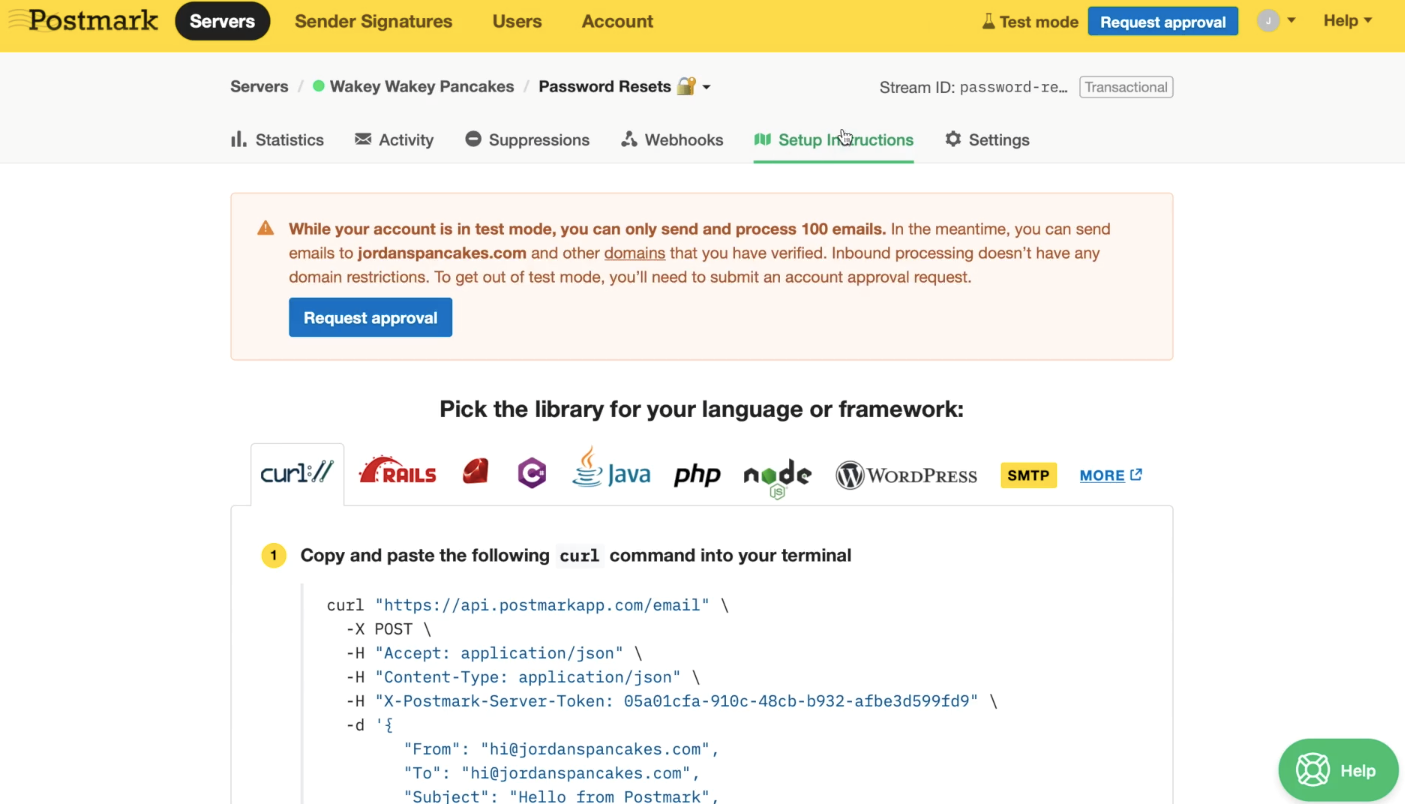 Postmark setup instructions showing language/framework options and API integration via curl command; source: Postmark
What stands out about Postmark’s transactional SMTP service:
- Strong deliverability on shared IPs. Because Postmark actively blocks spammers and separates transactional from promotional traffic, shared IP reputation stays high. Most users report excellent inbox placement without needing to pay for a dedicated IP.
- Message Streams. Transactional and broadcast emails run on separate streams with isolated reputations. This means a marketing campaign will not affect your password reset deliverability. You can also set up multiple streams per server for further isolation.
- 45-day content history. Full message content, events, and metadata are retained for 45 days by default — with options to extend or reduce. That’s more than Mailgun’s 30-day cap on its highest plan.
- Official SDKs. Libraries for Rails, Ruby, .NET, Java, PHP, and Node.js, plus a well-documented REST API.
What to consider before choosing Postmark:
- Higher per-email cost. Pricing starts at $1.80 per 1,000 emails (dropping to $1.20 at higher volumes), which adds up fast at scale. At 100,000 emails/month, you’re paying over $150, which is much higher than Amazon SES ($10) or SendPulse ($32) at the same volume.
- Deliberately limited feature set. No drag-and-drop builder, no CRM, no marketing automation. Postmark is a transactional email tool, full stop. If you need more marketing tools, you will need to use another platform as well.
- Free plan is essentially a sandbox. 100 emails/month with no overages — useful for testing the API, but not for any real workload.
What users say: The UI is minimal but effective, and the use of REST API over SMTP for faster async delivery comes up often. What resonates most in G2 reviews is Postmark’s strict anti-spam policy — as one user put it, the platform “maintains their systems well and doesn’t entertain spammers,” keeping shared IP reputation clean — a critical factor for transactional senders.
Pricing. Postmark’s free plan includes 100 emails/month with no overages. Paid plans start at $15/month for 10,000 emails with no daily limits. Additional emails cost $1.80 per 1,000, decreasing to $1.20 at higher volumes. Dedicated IPs are available at $50/month.
MailerSend
Best for: Teams that want developer-grade SMTP infrastructure without giving up visual email tools.
MailerSend bridges a gap that most SMTP providers don’t even try to close. Built by the team behind MailerLite, it pairs a full-featured API (PHP, Node.js, Golang, Python, Ruby, Java, Laravel) and SMTP relay with a drag-and-drop email builder and template management — meaning developers can integrate via API while marketing or ops teams design and edit transactional templates without touching code.
The platform is optimized for transactional reliability. It includes IP pool management, domain authentication, and deliverability consultations. The blocklist monitoring tool lets you check your domain against major blocklists like Spamhaus and SORBS in real time.
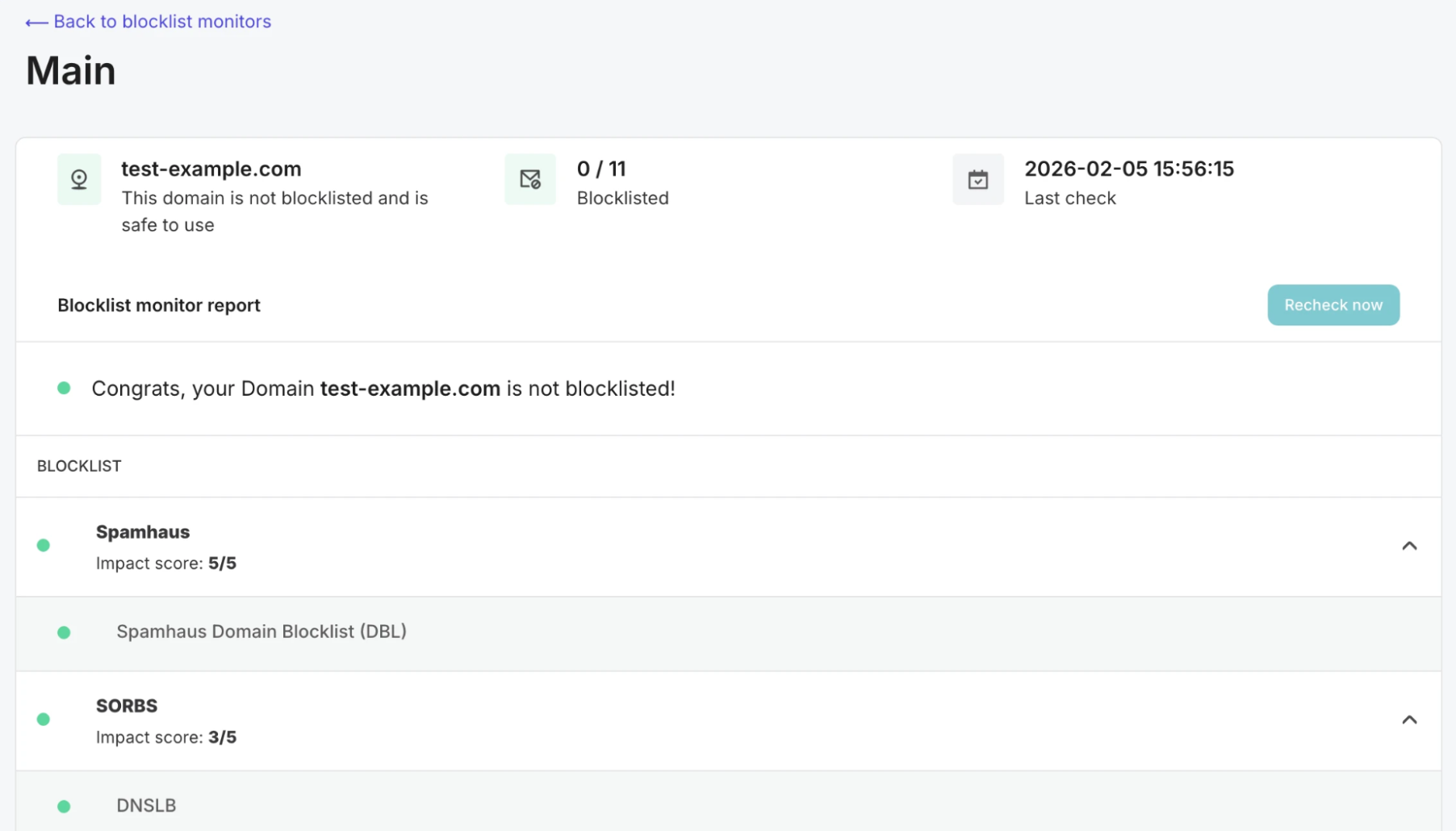 Blocklist monitor report, checking domain status against Spamhaus, SORBS, and other major blocklists; source: MailerSend
What stands out about MailerSend’s SMTP service:
- Dual developer and no-code experience. API and SMTP relay for developers, drag-and-drop builder for everyone else. Multiple SMTP users per domain means teams can segment access without sharing credentials.
- Blocklist monitoring. Real-time domain checks against 11 major blocklists with impact scores — a proactive deliverability feature that most competitors either don’t offer or gate behind premium tiers.
- Built-in email verification. Validate recipient addresses before sending to protect bounce rates and sender reputation. Verification credits are included even on the free plan.
- Inbound email routing. Parse and route incoming emails into your application — useful for support ticket systems, reply handling, or automated workflows. Like Mailgun, MailerSend is one of the few providers that support inbound parsing natively.
- Extensive documentation. Getting-started guides, API references, and use-case tutorials are thorough and kept up to date.
What to consider before choosing MailerSend:
- Less deliverability transparency than transactional-only providers. MailerSend doesn’t publish public delivery metrics the way Postmark does, and advanced deliverability reporting is less granular than what you’d get from Mailgun or SendGrid at comparable tiers.
- Strict account vetting. The flip side of MailerSend’s clean-sending-reputation approach: multiple Capterra reviewers report being denied or suspended during onboarding without clear explanations. If your use case is legitimate but unusual, expect some friction during account approval.
- Limited free plan. With 500 emails per month, it is mainly suitable for testing the integration.
What users say: The contrast with Amazon SES comes up more than once on Capterra. A user who switched put it bluntly: with SES, “they just say ‘you have something wrong but we won’t tell you'” — whereas MailerSend’s team “unblocked in 10 minutes because a real human could understand what happened.” Someone who left Brevo called the switch “one of our better decisions,” citing MailerSend’s focus on transactional reliability over mass-sending.
Pricing. MailerSend’s free plan includes 500 emails/month and 10 email verification credits. The mid-tier paid plan with 7-day email data retention costs $31.50/month for 50,000 emails and 100 verification credits, with overage at $1.50 per 1,000 emails.
SMTP2GO
Best for: Businesses that need a reliable SMTP relay with minimal technical complexity.
SMTP2GO is what happens when an SMTP provider focuses on doing the fundamentals exceptionally well. It’s not trying to be an all-in-one marketing platform or a developer-first API tool — it’s a dedicated SMTP relay service built for deliverability, uptime, and support.
SMTP2GO runs on a multi-data center network that reroutes traffic automatically during outages, so emails still get delivered even if one region goes down. For IT teams managing devices that send SMTP notifications — scanners, ERP systems, monitoring tools — this kind of reliability matters more than a drag-and-drop template builder ever will.
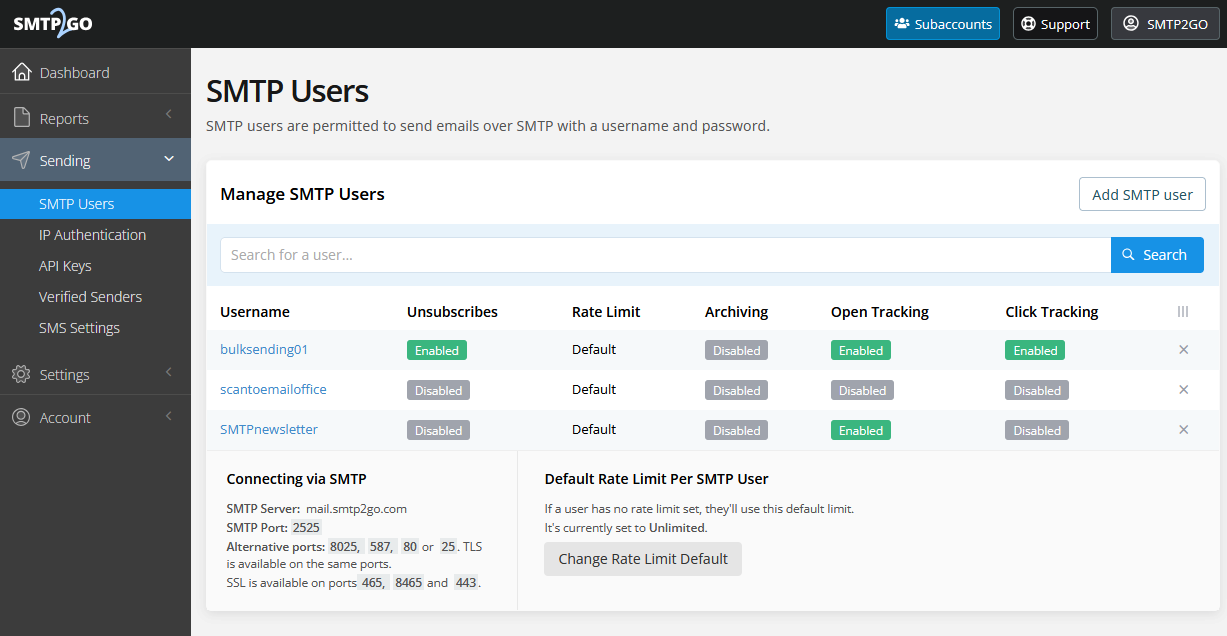 SMTP Users management panel with per-user controls for unsubscribes, rate limits, archiving, and tracking; source: SMTP2GO
What stands out about SMTP2GO’s SMTP service:
- Proactive deliverability protection. Blacklist monitoring, spamtrap detection, SPF/DKIM authentication, and feedback loop tracking are all built in. SMTP2GO actively works to keep you off blocklists rather than just reporting when you’re already on one.
- Redundant global infrastructure. A multi-data center setup with automatic failover means that if one data center goes down, your emails will still be sent.
- Per-user SMTP controls. You can create multiple SMTP users per account with individual settings for rate limits, unsubscribe handling, archiving, and open/click tracking.
- Clean, intuitive dashboard. Capterra reviewers consistently call it one of the easiest interfaces in the SMTP space. Reports, delivery logs, and account management are all accessible without needing a developer.
- No “success tax” on scaling. Per-thousand pricing improves as volume grows, rather than jumping to expensive tiers. Several reviewers specifically contrasted this with SendGrid and Mailgun’s pricing models.
- Responsive human support. 24/7 support on paid tiers, and multiple reviewers specifically mention fast, knowledgeable responses — not canned replies.
What to consider before choosing SMTP2GO:
- No contact database. SMTP2GO is a sending service, not a contact management platform. You’ll need to maintain your recipient lists elsewhere, like in your CRM, app database, or a separate email marketing tool.
- Feature gating on lower tiers. Dedicated IPs, email testing tools, and some advanced reporting features require higher plans. The free and entry-level plans are solid for basic sending but limited for teams that need deeper tools.
- Short data retention on lower plans. Reporting data retention scales with your plan tier. If you need long-term delivery records for compliance or auditing, confirm the retention window matches your requirements before choosing a plan.
What users say: SMTP2GO has built a reputation as a “set and forget” SMTP service — a long-time user called it “rock-solid” with “a support team that actually cares” and the portal “one of the cleanest and easiest I’ve used.” Several IT teams switched from Microsoft 365 specifically because SMTP2GO handled legacy device relay more reliably.
Pricing. The free plan includes 1,000 emails/month (200/day) with ticket support. Paid plans start at $15/month for 10,000 emails with 30-day reporting retention and more support options. Additional emails cost $1.20 per 1,000. Dedicated IPs and advanced features are available on the highest tier ($65/month).
Brevo
Best for: Companies that want marketing automation, CRM, and transactional SMTP in a single platform.
Brevo (formerly Sendinblue) is one of the most feature-dense platforms on this list. Beyond SMTP relay and transactional email API, you get a basic CRM system, marketing automation workflows, SMS and WhatsApp messaging, Facebook Ads, landing pages, and live chat.
However, this wide range of features comes with a trade-off. Brevo is mainly a CRM and marketing automation platform that also offers transactional SMTP, rather than an SMTP provider with extra marketing tools. The transactional features are reliable, with solid deliverability, API and SMTP access, and transactional/promotional stream separation.
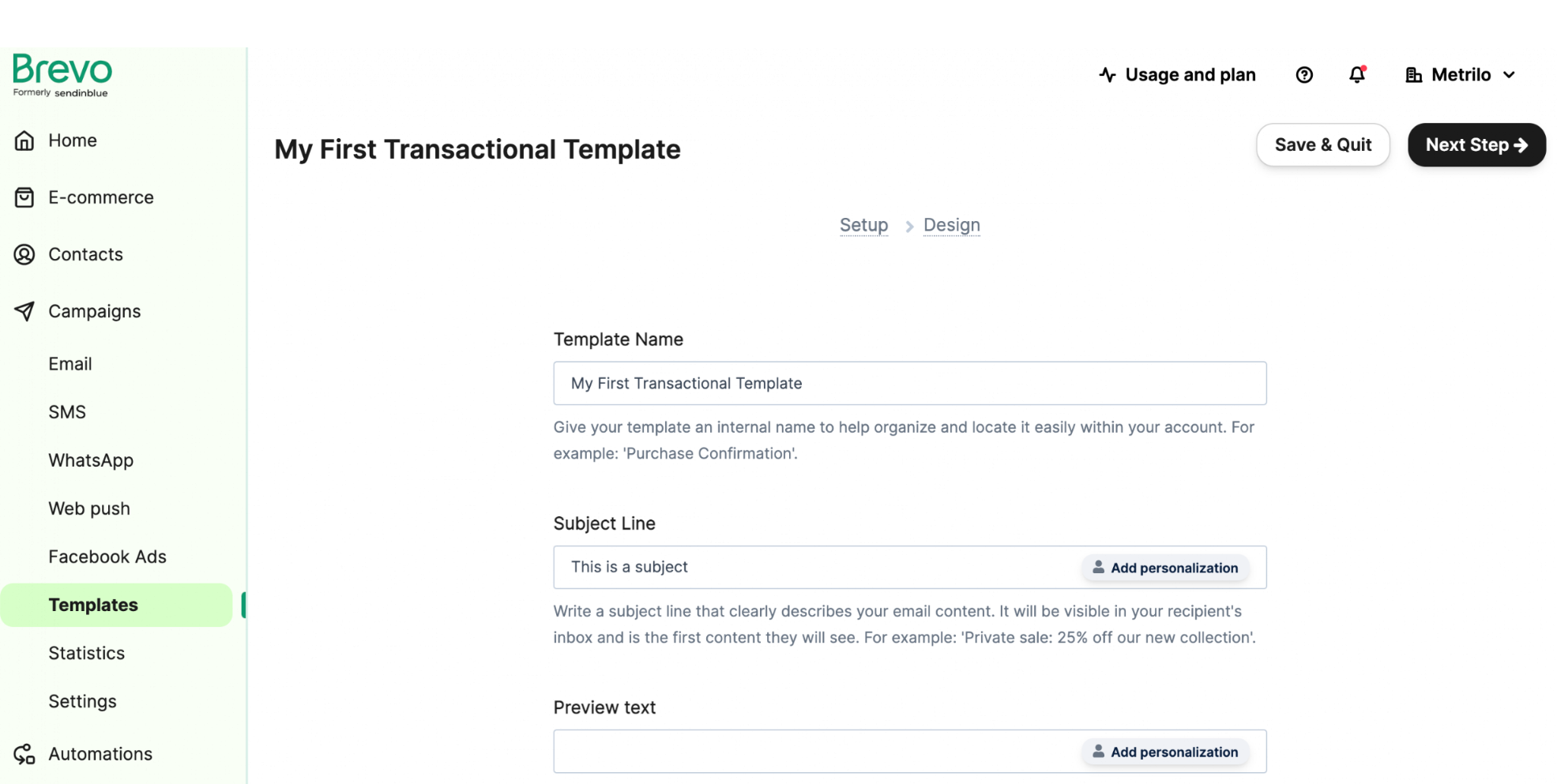 Creating a transactional email template in Brevo with subject line personalization and preview text fields; source: Brevo
What stands out about Brevo’s SMTP service:
- True all-in-one platform. CRM, email marketing, transactional SMTP, SMS, WhatsApp, chat, and landing pages in one tool. If you’re currently paying for three or four separate tools, Brevo can consolidate them.
- Transactional/promotional stream separation. You can split transactional and marketing emails by sender or IP address, protecting your transactional deliverability.
- One-click Cloudflare domain verification. If your DNS runs through Cloudflare, domain verification is automatic instead of manual record-copying.
- Brevo Aura AI. The platform offers AI-driven segmentation, content assistance, and data insights.
- Strong eCommerce integrations. Native plugins for WordPress, WooCommerce, and Shopify. Order confirmations, abandoned cart emails, and shipping notifications connect without custom development.
What to consider before choosing Brevo:
- SMTP relay requires manual activation. It’s not enabled by default — you need to activate it in account settings. The API works out of the box, but if you specifically need SMTP credentials for an app or device, expect an extra setup step.
- Transactional email isn’t the core focus. Brevo’s primary product is marketing automation, so if you need advanced transactional tools (message streams, inbound parsing, granular delivery logs), a dedicated provider like Postmark or Mailgun may serve you better.
- Daily cap on free plan. 300 emails/day is a hard limit, and there’s no overage option.
- Email-only support on most plans. The free and mid-tier plans are limited to email support. Phone support is only unlocked on the higher-tier plans ( from $449.08/month), while providers like SendPulse and SMTP2GO offer live chat or 24/7 support on much cheaper tiers.
What users say: Once SMTP is properly configured, deliverability is the consistent takeaway — as one G2 reviewer put it, “I absolutely don’t need to worry about emails ending up in spam because it’s not possible.” A web agency that tested multiple SMTP providers called Brevo’s setup “far and away the easiest,” singling out one-click Cloudflare domain verification.
Pricing. The free plan allows up to 300 emails/day, and the cheapest paid plan costs $8.08/month (billed annually) for 5,000 emails and 500 contacts.
Mailtrap
Best for: Developers and SaaS teams who want email testing and transactional sending in a single platform with per-provider deliverability data.
Mailtrap started as an email testing sandbox and has grown into a strong transactional SMTP service. Its testing roots are clear in features like spam score analysis before sending, HTML and RAW content inspection after delivery, and a dashboard that shows deliverability by mailbox provider (Google, Yahoo, Outlook, GMX). That per-provider breakdown lets you spot ISP-specific issues that flat delivery rates would hide.
The sending infrastructure is reliable too, with SMTP and API access, automatic SPF, DKIM, and DMARC authentication, dedicated IPs with auto warm-up, and real-time webhooks for opens, clicks, bounces, and complaints.
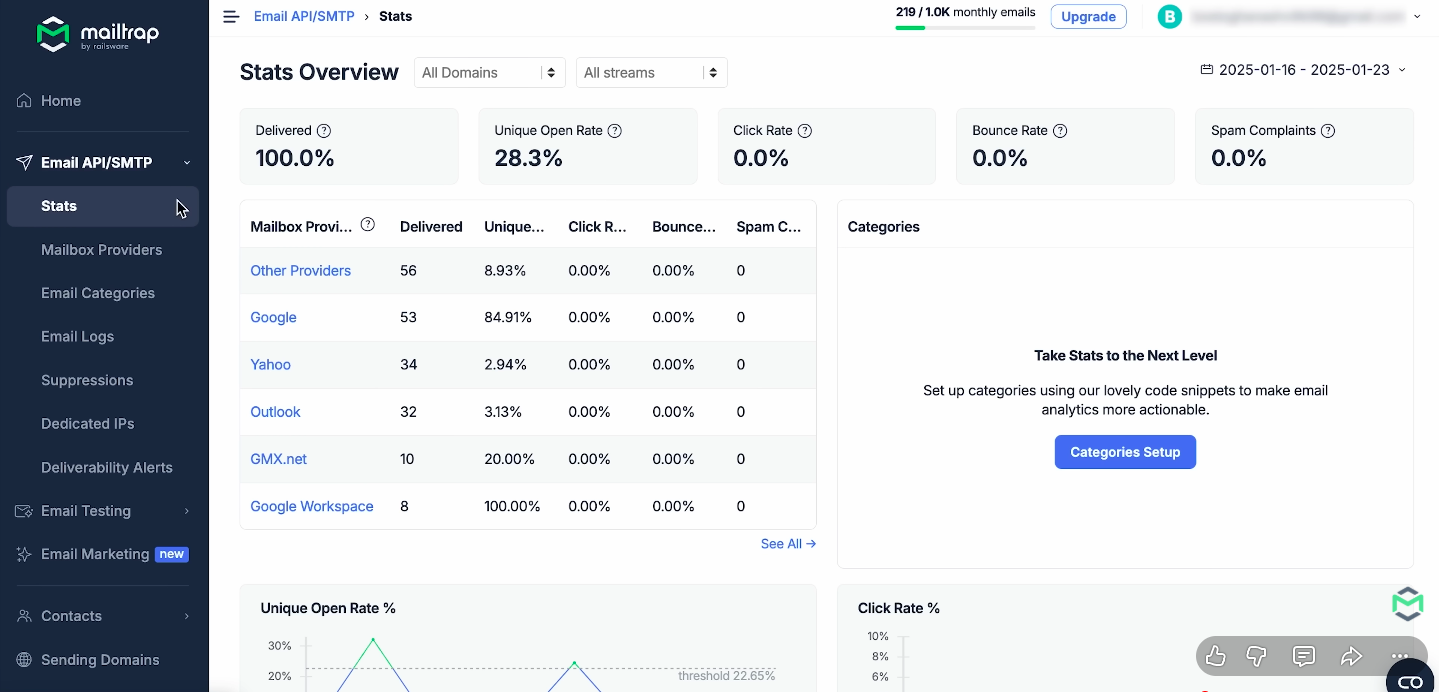 Email API/SMTP stats overview in Mailtrap with deliverability broken down by mailbox provider; source: YouTube
What stands out about Mailtrap’s SMTP service:
- Testing-to-production pipeline. Mailtrap offers an email sandbox for development and staging, as well as production SMTP and API sending, all within the same platform.
- Dedicated IPs with auto warm-up. Available on higher plans with automated warm-up scheduling, so you don’t have to manually ramp sending volume on a new IP.
- 25+ integration code snippets. Mailtrap provides ready-to-paste examples for major languages and frameworks, along with SDKs. This makes initial integration faster compared to providers that only offer documentation.
What to consider before choosing Mailtrap:
- Minimal log retention on lower tiers. The free plan keeps logs for only 3 days, and the lowest paid plan extends this to just 5 days.
- Developer-first interface: The dashboard is clean but technical. While non-developers can view stats and logs, setting up, integrating, and managing templates requires familiarity with APIs and coding.
- Free plan daily cap. 4,000 emails/month sounds reasonable, but the 150/day limit can be restrictive for apps with uneven sending patterns. On a busy day, you might reach your daily quota before lunch.
What users say: The typical Mailtrap journey starts with email testing — “we used Mailtrap for testing for years, then added their sending” is a recurring thread across reviews. A SendGrid switcher cited the “confusing user interface” there vs. Mailtrap’s clarity. Post-dispatch email inspection, including HTML and RAW data, and in-depth weekly summaries are the features developers mention most.
Pricing. The free plan includes 4,000 emails/month (150/day), 100 contacts, and 3 days of log retention. The cheapest paid plan costs $15/month for 10,000 emails and 5,000 contacts with 5-day logs. Extra emails cost $1.00, $0.88, or $0.55 per 1,000, depending on your plan. Dedicated IPs and 30-day retention are available on higher-tier plans starting at $85/month.
Resend
Best for: Developers building modern apps who want a clean API, React Email integration, and minimal configuration overhead.
Resend aims to make sending emails from your code as easy as possible. The API is clean, the documentation is easy to follow, and integration with frameworks like Next.js, Supabase, and Nodemailer is designed to work out of the box.
You can use SMTP as well as the REST API, so you have options for integration. Security basics are in place, including SMTPS and STARTTLS encryption, SPF/DKIM/DMARC authentication, suppression lists, and compliance with GDPR and SOC 2. The dashboard lets you track events for each email with suppression list alerts and content inspection.
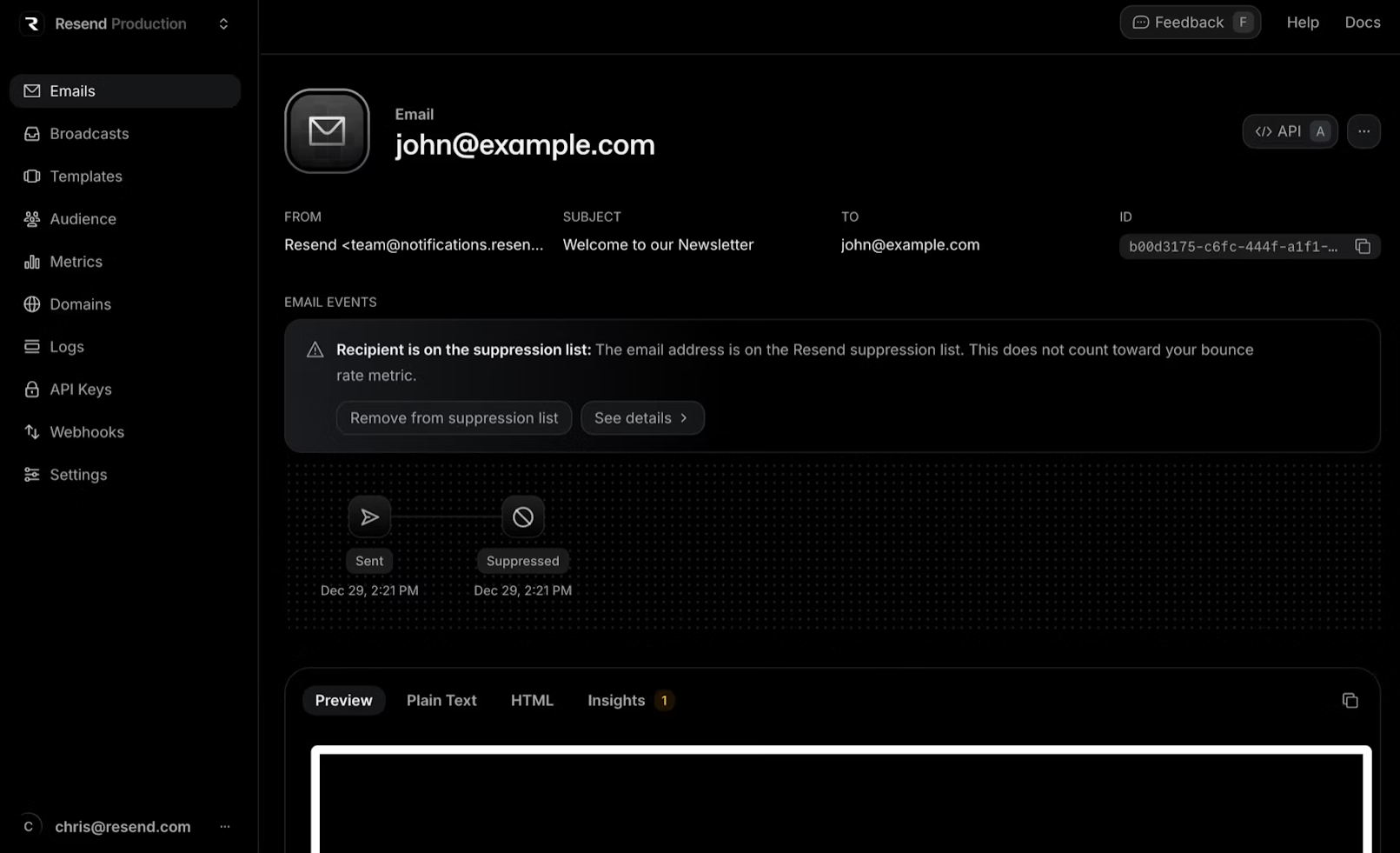 Email event log with delivery status, suppression list alerts, and content preview with HTML/Plain Text inspection; source: Resend
What stands out about Resend’s SMTP service:
- Developer experience as the core product. REST API, SMTP, SDKs in major languages, batch sending, and scheduling are all built to require as little extra code as possible. With React Email integration, you can create transactional templates as React components, which is something only Resend offers.
- Built-in automation. Every plan, even the free one, includes 10,000 automation runs. This is useful for drip campaigns or delayed transactional emails, and you do not need any extra workflow tools.
- Security and compliance. Resend meets GDPR and SOC 2 standards, uses encrypted connections, and supports full authentication. For teams in regulated industries, this helps meet compliance requirements early on.
- 30-day log retention on all plans. Most competitors limit log retention on lower tiers. For example, Mailtrap provides 3 days on its free plan, and Mailgun only offers 30 days on its $90/month plan. Resend gives you 30 days from the start, which is generous for troubleshooting and compliance.
What to consider before choosing Resend:
- Limited track record. Resend is newer than every other provider on this list, so there’s less real-world feedback on how it performs at scale over time.
- Dedicated IPs are a $30/month add-on. They cost an extra $30 per month and are not included in any standard plan. If you need IP isolation for sender reputation, that’s an extra cost that providers like SendPulse and Mailgun bundle into their mid-tier plans.
- No visual template builder. Templates are built in code or via React Email. There’s no drag-and-drop editor for non-developers, which is consistent with Resend’s developer-first philosophy but is less user-friendly for mixed teams.
What users say: Resend has too few reviews to draw reliable patterns from. It’s included here based on feature set rather than user feedback at scale.
Pricing. The free plan includes 3,000 emails/month (100 emails/day) and 10,000 automation runs. The cheapest paid plan costs $20/month for 50,000 emails and 10,000 automation runs, with overages at $0.90 per 1,000 emails. Dedicated IPs are available on higher-tier plans for $30/month.
Mailjet
Best for: European teams and agencies that need both marketing and transactional email in one GDPR-compliant platform.
Mailjet is one of the few platforms that handles both transactional SMTP and marketing emails equally well. The setup is easy. SMTP credentials and API keys appear together on one configuration page, and integration works smoothly with standard MTAs and popular programming languages.
What genuinely sets Mailjet apart is the real-time collaborative email editor. Multiple team members can work on the same email template at the same time, and no other SMTP provider on this list offers a similar feature. As an EU-based company owned by Sinch and headquartered in France, Mailjet offers built-in GDPR compliance. This is important for teams with European customers or data residency needs.
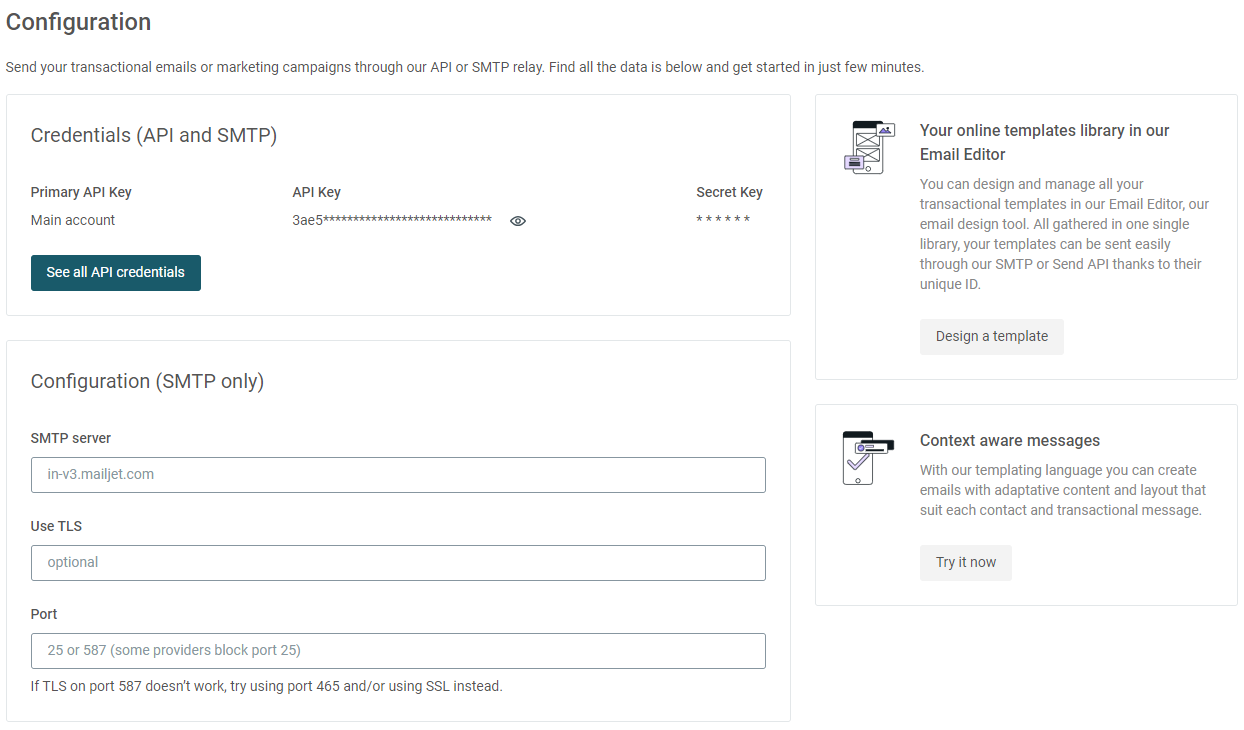 SMTP and API configuration page with credentials, server settings, and quick links to the template editor and context-aware messaging; source: Mailjet
What stands out about Mailjet’s SMTP service:
- Real-time collaborative email editor. Multiple team members can iterate on email content together, so there is no need to export drafts or collect feedback in separate channels.
- GDPR-native compliance. Mailjet uses EU-based infrastructure, GDPR-compliant forms, data processing agreements, and European data residency. If your legal team asks about data protection, Mailjet already has the necessary paperwork.
- Context-aware templating. Mailjet’s templating language supports dynamic content and layout per recipient, which means a single template can render differently based on contact attributes, reducing the number of templates you need to maintain.
- AI content assistant. It is available on mid-tier plans for generating and refining email copy within the editor.
What to consider before choosing Mailjet:
- Daily cap on free plan. The free plan allows 6,000 emails per month, but you can only send 200 per day. This means you cannot send a large batch at once, even if you have not reached your monthly limit.
- Dedicated IPs only on high-volume plans. You’ll need a plan with 100,000+ emails/month to access dedicated IP options. Lower-volume senders are limited to shared IPs.
- Account suspension reports. Several reviewers, including long-time paying customers, have reported account suspensions without warning or a clear explanation. This is a risk to keep in mind.
What users say: The real-time email editor with built-in team collaboration draws frequent positive mentions, and GDPR compliance (Mailjet is EU-based) is a recurring draw for European users. A Capterra reviewer who previously struggled with Mailgun’s onboarding found Mailjet “easy to set up” with “well-documented” API integration.
Pricing. The free plan includes 1,000 contacts and 6,000 emails/month (200/day). Paid plans start at $8.10/month (billed annually) for 2,000 contacts and 8,000 emails with no daily cap. Automation and advanced features require the highest-tier plan.
Elastic Email
Best for: Budget-conscious teams and web developers managing email across multiple client domains who need an affordable SMTP relay.
Elastic Email stands out for its low price. At $19/month for 50,000 emails, it’s one of the most affordable paid SMTP options on this list. The setup is simple: plug in your SMTP credentials, verify your domain, and start sending your emails. It also supports HTTP API integration for teams that prefer programmatic access.
The platform offers real-time delivery logs, SPF/DKIM/DMARC authentication, suppression management, and a drag-and-drop email editor with responsive templates. It also allows multi-user access with subaccounts and configurable permissions, which helps agencies manage transactional email for several client domains.
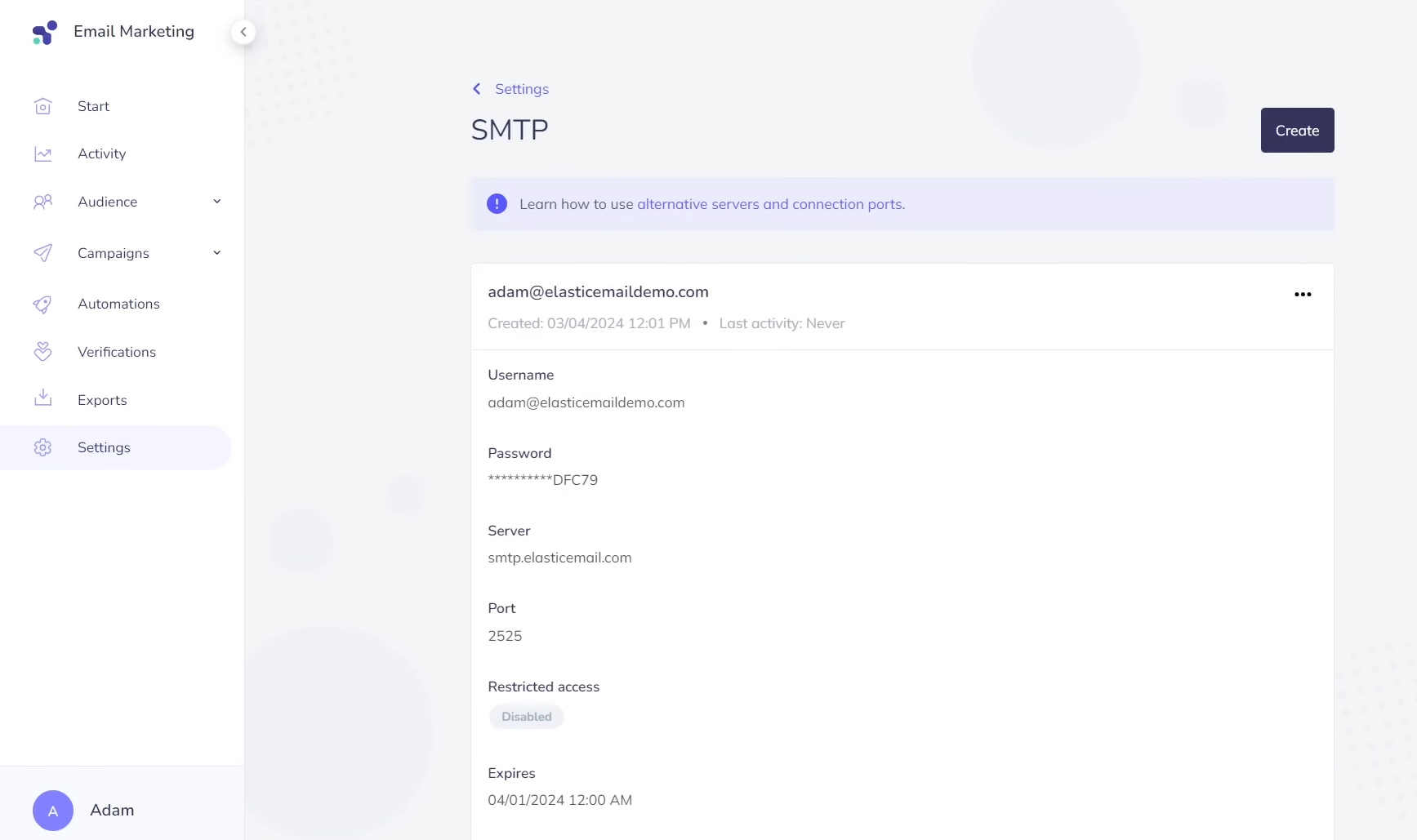 SMTP settings page with server credentials, port configuration, and access controls; source: YouTube
What stands out about Elastic Email’s SMTP service:
- Multi-domain and multi-user management. Subaccounts with user permissions make it practical for freelancers and agencies handling email infrastructure for multiple clients from a single dashboard.
- Built-in visual editor. Unlike Mailgun or Amazon SES, Elastic Email includes a drag-and-drop template builder with responsive design support, so you don’t need HTML knowledge for basic transactional templates.
- Inbound email routing and webhooks. The platform supports inbound parsing and webhooks, so you can automate workflows based on incoming emails or delivery events.
- Dedicated IP with custom rDNS. Available as an add-on for paid plan users who need full control over sender reputation and reverse DNS configuration.
What to consider before choosing Elastic Email:
- Short log retention. Email logs are stored for only 3–7 days, depending on your plan. Teams with compliance or audit requirements will need to export logs to external storage via webhooks.
- Dedicated IPs are an expensive add-on. At $40 to $50 per month for each IP, they are more expensive than most competitors.
- Free plan is a sandbox. Elastic Email’s free tier is limited and meant for trying out features. It is not intended to be used as a permanent free SMTP server.
What users say: Cost-to-value is the thread that runs through Elastic Email reviews. A user who switched from both Postmark and Mailgun said it offered “better cost-to-value ratio for transactional emails at scale.” Another called it a “must have for web developers that host sites for their clients,” noting it solved deliverability problems across multiple client domains.
Pricing. The free plan only lets you test key features. Paid plans start at $19/month for 50,000 emails and 3-day log retention. Dedicated IPs cost $40 or $50 per month, depending on your plan.
Bottom line
Every SMTP provider on this list can send transactional emails. Which one works best depends on your needs, team, and budget.
If you need the cheapest possible infrastructure and have developers on hand, Amazon SES is hard to beat on price. If transactional delivery speed is your top priority and you don’t need marketing features, Postmark is purpose-built for that. And if you want a reliable SMTP without technical complexity, SMTP2GO’s 4.9/5 Capterra rating speaks for itself.
For teams that want affordable transactional SMTP and a broader toolkit — marketing emails, chatbots, CRM system, SMS — SendPulse covers both without requiring a second platform. The free plan includes 12,000 emails/month with full authentication, analytics, and webhooks to test in real conditions.
Start with the criteria that matter most to your use case, test two or three providers using your actual domain, and let the deliverability data make the decision for you.