When potential customers land on your website for the first time, they often have questions. How quickly those questions get answered can make or break their experience with your brand. That’s where live chat software comes in. It lets you respond to prospects and customers in real time, resolve issues before they escalate, and build trust from the very first interaction.
Many of today’s best live chat software options go a step further, with AI-powered features that handle common inquiries instantly, even when your team isn’t available. In this post, we’ll cover what to look for when choosing a live chat tool, review each platform, and share our hands-on impressions of the top options available in 2026.
Disclosure: This guide is published by SendPulse. Although we cover our own product alongside competitors, we aim to present each tool fairly.
TL;DR Live chat software at a glance
Before jumping into a detailed comparison, have a look at the table below. We’ve listed all the live chat software discussed in this post for a quick overview.
| Tool |
Best for |
Pricing model |
Starting price |
Key highlights |
| SendPulse |
SMBs and online shops wanting live chat, chatbots, and CRM in one platform |
Contact-based |
$9.60/mo for 500 contacts, unlimited chats |
AI flow builder with LLM integrations; 7 messaging channels + website; built-in CRM and email marketing |
| Intercom |
SaaS companies scaling AI-powered support |
Per agent + per AI resolution |
$29/mo per agent; $0.99 per Fin AI resolution |
Fin AI Agent for autonomous resolution; AI Copilot for agent assistance; real-time translation |
| Zendesk |
Mid-size to enterprise teams needing omnichannel support with advanced ticketing |
Per agent |
$55/mo per agent (Suite Team) |
AI agents with continuous learning; 8+ channels incl. WeChat and LINE; advanced ticketing and SLA management |
| Freshchat |
Support teams managing conversations across messaging channels |
Per agent |
$19/mo per agent with Freddy AI Agent |
Freddy AI Agent + AI Copilot; IntelliAssign smart routing; free plan for up to 10 agents |
| LiveChat |
Companies using website chat as a primary support channel |
Per agent |
$19/mo per agent with AI Copilot |
Message sneak-peek (live typing preview); 8+ channels via integrations; chatbot via separate ChatBot product |
| Tidio |
eCommerce brands needing live chat with AI product recommendations |
Per workspace + usage-based for Lyro AI |
$28/mo for 100 conversations and 10 seats |
Lyro AI with guardrails and product recommendations; Shopify and WordPress integration; visual flow builder |
| Crisp |
Startups and digital-first companies wanting shared inbox with AI |
Per workspace |
$52/mo for 4 agents and 5,000 contacts |
AI agent trainable on your content; 10+ channels incl. phone and SMS |
| Help Scout |
Smaller support teams that prioritize human agents with AI assistance |
Per agent + per AI resolution |
$25/month per agent for 2 inboxes and unlimited contacts; AI Answers at $0.75/resolution |
Cleanest inbox UX in the category; AI drafts and summaries for agents; email-first with live chat add-on |
| HubSpot Live Chat |
Teams needing live chat with native CRM for lead management |
Per agent |
$9/mo per agent for 1,000 marketing contacts |
Native CRM with auto-logged conversations; Breeze AI Agent on higher plans; free plan available with branding |
| tawk.to |
Small teams wanting free live chat with no monthly fees |
Free core + optional add-ons |
Free; optional features from $29/mo |
No agent or conversation limits; Apollo AI Bot; 2 messaging channels + website |
| Olark |
Small teams needing a simple, easy-to-deploy live chat tool |
Per agent |
$29/mo per agent |
Fast setup with minimal learning curve; WCAG 2.1 AA accessible |
| LiveAgent |
Support teams handling moderate to high ticket and chat volumes |
Per agent |
$15/mo per agent with AI included |
AI included from the lowest plan; 40+ languages; built-in ticketing with SLA management |
This quick comparison gives you a snapshot of what each tool offers. Now, let’s take a closer look at their features and pricing models.
What is live chat software, and how does it differ from help desks and chatbots?
Live chat is software that lets your support agents chat with prospects and customers in real time, answering questions as they come in. You can add a live chat widget to your website to assist visitors around the clock, reduce friction during the buying process, and improve overall satisfaction with your brand.
Live chat is often the first thing people think of when it comes to customer support, but it’s just one part of a broader ecosystem. Help desks and AI-powered chat solutions each serve a different purpose. Understanding how they differ will help you choose the right tool for your business.
Live chat vs help desk software
The difference between live chat vs help desk software comes down to real-time interaction versus structured support management.
Live chat is built for instant communication. It lets support agents, or AI, respond to users immediately while they’re actively browsing your website. It’s ideal for quick questions, sales assistance, and reducing friction during the customer journey.
Help desk software, on the other hand, is designed to organize, track, and resolve support requests over time. It typically uses a ticketing system to manage customer issues across multiple channels like email, forms, and chats.
Here’s a simple way to think about it:
A potential customer visits your pricing page and has a quick question about features. Live chat software gets them an instant answer so they can continue toward a purchase. But if an existing customer reports a technical issue that needs investigation, a help desk is the better fit, as it can track the request and resolve it step by step.
AI agent vs copilot vs rule-based chatbot
Modern live chat tools often include AI capabilities, but not all AI-powered solutions work the same way. Here’s a quick breakdown:
AI agents are built to automate conversations end-to-end. They understand context, handle complex queries, and resolve issues without human involvement. They continuously learn and improve, making them well-suited for scaling support operations.
AI copilots are designed to assist human agents rather than replace them. They suggest replies, summarize conversations, and surface relevant knowledge base content in real time.
Rule-based chatbots are the most basic option. They follow pre-defined scripts and decision trees and can only handle predictable, structured queries.
Here’s what to consider when choosing between them:
- Automation rate. AI agents offer the highest level of automation; copilots enhance human performance; rule-based bots provide limited automation.
- Risk and control. Rule-based chatbots are predictable but limited; AI agents are more powerful but require trust in their decision-making; copilots offer a balanced approach with human oversight.
- Cost predictability. Rule-based systems are usually cheaper but less efficient at scale; AI agents can reduce long-term support costs through automation; copilots optimize team productivity without fully replacing human agents.
In practice, many modern AI live chat platforms combine all three approaches — using AI agents for common queries, copilots to support agents, and live chat for human interaction when it matters most.
Not sure whether your business needs a chatbot, live chat, or both? Check out our chatbot vs live chat comparison to see how the two work together in practice.
Key live chat benchmarks and trends in 2026
Live chat is no longer just a support widget in the corner of your screen. It’s a core part of how businesses build and maintain customer relationships. But what do strong live chat results actually look like in 2026? The Comm100 Live Chat Benchmark Report gives us some useful reference points.
Response time, CSAT, and chatbot share
To evaluate live chat tools effectively, you need to benchmark them against real-world performance metrics. Here are some key numbers shaping buying decisions in 2026:
- average response time ~44.8 seconds;
- average wait time ~23.6 seconds;
- average CSAT ~79.9%;
- chats handled by chatbots ~73.8%;
- chats fully resolved by chatbots ~45.8%.
A few things are worth noting here. Customers expect a response in under a minute, and satisfaction scores, while solid overall, are sensitive to both speed and interaction quality. Perhaps most telling is the chatbot share: AI is already handling the majority of initial customer conversations. This clearly signifies a shift toward automation.
If your live chat software can’t combine fast response times with solid automation, it will struggle to keep up with both customer expectations and the competition.
The AI-first model with human handoff
One of the most important trends in 2026 is the shift toward AI-first conversations with seamless human handoff. Data from the Comm100 report shows that while chatbots now handle nearly 74% of chats, they fully resolve only about 46%. This gap matters, as it means that automation alone isn’t enough.
The most effective setups follow a hybrid model: AI handles high-volume queries instantly, and human agents step in for more complex interactions. This combination reduces drop-offs during the buying journey, lowers support costs, and keeps personalization and conversion rates high.
For buyers, this changes how customer support live chat should be evaluated. Here are some of the right questions to ask:
- Automation capability. How much volume can AI handle effectively?
- Handoff quality. How seamless is the transition to a human agent?
- Control and risk. Can you balance automation with human involvement?
- Cost predictability. Does automation reduce long-term support costs?
The question is no longer whether you need AI live chat functionality; it’s how well it works alongside your human team. In the next section, we’ll walk you through how to choose the right live chat software for your business.
What to look for in live chat software
Choosing AI live chat software is a bigger decision than it might seem, as it affects how your team works, what you spend, and how customers experience your brand. Here’s what you should consider before making a decision.
Pricing models and hidden costs
Live chat pricing might sometimes not be that straightforward. Understanding the different models can save you unexpected costs. Below are the most common scenarios:
- Per-seat pricing charges for each agent using the software. While simple, it can quickly escalate for growing teams.
- Per-workspace or flat pricing covers all agents within a workspace regardless of headcount. For example, Crisp uses flat workspace pricing. This approach simplifies budgeting for multiple agents.
- Outcome-based AI pricing charges for AI-generated results rather than seats. Intercom, for instance, offers a $0.99 per outcome model, where an outcome is a successful resolution or customer interaction processed by the AI. Help Scout defines AI resolution as a resolved conversation or task within pre-set spending caps. At the same time, Tidio uses a Lyro conversation metric to track AI-assisted interactions.
When evaluating costs, check for hidden fees such as add-on channels, AI usage caps, or escalation features.
AI capabilities
Modern live chat software includes some form of AI, but the depth of those capabilities varies a lot. Here’s what you should look for:
- Knowledge base training. AI should be able to reference your internal documentation to provide accurate, consistent answers.
- Escalation rules. Your team should be able to define exactly when AI hands off to a human agent.
- Conversation summaries. AI should summarize chats and draft replies to help agents pick up conversations quickly.
- Translation support. For companies operating globally, it’s always an advantage to have automatic multilingual handling.
- Analytics and insights. You should be able to have clear visibility into AI performance metrics and conversation trends.
- AI actions. The ability to execute workflows or trigger automations based on conversation outcomes is crucial for reducing manual work.
Zendesk, for example, offers advanced AI agent flows with a visual integration builder. Freshworks’ Freddy AI features conversation summarization, sentiment detection, tone enhancements, and can assist agents across multiple products.
Extra channels and integrations
Live chat tools vary widely in which channels and integrations they support, and the wrong choice can mean extra costs or missing channels your customers actually use. Before evaluating any live chat software, make a list of the integrations your team relies on and the channels your customers prefer.
When it comes to channels, look for two things:
- native support for channels like live chat, email, WhatsApp, Instagram, and voice;
- integration support for any channels that aren’t available natively.
Help Scout is a good example of how this plays out in practice. It supports live chat, Messenger, and Instagram natively, while phone and SMS require third-party integrations. Always verify whether your preferred channels are included in the base plan or come with additional costs.
Reporting, QA, and KPIs
An effective AI live chat platform should give you clear visibility into how your team is performing. According to The CX Lead, the key metrics to track include:
- first response time – how quickly an agent or AI responds to a new conversation;
- resolution time – how long it takes to fully resolve a ticket or conversation;
- ticket reopens – conversations that required more than one interaction to close;
- CSAT – customer satisfaction scoring per interaction;
- abandonment rate – conversations abandoned before a resolution is reached;
- agent utilization – a measure of workload and efficiency across your team.
Beyond these core metrics, look for platforms that include built-in dashboards, automated reporting, and QA tools, so supervisors can review both AI and human agent interactions.
Setup and time-to-value
Speed of setup matters, especially for teams looking for a quick return on investment. Here’s what to expect:
- Setup time. Most tools offer a 10–30 minute basic setup for simple chat implementation.
- Complexity factors. Custom flows, AI training, CRM integrations, and multi-channel support will extend setup time.
- Time-to-value. Early wins usually come from automating FAQ responses and simple workflows; full automation typically takes a few weeks to dial in.
Setting realistic expectations upfront keeps frustration low and helps your team get value from your live chat software from day one.
Please note that all information in this post, including features, pricing, and positioning, is accurate as of May 20, 2026.
With so many live chat tools on the market, finding the right one takes time. To build this list, we reviewed each platform’s setup process, agent-side interface, AI features, and pricing structure, cross-referencing official documentation with hundreds of verified user reviews on G2 and Capterra. Here’s what stood out.
SendPulse
Best for: SMBs looking for an affordable, easy-to-use live chat and chatbot solution with multiple features in one place.
SendPulse is an all-in-one platform that brings together live chat, chatbots, landing pages, and a CRM system under one roof. Its live chat software lets teams communicate with website visitors in real time, and getting started is fast — new users are walked through a guided setup tour, and the widget itself takes just a few minutes to configure without coding.
The live chat widget can be customized to match a website’s design, including when and how it appears to visitors. All customer conversations are managed from a single inbox, even across different messaging platforms, so agents don’t need to switch between tabs to stay on top of incoming chats.
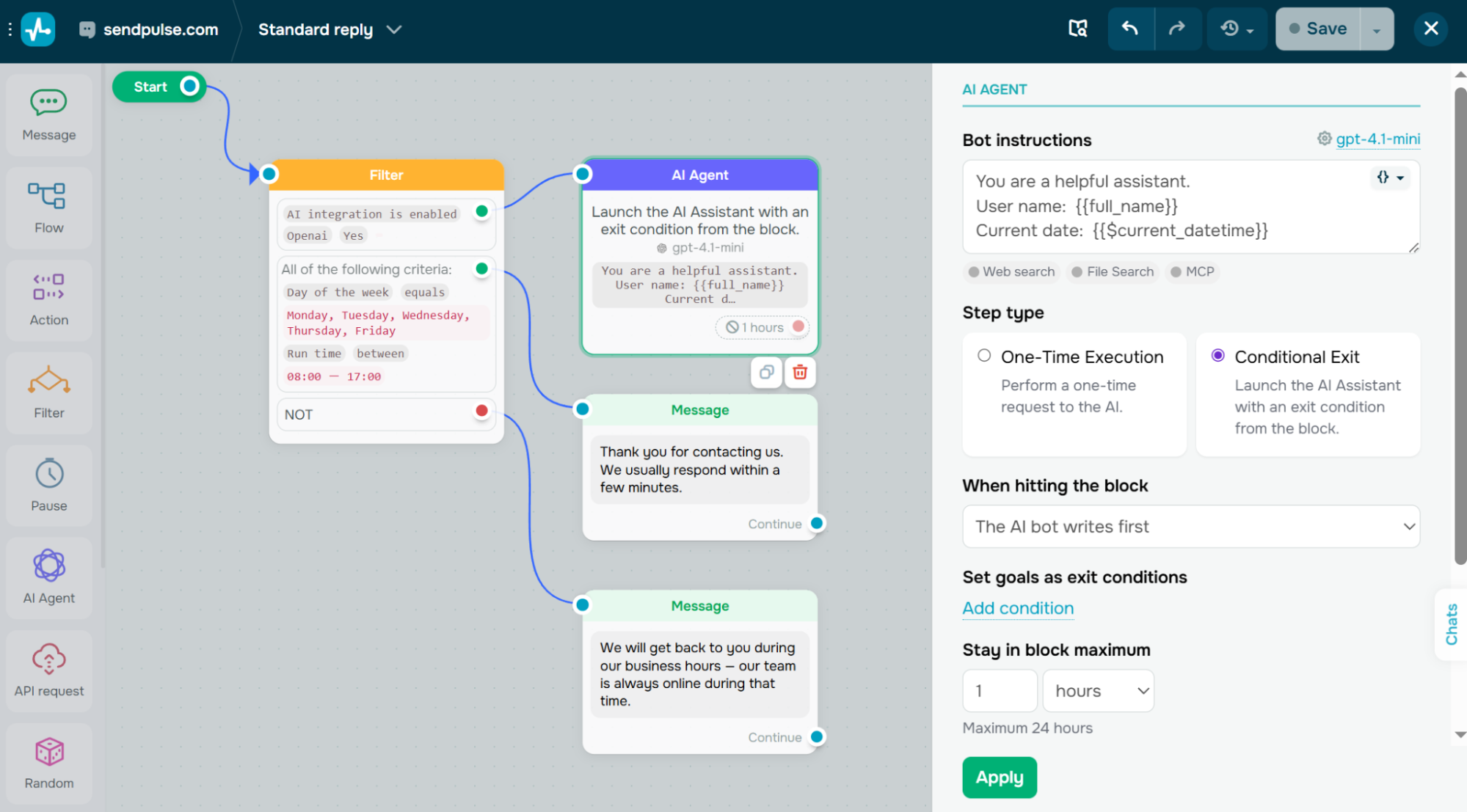 A live chat flow we built in SendPulse using the AI agent and Filter elements in under 15 minutes
Automation is a core part of how SendPulse works. An AI assistant handles routine interactions, understands user context and intent, and can trigger actions like creating CRM deals or sending follow-up emails. Supported chatbot channels include website, Facebook Messenger, Instagram, WhatsApp, TikTok, and Telegram. This way, SendPulse lets businesses provide 24/7 support while keeping human agents available for conversations that need a personal touch.
| Standout features |
AI capabilities |
- drag-and-drop flow builder;
- real-time website live chat;
- customizable live chat widget;
- adaptive display based on user actions and preferences;
- trigger-based automated messages;
- dynamic segmentation;
- accepting payments right in chat;
- multi-channel chatbot support;
- CRM action triggers.
|
- AI assistant for handling routine workflows;
- context awareness and sentiment detection;
- automatic data capture;
- AI-generated chatbot flows, responses, and recommendations;
- voice message transcription;
- image generation and image description features;
- LLM integrations and native MCP server.
|
Cons. This live chat software’s analytics are fairly basic, which makes it harder to deeply analyze chat performance, track user behavior, or optimize conversations over time.
Pricing. SendPulse offers a free plan that includes 3 chatbots or live chats, 500 contacts, up to 10,000 messages across all bots, 10 variables, and 10 triggers. The paid plan scales with the number of contacts, starting at $9.60/month for 500 contacts with unlimited chatbots and live chats.

Boost conversions with live chats
Add a live chat widget to your website to answer your visitors’ questions, help them place orders, and accept payments. Your first 500 active live chat users and 10,000 monthly messages are free.
Get started for free
Intercom
Best for: SaaS companies, tech startups, and online platforms looking to combine live chat, automation, and AI in one system.
Intercom is a customer support platform built around an AI-powered helpdesk with integrated live chat. Human agents and automation work from a single shared inbox, and before replying, agents can see which pages a visitor browsed, what plan they’re on, and their full conversation history. Routine inquiries are handled automatically, while more complex issues are escalated to human agents.
This agent-side context is one of Intercom’s most praised features. It makes support feel proactive rather than reactive — agents already know what brought the visitor to the conversation before typing a single reply.
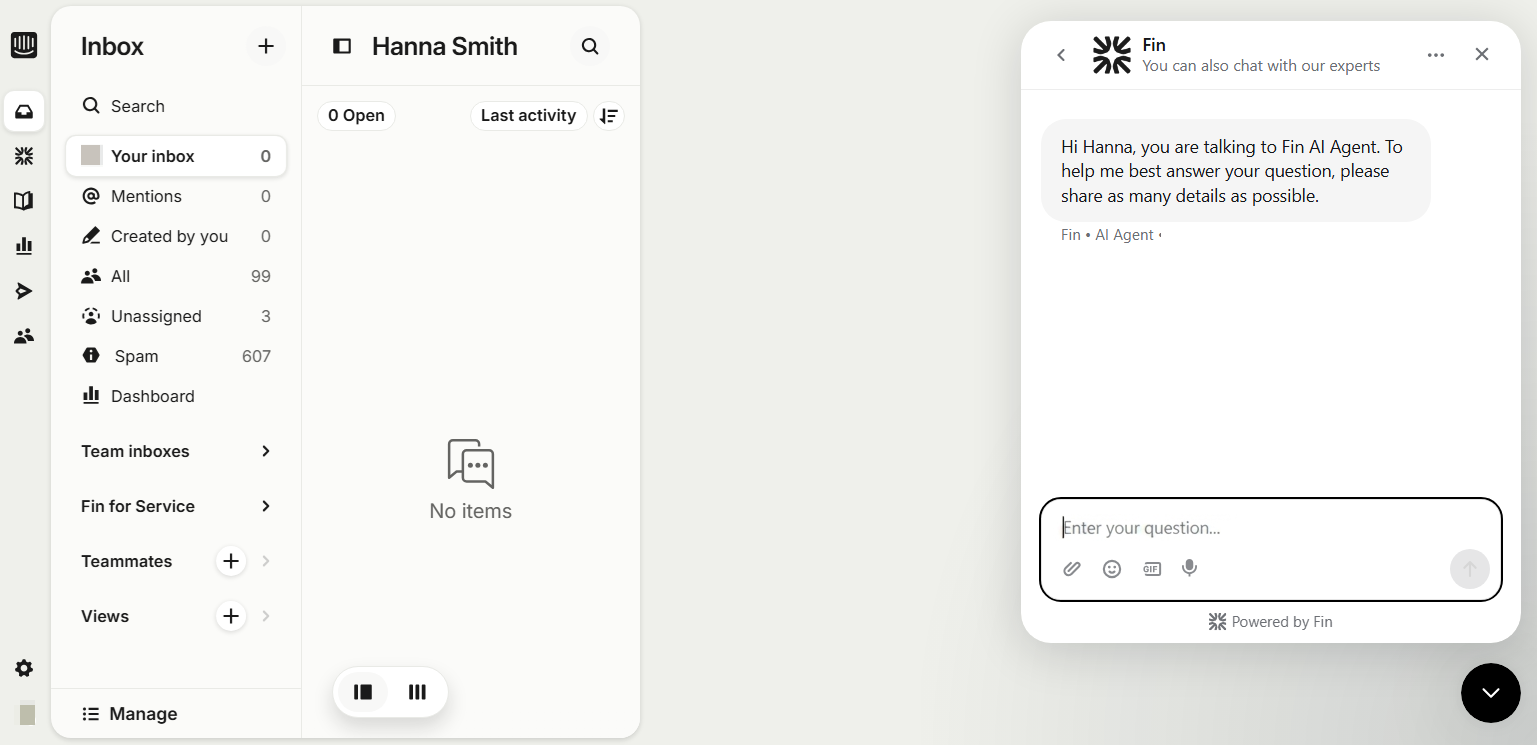 Starting a chat with Fin, an AI agent, in the Intercom dashboard
A key differentiator is Intercom’s AI layer, especially the Fin AI Agent and Copilot tools. Fin acts as an autonomous chatbot capable of resolving a large portion of customer queries across channels. Meanwhile, AI Copilot assists human agents in real time with suggestions, troubleshooting, translations, and answers.
| Standout features |
AI capabilities |
- conversation routing, assignment, and snoozing;
- live chat across multiple channels;
- advanced automation workflows;
- chatbot builder;
- ticketing system with forms, side conversations, and customer portals;
- SLA management;
- proactive messaging;
- reporting and analytics with conversation tracking and performance insights.
|
- Fin AI Agent for automated customer query resolution;
- AI Copilot for answers, troubleshooting, and guidance;
- AI Compose for drafting replies;
- AI Summarization for conversation summaries;
- AI Autofill for faster data entry;
- personalized AI responses based on customer data and history;
- real-time translation;
- AI insights, trends, and recommendations;
- multi-source generative answers.
|
Cons. Intercom’s live chat pricing combines core plan fees with add-ons, and Fin AI is charged per outcome. This means costs can grow quickly as your support volume increases. Proactive messaging, WhatsApp, and SMS are also add-on features with separate usage-based pricing.
Pricing. Intercom doesn’t offer a free plan, but new users get a 14-day free trial. The entry-level plan starts at $29/month per seat and includes unlimited live chat, Messenger, and a ticketing system. Fin AI Agent is available on all plans at $0.99 per resolved outcome.
Zendesk
Best for: Mid-size to enterprise businesses looking for an all-in-one customer support system.
Zendesk is a comprehensive customer service platform built around omnichannel support, automation, and AI features. It centralizes conversations from live chat, email, and social media into a single workspace. It gives agents full customer context alongside ticketing, workflows, and analytics.
The out-of-the-box functionality covers the basics quickly, but full configuration takes real investment — Capterra reviewers note that managing settings across both the admin panel and the support section can feel disorienting at first, especially for teams without a dedicated admin.
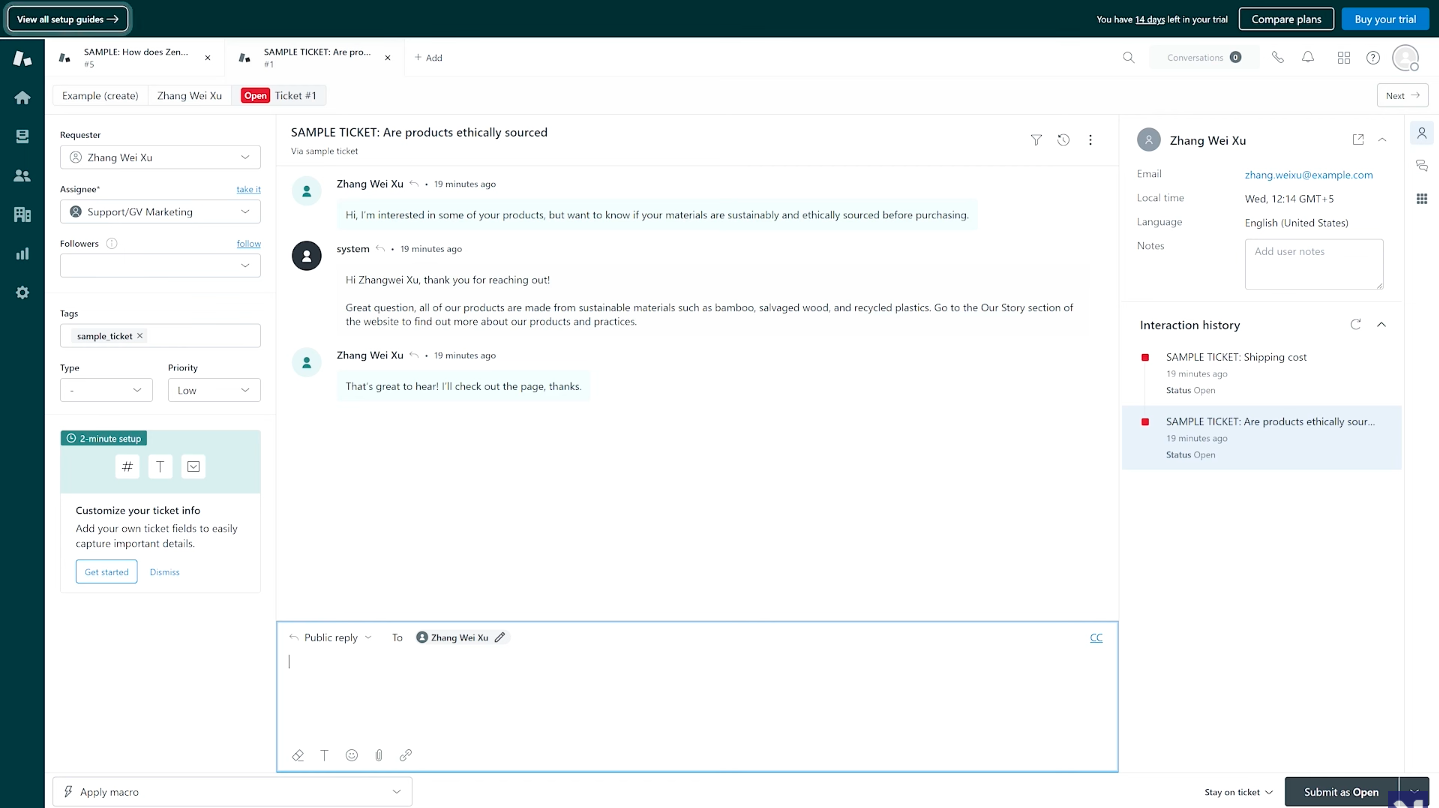 Zendesk’s agent workspace showing a support ticket with customer context and interaction history; source: YouTube
Zendesk’s AI agents can automatically resolve a large share of customer interactions. Its Resolution Learning Loop uses past interactions to improve future responses over time, and the platform combines customer support live chat, human agents, and knowledge bases to keep response quality high.
| Standout features |
AI capabilities |
- omnichannel support across live chat, email, social media, and voice;
- advanced live chat with concurrent chats and conversation history;
- customizable live chat widget;
- skill-based routing;
- automated conversation transfers;
- ticketing system with automatic ticket creation from chats and calls;
- voice support with IVR, call routing, recording, and callback requests;
- proactive messaging;
- built-in translation;
- pre-built analytics dashboards.
|
- AI agents for chat and email;
- generative AI replies;
- AI agent builder;
- automated end-to-end resolutions;
- AI agent persona and instruction control;
- escalation handling and intelligent data capture;
- AI-powered reporting and analytics;
- multilingual AI support;
- reasoning controls for AI responses;
- continuous learning system.
|
Cons. Key features like AI agents, advanced analytics, and SLA management are locked behind higher-tier plans. The AI copilot add-on costs an additional $50 per agent/month, and per-resolution AI fees can add $1–2 per automated conversation on top of that.
Pricing. Zendesk doesn’t offer a free plan, but new users get a 14-day free trial. The entry-level plan starts at $19/month per agent and covers basic features. Live chat functionality requires an upgrade to the $55/month per agent plan.
Freshchat
Best for: SMBs looking for a customer support live chat tool to manage real-time conversations across multiple messaging channels.
Freshchat is a customer service tool designed to manage communication between businesses and their customers. It supports multiple channels such as AI live chat, email, voice, messaging apps, and self-service options. The platform also includes AI-driven bots that can automate responses and provide support across websites, apps, and messaging channels.
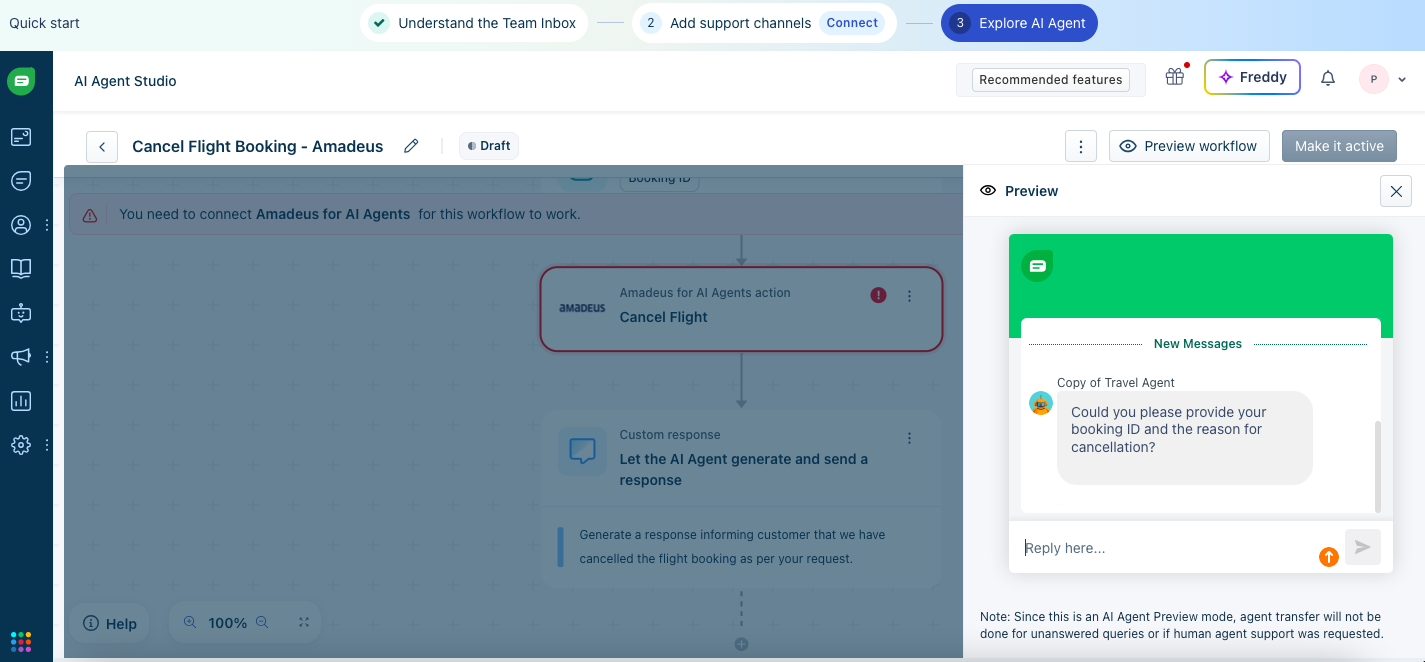 Building an AI agent workflow in Freshchat’s AI Agent Studio — the preview panel on the right lets you test responses before going live
In addition, the system offers a unified workspace for customer support agents, where they can access relevant information such as past interactions, purchases, and ongoing issues to provide more personalized assistance. One practical touch: Freshchat offers multiple automatic methods for distributing incoming chats — round robin, load-balanced, and skill-based — to manage queues and agent workloads efficiently.
| Standout features |
AI capabilities |
- chat widget for websites and mobile apps;
- integration with Facebook and Instagram;
- messaging via SMS, WhatsApp, Line, and Google Business Messages;
- multilingual conversation support;
- voice support via Freshcaller;
- omnichannel conversation management;
- automatic assignment like round robin, load-balanced, IntelliAssign;
- skill-based routing;
- analytics and reporting.
|
- Freddy AI Agent for automated customer support;
- AI Copilot for real-time agent assistance;
- automated response handling;
- AI-powered support across multiple channels;
- conversation summarization;
- sentiment detection;
- tone adjustment;
- multilingual AI support.
|
Cons. Freddy AI Agent handles simple FAQ-style queries well but struggles with complex or multi-step issues. Knowledge ingestion is limited — file size and count caps apply, and only public URLs are supported. Besides, the AI Copilot costs an extra $29/agent/month, and session-based AI billing can also make costs unpredictable at scale.
Pricing. Freshchat offers a free plan for up to 10 agents covering website live chat and email, though AI features are not included. The entry-level paid plan starts at $19/month per agent and adds channels like WhatsApp, Instagram, and Facebook, along with access to Freddy AI Agent.
LiveChat
Best for: Companies that rely on websites and in-app chat as a primary support or engagement channel.
LiveChat is a customer support platform that lets you add a chat widget to as many websites as you need — all managed from a single dashboard with no extra per-site fees. Teams can use automated greetings based on user behavior, route chats to the right agents, and handle multiple conversations simultaneously. One standout agent-side feature is LiveChat’s “message sneak-peek” that shows what visitors are typing in real time before they hit send, which helps agents prepare responses faster during busy shifts.
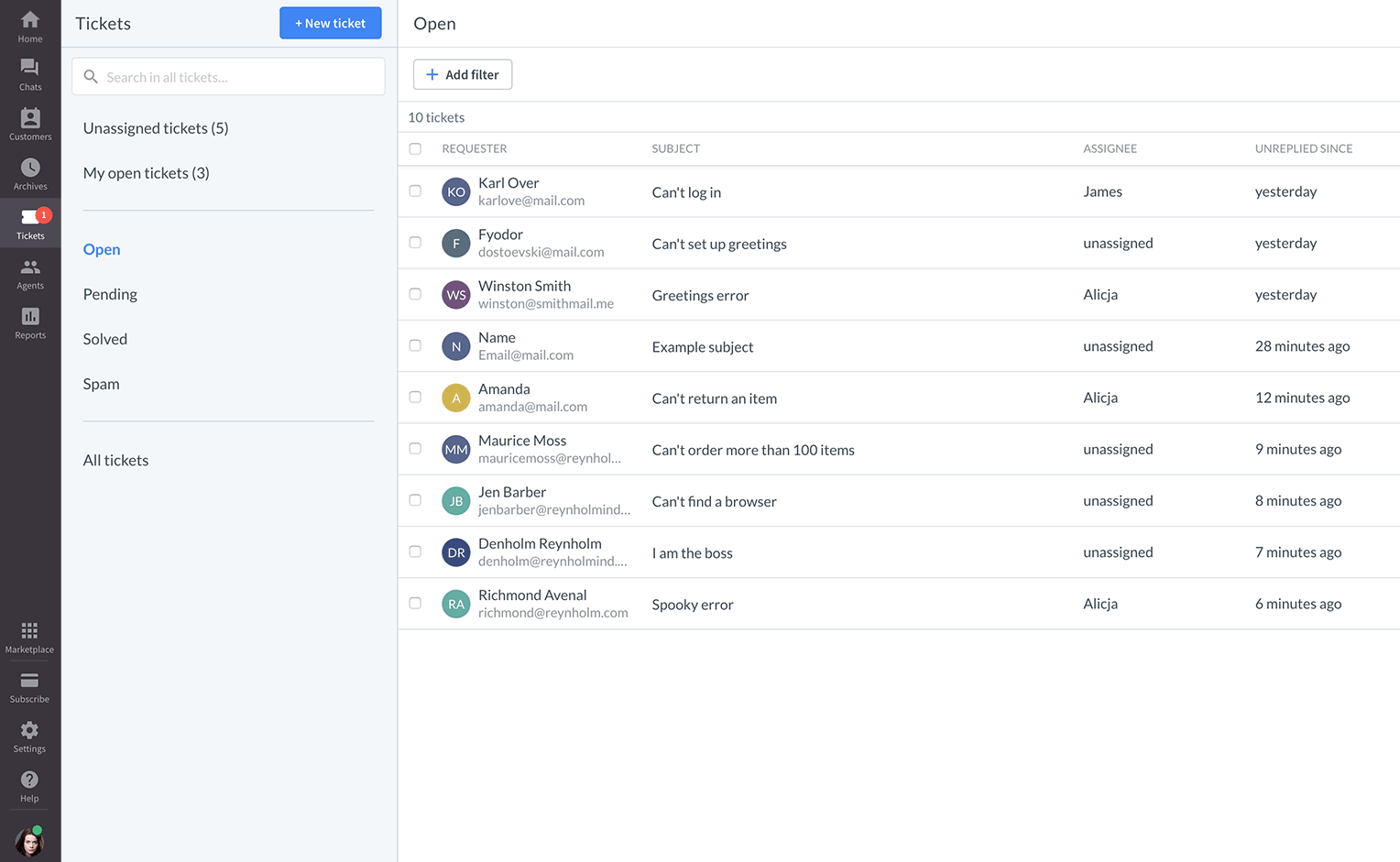 LiveChat’s ticket dashboard showing open tickets, assignees, and response times; source: LiveChat
Beyond live chat, the platform includes AI and automation capabilities. Chatbots handle common questions, qualify leads, and transfer complex cases to human agents when needed. LiveChat also supports asynchronous communication, so conversations can continue even when agents are offline.
| Standout features |
AI capabilities |
- website live chat widget;
- multiple channels, including Facebook Messenger, Instagram, X, and Apple Messages for Business;
- SMS, email, and WhatsApp via marketplace integrations;
- pre-chat and post-chat surveys;
- manual and smart routing;
- public, private, and AI-suggested canned responses;
- custom customer segments and chat tagging;
- asynchronous communication;
- proactive chats;
- agent activity reports covering chat duration, response times, campaign conversions, and tag usage.
|
- LiveChat AI for intelligent assistance;
- reply suggestions and text enhancement;
- AI chatbots via ChatBot integration;
- AI-assisted responses;
- AI conversation summaries for multi-chat management;
- predictive insights.
|
Cons. Full chatbot functionality depends on the ChatBot integration rather than being built in natively. Some AI features are also limited or only available on higher-tier plans. The entry-level plan is limited to 1 agent seat, which makes it impractical for teams without upgrading.
Pricing. LiveChat offers a 14-day free trial followed by 4 paid plans. The entry-level plan costs $19/month and includes 1 user seat, support for websites, apps, and Facebook Messenger, and tracking for up to 100 website visitors. Additional channels and advanced AI features beyond AI Copilot require upgrading to a higher-tier plan.
Tidio
Best for: eCommerce brands that need live chat, order support, and product recommendations.
Tidio is a robust platform that offers multiple tools for marketing, sales, and customer support. It combines live chat with automation to help businesses manage customer communication in real time. This live chat software pulls messages from website chat, Instagram, WhatsApp, and Messenger into a single inbox and is quick to set up without any coding.
Agents can access saved replies, live typing preview, and customer context to improve response quality. The drag-and-drop flow builder is fast to pick up — building a functional flow from one of Tidio’s pre-built templates takes just a few minutes.
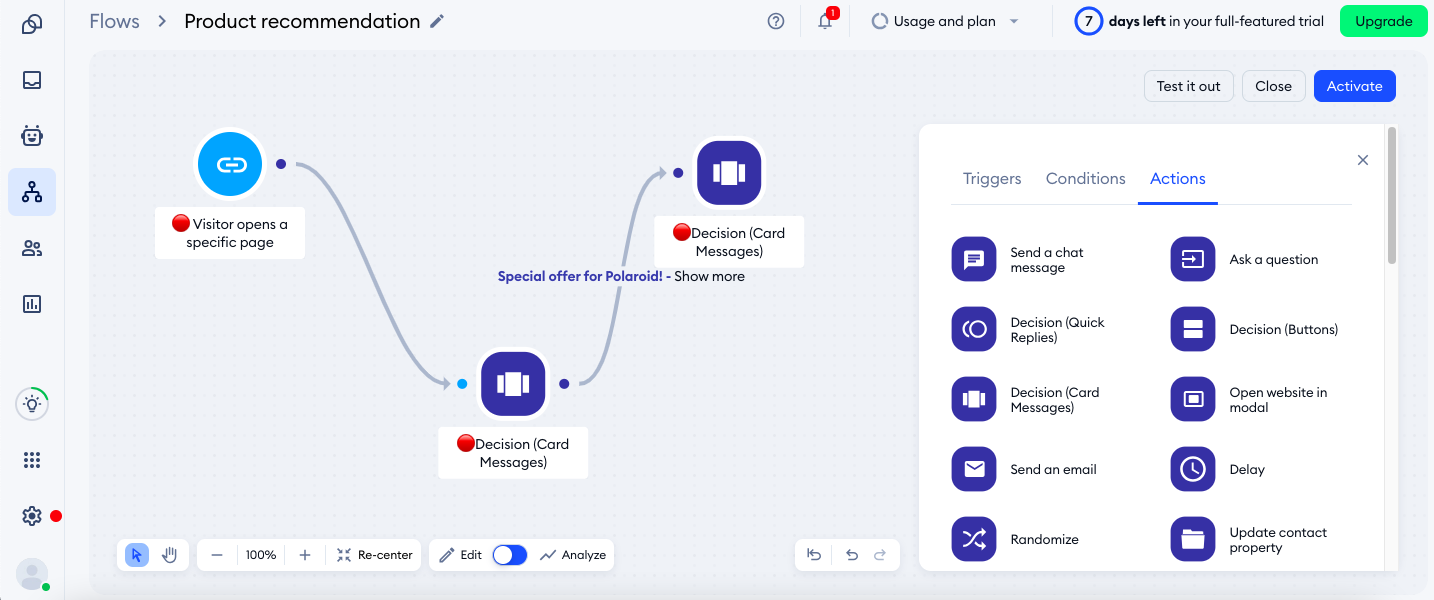 Building a product recommendation flow in Tidio — the Actions panel on the right shows available elements
Tidio’s Lyro AI uses your business’s knowledge base to answer questions, resolve routine inquiries, and assist customers with recurring support needs. It includes guardrails to prevent unsupported answers and supports flexible handoff rules so human agents can step in at any point. One thing to be aware of: Lyro AI and custom flows can’t run simultaneously in the same conversation, so you’ll need to choose one approach or the other.
| Standout features |
AI capabilities |
- live chat with website visitors;
- unified inbox for website chat, Messenger, Instagram, WhatsApp, and email;
- live typing preview and visitor activity tracking;
- pre-defined replies;
- built-in video calls in chats;
- multi-language support;
- visual chatbot builder;
- pre-built templates for sales and FAQ automation;
- automated conversation handling and routing.
|
- Lyro AI Agent trained on business content;
- automated handling of common customer questions;
- AI product recommendations;
- AI reply assistant;
- custom tone, guidance, and brand alignment controls;
- safe responses with guardrails;
- human handoff and escalation rules;
- performance analytics.
|
Cons. Lyro AI relies heavily on your existing content, so it performs best when you have a well-structured help center or FAQ. It also operates within Tidio’s ecosystem, with limited ability to connect external AI models.
Pricing. Tidio offers a 7-day free trial on all paid plans, which rolls back to a free plan afterward. The free plan includes live chat for up to 10 agents, 50 monthly conversations, basic chatbot flows, and limited Lyro AI features. The entry-level paid plan costs around $28/month and includes 100 billable conversations, 10 seats, live chat, and 50 Lyro AI Agent conversations.
Crisp
Best for: Startups, SMBs, and digital-first companies that interact with users via websites or apps.
Crisp combines live chat with chatbot functionality into a single shared inbox. Teams can respond in real time through a live chat widget embedded on websites or apps, with full access to conversation history and customer data. This makes it suitable for both immediate support and ongoing customer communication.
The widget loads fast, and the shared inbox is intuitive from the start, though G2 reviewers flag that some configuration options are split between the main Settings panel and a separate Plugins section in ways that aren’t immediately obvious.
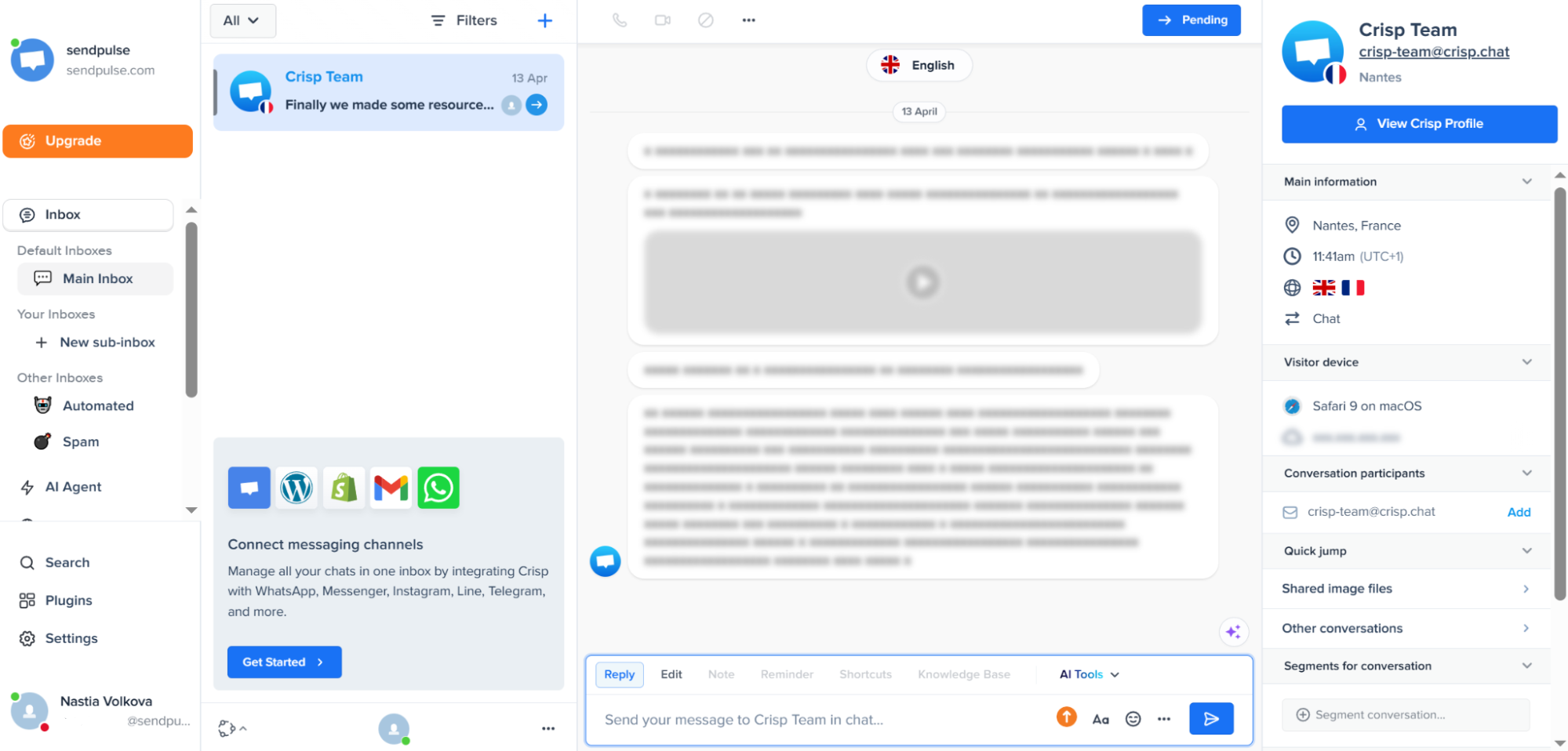 Crisp’s shared inbox with visitor details, device info, and AI Tools in the reply bar — tested on a free plan
On the automation side, Crisp includes chatbot and AI features that can be configured without coding. You can train AI agents on your own content, including websites, PDFs, and help articles, and then use them within workflows to control how conversations are handled. They can answer common questions, suggest replies, summarize conversations, and automate parts of the support process.
| Standout features |
AI capabilities |
- shared team inbox;
- real-time messaging in live chat;
- live typing preview and typing status indicator;
- conversation management with transcripts, full history, and internal notes;
- conversation routing;
- visitor controls like banning, and geolocation view;
- proactive chat messages;
- video and audio chat;
- multi-channel messaging;
- no-code workflow builder;
- conditional logic and custom input fields;
- CRM-based triggers and segmentation.
|
- AI agent;
- AI knowledge training;
- AI Copilot for internal agent assistance;
- AI-generated answers;
- AI writing assistant;
- conversation summaries;
- AI inbox spam filtering;
- multilingual AI support;
- voice-to-text;
- AI-powered site search;
- AI-based triggers in workflows;
- AI agent blocks within chatbot flows.
|
Cons. The built-in CRM is relatively basic and may not be sufficient as a replacement for dedicated CRM tools. AI credits are fixed per plan (e.g., ~90 automated conversations on the entry-level paid plan), which can be restrictive for higher-traffic sites.
Pricing. Crisp offers a free plan with 2 seats, a shared inbox, 100 customer profiles, and a live chat widget. The entry-level paid plan costs around $52/month and includes 4 seats, 5,000 customer profiles, AI credits for around 90 automated conversations, and multi-channel support.
Help Scout
Best for: Smaller support teams that prioritize human agent assistance over heavy automation.
Help Scout brings together conversations from chat, email, and other channels into what reviewers consistently describe as one of the cleanest inboxes in the category. Onboarding is fast — most teams are up and running within a day — and the interface is simple enough that new agents rarely need formal training.
Teams can manage incoming messages collaboratively and assign conversations manually or automatically. This live chat software for small businesses also includes tools like saved replies for common questions and workflow rules that automate tasks such as tagging or routing.
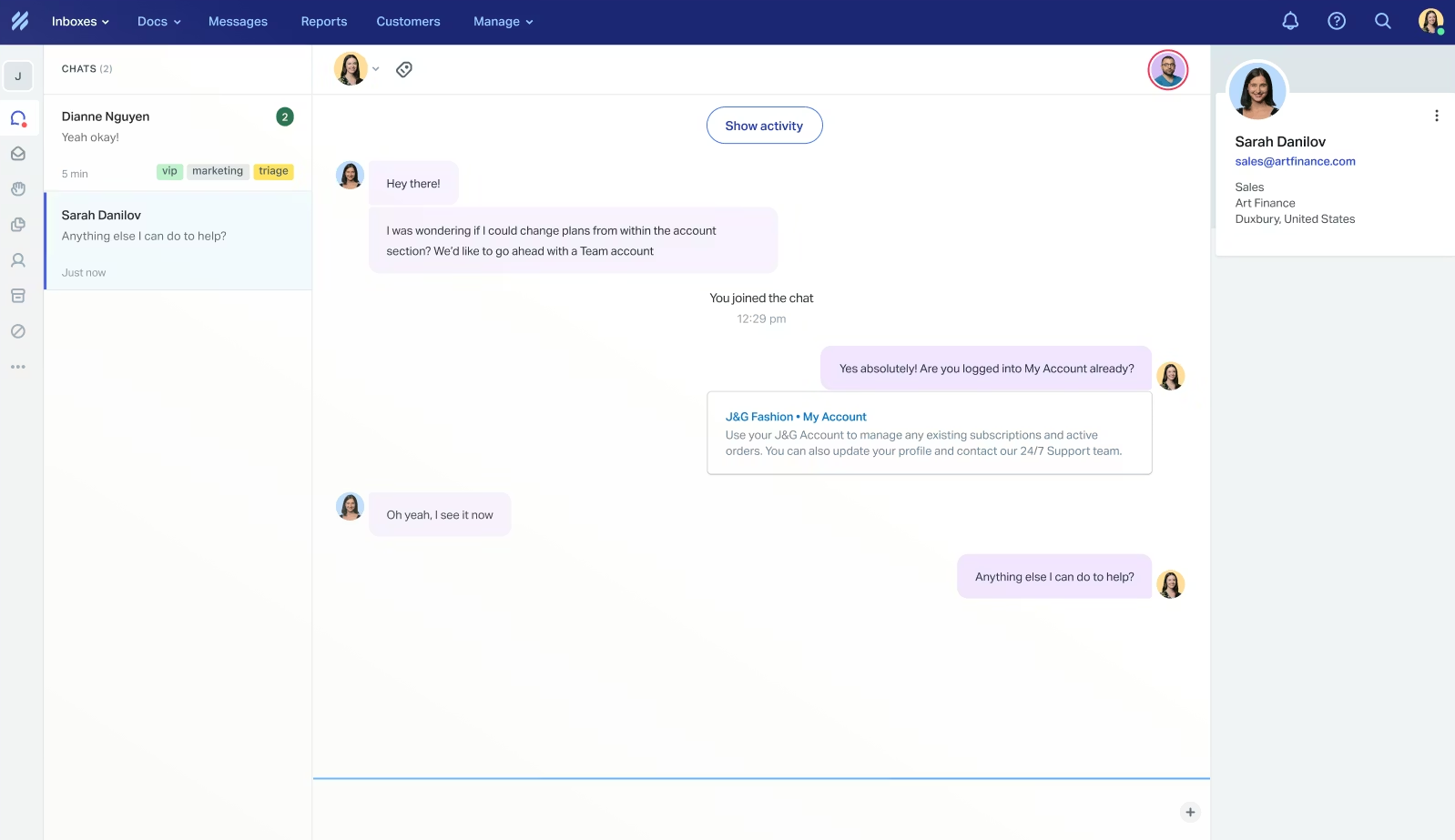 A live chat conversation in Help Scout’s inbox with customer profile and tags visible on the side; source: Help Scout
That said, Help Scout is built to assist human agents rather than replace them. AI features include automatic summaries of long conversations and AI-generated draft replies to help agents respond faster with less repetitive writing. Rather than complex AI workflows or fully autonomous bots, the platform leans toward lightweight, agent-friendly automation.
| Standout features |
AI capabilities |
- live chat and multi-channel messaging;
- conversation assignment and routing;
- customer profiles with history, properties, and company-level grouping;
- saved replies for common questions;
- tags and custom views;
- workflow automation;
- contact forms and proactive communication tools;
- conversation management tools like snooze and send later;
- basic to advanced chatbot flows;
- auto-replies and office hours logic;
- trigger-based actions;
- integration-based automation via APIs, webhooks, and external tools.
|
- AI inbox assistant;
- AI reply suggestions;
- AI summaries of long threads;
- AI Answers chatbot for customers;
- AI trained on website or external content;
- escalation to human agents.
|
Cons. Help Scout is primarily email-centered, so it may feel limited if real-time chat or broader omnichannel support is a priority. AI Answers chatbot is billed separately at $0.75 per resolution, which adds variable costs on top of the base plan.
Pricing. Help Scout offers a free plan with up to 5 user seats, 1 inbox, 100 unique contacts, and email support. The entry-level paid plan costs $25/month per user seat and includes 2 inboxes, unlimited contacts, and additional channels, including live chat, Messenger, and Instagram.
HubSpot Live Chat
Best for: Teams that need real-time website messaging with CRM integration for lead qualification, conversion tracking, and support workflows.
HubSpot Live Chat is a website messaging tool that lets businesses communicate with visitors in real time and automatically routes conversations to the right team. The platform’s live chat widget is customizable to match your brand and can display targeted messages based on the page a visitor is on or the audience segment they belong to.
All conversations are stored in HubSpot’s built-in CRM system, giving teams full context on every contact. This is the platform’s main advantage over standalone live chat tools — every chat auto-logs to the contact record, so sales reps see the full interaction history without switching tabs.
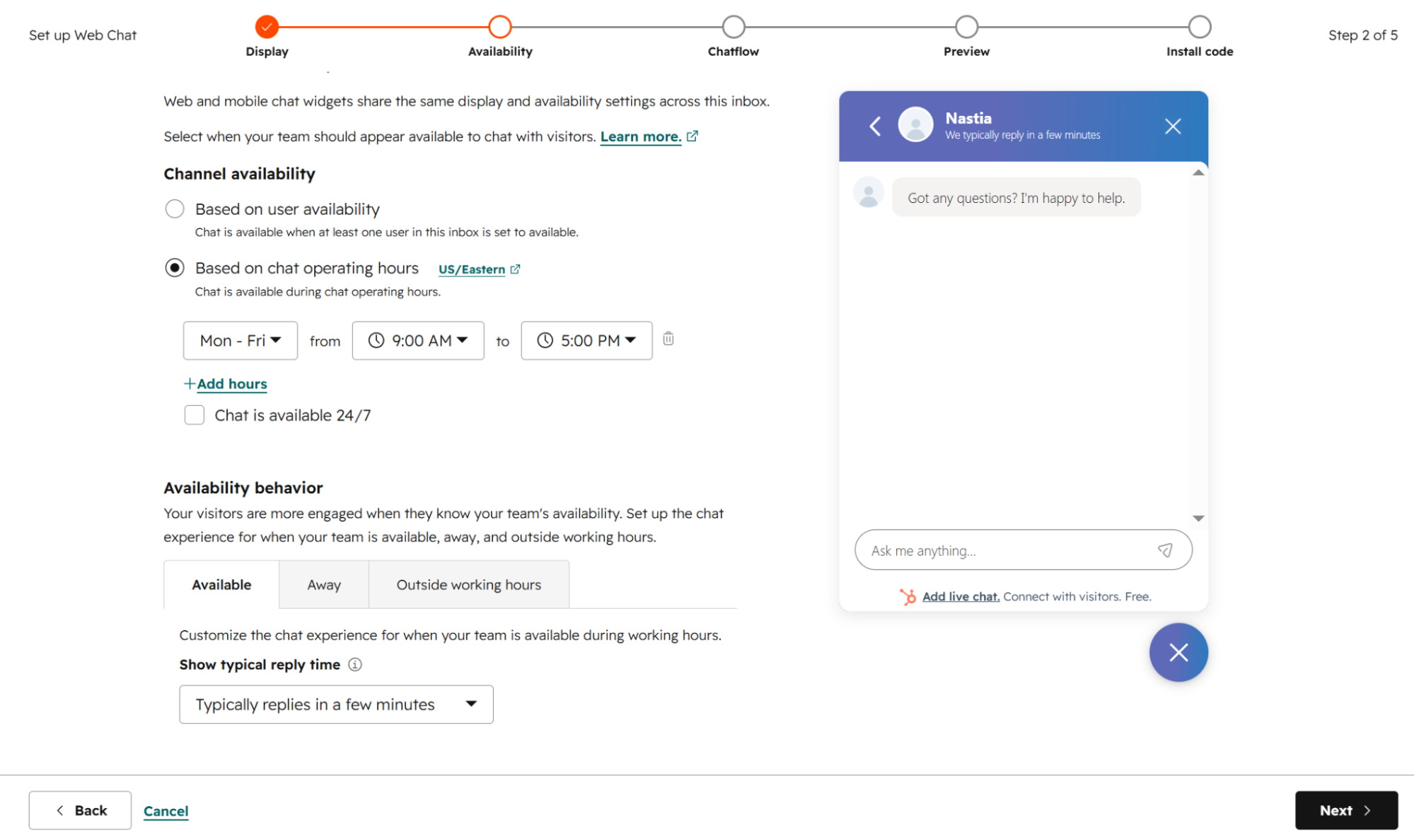 Configuring chat availability and operating hours in HubSpot’s five-step setup wizard
This live chat software also includes basic chatbot functionality to automate repetitive tasks, such as answering common questions, qualifying leads, and booking meetings. HubSpot’s Breeze AI Agent takes this further, handling multiple channels and escalating to human agents when needed.
| Standout features |
AI capabilities |
- customizable live chat widget;
- conversational bots for automated responses;
- conversation routing;
- Facebook Messenger and WhatsApp integration;
- logged-in visitor identification;
- targeted welcome messages based on page or audience segment;
- chat automation;
- native CRM integration with auto-logged conversations;
- multi-channel chat availability.
|
- Breeze AI Agent;
- automatic lead qualification;
- instant answers to FAQs;
- context-aware responses using CRM data;
- multi-channel AI support;
- smart escalation to human agents;
- on-brand responses with source citations.
|
Cons. The free plan includes HubSpot branding on the chat widget, and the Breeze AI Agent is only available on higher tiers starting from $800/month.
Pricing. HubSpot offers a free plan with basic live chat functionality, though it excludes AI and WhatsApp integrations. The entry-level paid plan costs $9/month per seat and includes 1,000 marketing contacts and limited AI functionality.
tawk.to
Best for: Small businesses and startups with limited budgets that still want a fully-featured AI live chat without monthly fees.
tawk.to is a free live chat platform for websites and mobile apps, and unlike most “free plans” in this category, there are no conversation caps or agent limits. Teams can monitor visitors in real time, track page activity, and respond via desktop or mobile. The trade-off for a fully free product: the interface is functional but feels less polished than its paid competitors, like Intercom.
tawk.to supports canned responses, file transfers, visitor tagging, screen sharing, and detailed reporting. Its live chat widget is fully customizable and available in 45+ languages.
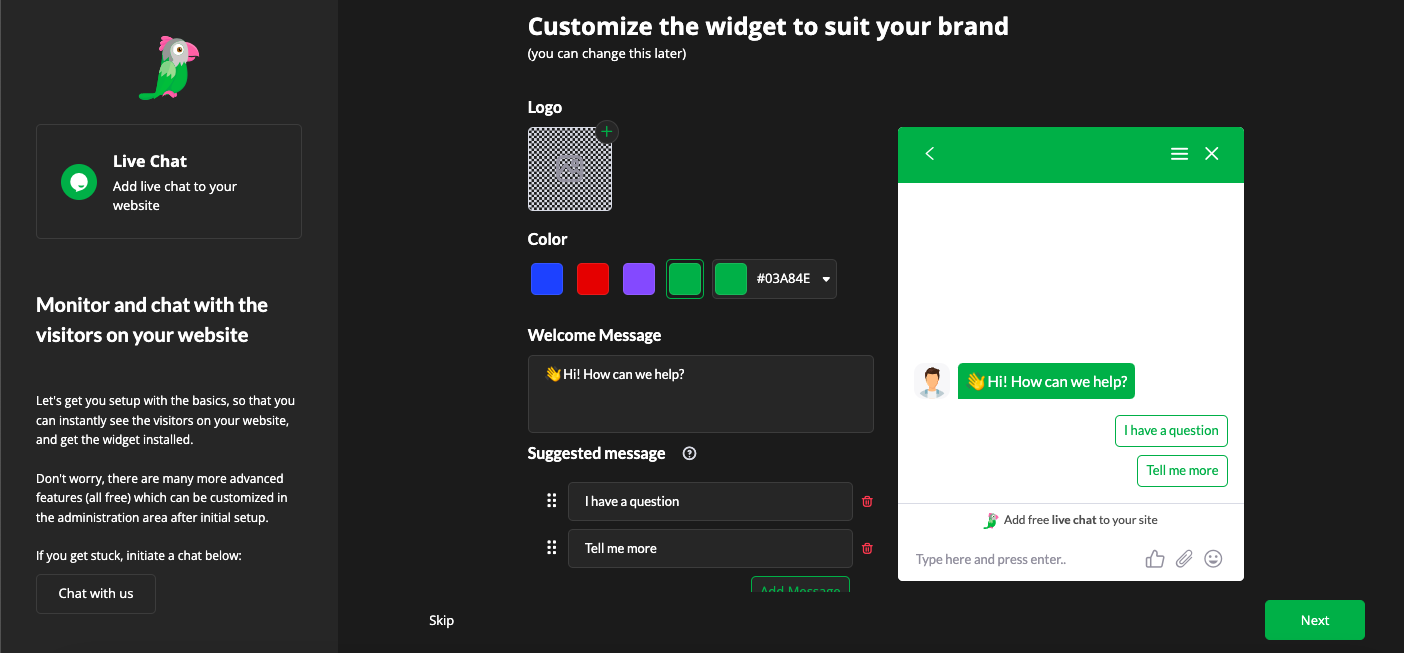 Customizing tawk.to’s chat widget during initial setup — logo, colors, welcome message, and suggested replies all configured in one screen
The platform also includes automation tools such as automated translations, in-chat payments, and basic workflow triggers to help teams respond faster and more consistently. Features like message sneak-peek, unlimited chat history, and engagement alerts keep agents informed and up to date on important interactions.
| Standout features |
AI capabilities |
- proactive chat triggers;
- unlimited agents with group and agent-to-agent messaging;
- video and voice support;
- customizable live chat widgets;
- in-chat payments;
- visitor tracking through geo IP, page activity, and engagement metrics;
- real-time monitoring;
- automated chat triggers;
- canned shortcuts for quick replies;
- automated translation;
- built-in ticketing;
- engagement tracking and alerts;
- detailed reporting, sentiment tracking, and unlimited chat history.
|
- Apollo AI Bot;
- AI-generated response suggestions;
- AI commands and writing tools;
- tone adjustment;
- content generation for emails, tutorials, or chat responses;
- AI summaries and translations.
|
Cons. Automation and AI features are more limited compared to most paid alternatives.
Pricing. tawk.to’s core live chat features are completely free. Optional add-ons like branding removal and AI automation are available for $29/month.
Olark
Best for: Companies looking for a simple, reliable live chat tool without a steep learning curve.
Olark provides a straightforward live chat system for real-time communication between website visitors and support or sales teams. Its key features include customizable live chat widgets, automated messages based on user behavior, chat routing, and pre-chat forms for collecting visitor information. It also offers reporting tools with real-time metrics and searchable chat transcripts.
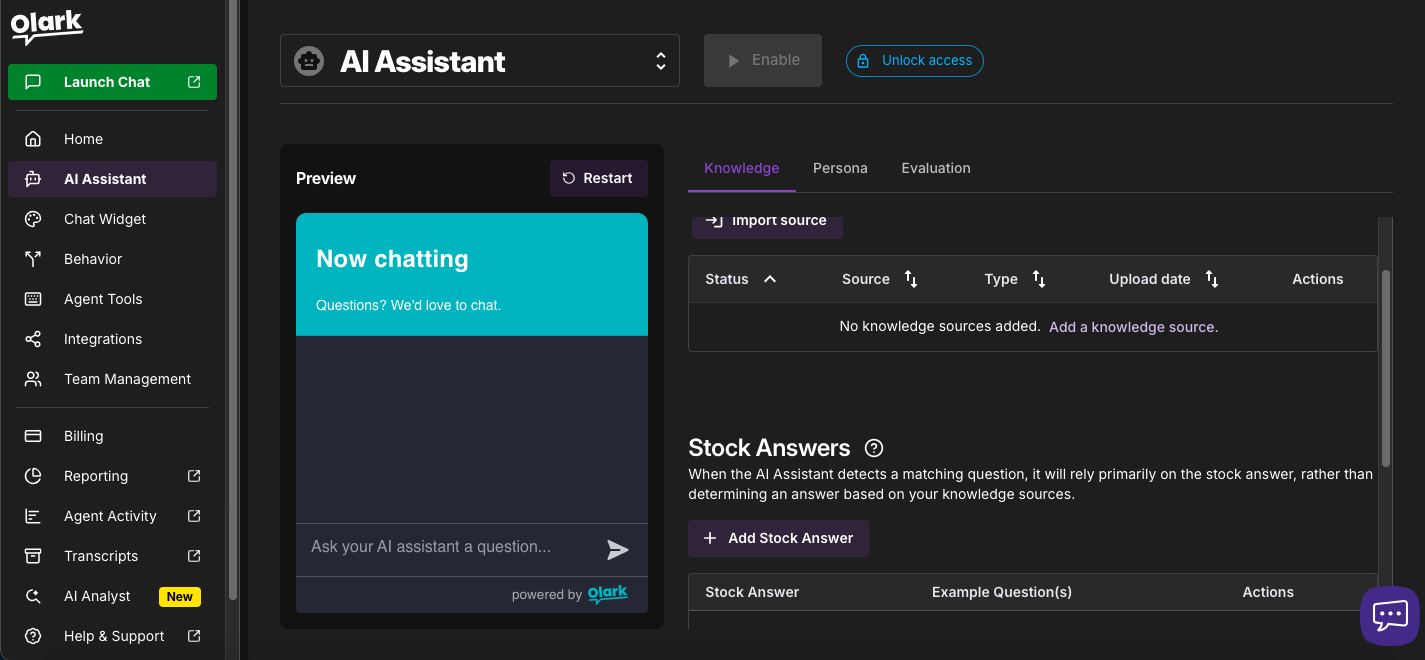 Setting up Olark’s AI Assistant — knowledge sources and stock answers are configured on the right, with a live preview on the left
AI functionality focuses on basic automation through chatbots that handle routine tasks like answering common questions and gathering initial customer details. These bots can be configured to fit specific workflows and pass more complex queries to human agents when needed. As one Capterra reviewer notes, the AI integration is still maturing — it’s available for 24/7 support but “still in the works and could be better” compared to more established AI-first platforms.
| Standout features |
AI capabilities |
- customizable live chat widget;
- real-time live chat with targeted messaging based on visitor behavior;
- agent groups;
- advanced reporting with insights on chats, agents, and performance;
- searchable chat transcripts;
- basic integrations with external tools;
- pre-chat data collection and targeted engagement;
- built-in accessibility features.
|
- AI-powered chatbots;
- automated handling of common support workflows;
- custom bot configuration based on business needs;
- intelligent chat routing for automatic conversation assignment;
- escalation to human agents.
|
Cons. Automation is mostly rule-based unless you upgrade to a higher-tier plan. The free plan is very limited, making it more of a trial than a usable tier.
Pricing. Olark offers a 14-day free trial that rolls back to a free plan if you don’t upgrade. The free plan includes limited features, 1 agent, and 20 chats per month. The entry-level paid plan costs $29/month for 1 seat and includes customizable chatbots and targeted chats.
LiveAgent
Best for: Teams that need omnichannel support in one place and handle moderate to high volumes of tickets and chats.
LiveAgent provides a feature-rich live chat solution for customer support and sales teams. The depth is real, but so is the learning curve: the sheer number of settings and configuration options means onboarding takes longer than simpler tools like Olark or tawk.to.
Its live chat widget includes proactive chat invitations, smart routing, visitor tracking, and real-time typing previews. This live chat software also offers unlimited chat history and multilingual support in 40+ languages.
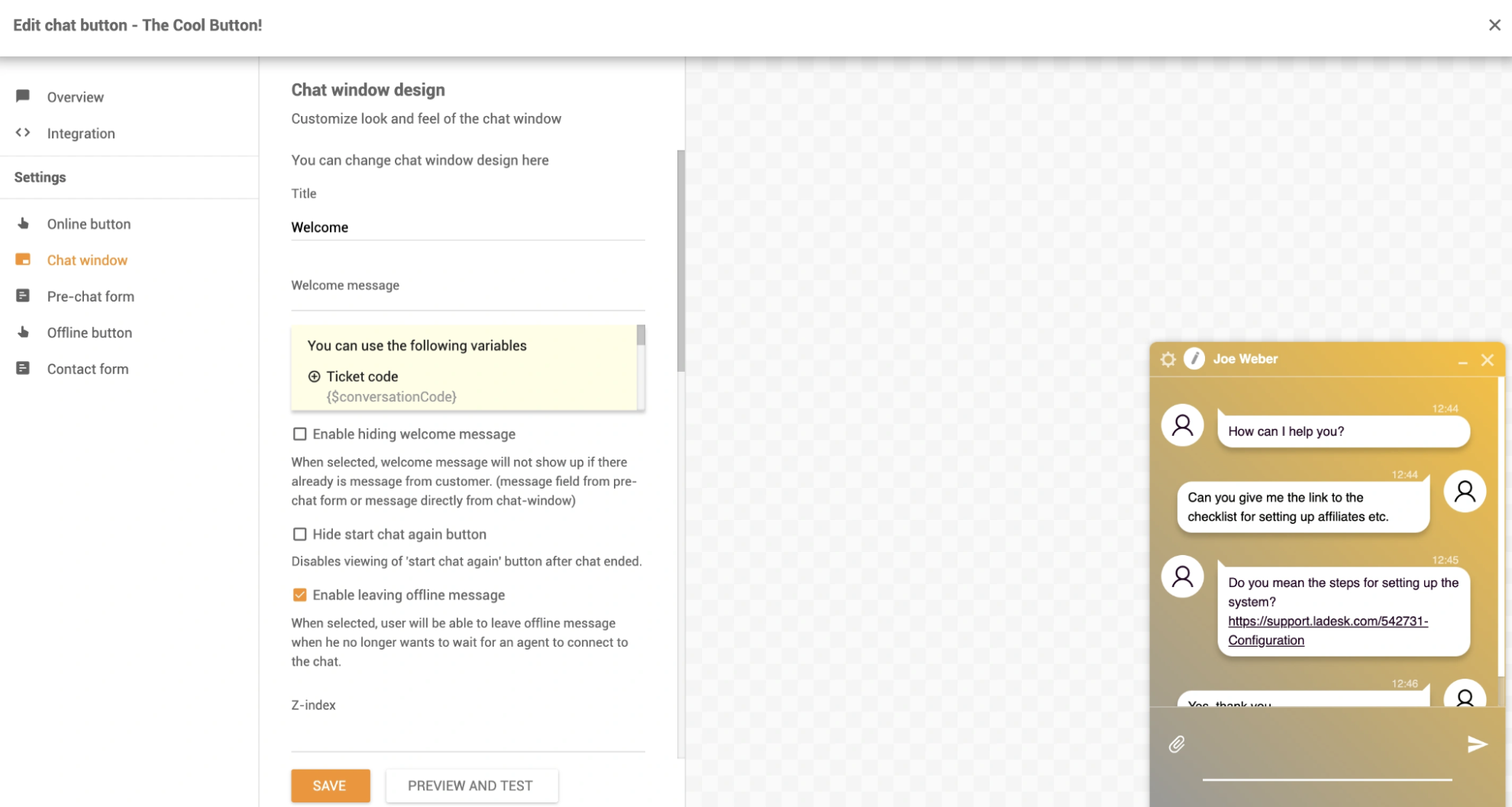 Customizing LiveAgent’s chat window design and welcome message settings, with a live conversation preview on the right; source: LiveAgent
On the AI side, LiveAgent includes AI agents that can handle customer queries around the clock, including more complex issues beyond standard FAQs. These chatbots understand context, access external tools via FlowHunt integrations, and can resolve requests end-to-end. When needed, they hand conversations off to human agents. Additional AI features include writing assistance to help agents respond faster and more accurately.
| Standout features |
AI capabilities |
- customizable live chat widgets;
- proactive chat invitations based on visitor behavior;
- omnichannel communication;
- built-in ticketing system;
- smart chat and ticket routing;
- real-time visitor monitoring and typing preview;
- analytics and reporting;
- automation rules and SLA management for workflows and prioritization.
|
- AI chatbots for 24/7 customer query handling;
- AI Answer Assistant for generating and refining agent replies;
- AI writing tools;
- context-aware replies based on ticket history and customer data;
- automation of repetitive tasks;
- seamless human handover;
- multilingual AI support.
|
Cons. The large number of features and settings means the platform can have a steep learning curve. Many messaging channels (WhatsApp, Facebook, Instagram) come with additional per-channel fees on lower-tier plans.
Pricing. LiveAgent offers a 30-day free trial. The entry-level paid plan is available at $15/month per agent and includes live chat, automations, and AI features.
Wrapping up
Live chat software does more than handle support requests. It builds trust, reduces unresolved issues, and helps turn website visitors into customers. With real-time support in place, you can engage prospects instantly, answer questions at the right moment, and guide people toward a decision.
If you’re looking for a reliable, cost-effective option, SendPulse is a solid choice. It offers free AI live chat software with multi-channel messaging, automated chat triggers, chatbots for FAQs and lead qualification, visitor tracking, and integration with email and SMS campaigns. Everything runs from a single platform, so managing customer communications across channels doesn’t require juggling multiple tools.
Create a free account today and see how it fits your workflow!