Thinkific built its reputation as one of the easiest ways to launch an online course, and for a lot of creators, it still rings true. However, “easiest to launch” doesn’t always mean “best to grow with.” Talk to enough long-time Thinkific users, and you’ll hear similar stories: piling up costs, elusive support, and integrations that should have been native features.
A genuinely different set of platforms has matured over the last couple of years, each solving for the gaps Thinkific leaves open in different ways, depending on whether you’re an independent creator, an educator, a B2B team, or someone running internal training.
In this guide, we’ll walk through exactly which Thinkific alternatives are worth your time in 2026, who each one is actually built for, and what to know before you switch.
Disclaimer: This guide is published by SendPulse. Although we cover our own product alongside competitors, we aim to present each tool fairly.
TL;DR Best Thinkific alternatives in 2026 at a glance
Please note that all features, pricing, and positioning below are accurate as of August 13, 2026.
Short on time? Here’s a quick overview of nine standout Thinkific competitors worth knowing about.
| Platform |
Best for |
Free plan |
Starting price (2026) |
Limits on cheapest plan |
Transaction fees |
| SendPulse |
Communication with students across platforms |
✅
1 course and 200 students |
$36/mo |
Unlimited courses and 1,000 students |
0% |
| Teachable |
Fast course sales with in-lesson upsells |
❌
7-day trial |
$39/mo |
100 active students, 5 products |
7.5% on the Starter plan, 0% fees on higher tiers |
| Kajabi |
All-in-one marketing + course funnels |
❌
14-day trial |
$179/mo |
2,500 contacts and 5 products |
Vary from 0.5% to 2.9% |
| Podia |
Running a whole business in one dashboard |
❌
30-day trial |
$49/mo |
Unlimited students, 100 email subscribers |
5% on Mover |
| LearnWorlds |
B2B, compliance & structured training |
❌
30-day trial |
$29/mo |
1,000 active learners |
0% (enrollment fee on Starter) |
| Mighty Networks |
Community-first learning & belonging |
❌
14-day trial |
$95/mo |
Unlimited members; feature limits by tier |
2% on some tiers |
| Skool |
Lightweight community and course hybrid |
❌
14-day trial |
$9/mo |
Unlimited members and courses |
10% on Hobby and 2.9% on Pro |
| Systeme.io |
Funnels + email + courses on a budget |
✅
1 course and 500 students |
$17/mo |
5 courses and unlimited students |
0% on paid plans |
| LearnDash |
Self-hosted WordPress LMS with deep quizzes |
❌
48-hour demo |
$259/year |
Unlimited courses and students (self-hosted) |
0% |
Now, let’s discuss why you may want to browse for alternative options in the first place.
Why look for a Thinkific alternative
To understand why some users choose to leave one of the most popular plug-and-play course builders, we analyzed hundreds of reviews and comments across G2, Capterra, Reddit, and Trustpilot. A few aspects come up often enough that they’re worth taking seriously before you commit, or stay committed.
Thinkific pricing in 2026
Thinkific is a lot of things, but it definitely isn’t the most go-to budget-friendly option it appears to be at first glance. Let’s break down its pricing structure and see why some creators eventually decide to pull back despite all the pros.
|
Basic |
Start |
Grow |
Plus |
| Monthly price |
$54/mo |
$109/mo |
$219/mo |
Custom |
| Annual price |
$40/mo |
$82/mo |
$164/mo |
Custom |
| Free use |
30-day free trial |
Personalized demo |
| Students |
10,000 |
Custom |
| Published courses |
Unlimited |
| Communities |
1 |
1 |
3 |
Unlimited |
| Reporting and analytics |
No |
No |
Yes |
Yes |
| Admin seats |
1 |
2 |
6 |
Custom |
| Customer support |
Email & chat |
Phone & priority chat |
Dedicated CSM |
| Payment processing fee |
~2.9% + $0.30 |
| Third-party gateway fee |
5% |
2% |
1% |
0% |
| Check Thinkific’s official pricing page and third-party payment gateway fee guide for details. |
The first thing that jumps out is the lack of a free plan. Also, Thinkific’s Basic, Start, and Grow plans cap you at 10,000 currently enrolled students, and that count includes students who completed a course but kept lifetime access.
Truly unlimited students only come with the custom-priced Plus tier. Most solo creators won’t notice that ceiling, but if you’re building a large free community or a high-volume membership website, it’s worth knowing the “unlimited students” promise doesn’t tell the whole story until you’re paying enterprise rates.
Other reasons creators outgrow Thinkific
Beyond pricing, Thinkific carries a number of limitations — several confirmed in its own help center, others surfaced repeatedly by users on review platforms. Here are the ones worth weighing before you commit:
- No true course export. Thinkific doesn’t offer a way to export an entire course as a single file. You can download individual videos, PDFs, and audio files, but there’s no bulk export, and interactive elements built with the Thinkific Course Builder don’t transfer out as-is. If you ever want to migrate your content elsewhere, you’ll have to rebuild it manually.
- Assignments and certificates are locked out of the Basic plan. These core teaching tools unlock only when you move to the Start plan or higher, which surprises creators who assumed a course platform would include them from the start.
- Feature requests go unanswered for a long time. A recurring theme in reviews is that user-suggested improvements sit in a feedback backlog with little visible movement, leaving long-time customers feeling unheard on the features they need most.
- No native way to make students retake a course annually. This is a specific pain point for compliance training, safety certifications, and any HR use case that requires yearly re-certification. Thinkific has no built-in mechanism to reset progress and require a retake on a schedule.
- SCORM support is limited and restricted to the enterprise tier. Thinkific doesn’t let you export courses you built on the platform into SCORM format, and importing SCORM content the other way has its own limitations and comes at a premium price tag.
- Paid memberships, bundles, and webinars are capped or missing on lower tiers. Creators on entry-level plans get a limited number of webinars and downloads and can’t offer paid memberships or product bundles until they upgrade.
- Branded mobile apps are enterprise-only. If you want your own app in the App Store or Google Play, that’s a Plus-tier feature, not something available to small or mid-sized creators.
- Thinkific branding removal requires a higher-tier plan. Lower-tier users are stuck with visible Thinkific branding they can’t remove until they upgrade to a higher tier, which matters for anyone building a client-facing or white-labeled product.
- Reporting and analytics are gated behind pricier plans. Detailed student engagement reports and progress analytics are essential for most educators and HR teams who actually need to prove training effectiveness, and they aren’t included on entry-level tiers.
- Priority support is reserved for top-tier customers. Reviewers on lower-tier plans report multi-day waits for responses, while faster support is effectively sold as an upgrade rather than a baseline expectation.
- PayPal is a higher-tier feature. Creators on entry plans have limited payment processor choices, which can be a dealbreaker for audiences who prefer paying via PayPal over card.
- Bulk student import and enrollment tools are tier-gated. Teams onboarding large cohorts at once, which is common in HR and corporate training, can’t do it efficiently without upgrading to a higher plan.
Taken together, these gaps explain why successful creators switch from Thinkific or at least start seriously considering alternatives.
How we evaluated the Thinkific alternatives
Rather than picking a platform based on marketing pages or star ratings alone, we evaluated every Thinkific alternative in this guide against the following criteria to help you determine whether it will fit your workflow in the long run:
- pricing and free plan — what you actually get before paying, and how costs scale as you add students, courses, or team members;
- course builder — how flexible and intuitive the actual course creation experience is, from content types to interactivity to compliance features;
- marketing, email, and sales tools — whether the platform enables you to nurture leads and drive sales natively, or whether you’ll need to rely on outside tools;
- community and membership features — support for cohorts, discussion spaces, and recurring-revenue memberships;
- integrations — how well the platform connects to the CRM, email, and payment tools you already use;
- support — response times, available support channels, and whether quality support is a core feature or a paid extra.
Reviews below reflect these priorities, along with who each tool is genuinely the right fit for.
Best Thinkific alternatives reviewed
We created accounts and tested the course builder of almost every Thinkific alternative below, so the features, pricing, and screenshots reflect what you’ll actually find. The tools are not ranked. For each, we cover what it does best, where it falls short, and what it costs, so you can jump to the ones that fit your eLearning goal.
SendPulse
G2: 4.6 ⭐ | Capterra: 4.6 ⭐
SendPulse is an all-encompassing solution for marketing and sales automation made with creators and corporate training in mind. One of its key selling points is an intuitive online course builder coupled with robust outreach, LMS, and community management tools.
In SendPulse, courses are built inside an academy on your own domain using a drag-and-drop editor. You drag lessons, sections, tests, and forms onto the page and arrange them into a curriculum. Lessons can be scheduled to unlock on a set date or a number of days after the previous one. Before publishing, you can choose the course format and lesson sequence, set the price, and customize the completion certificate. Courses remain unpublished until you click “Start,” while students can access free courses as soon as they enroll.
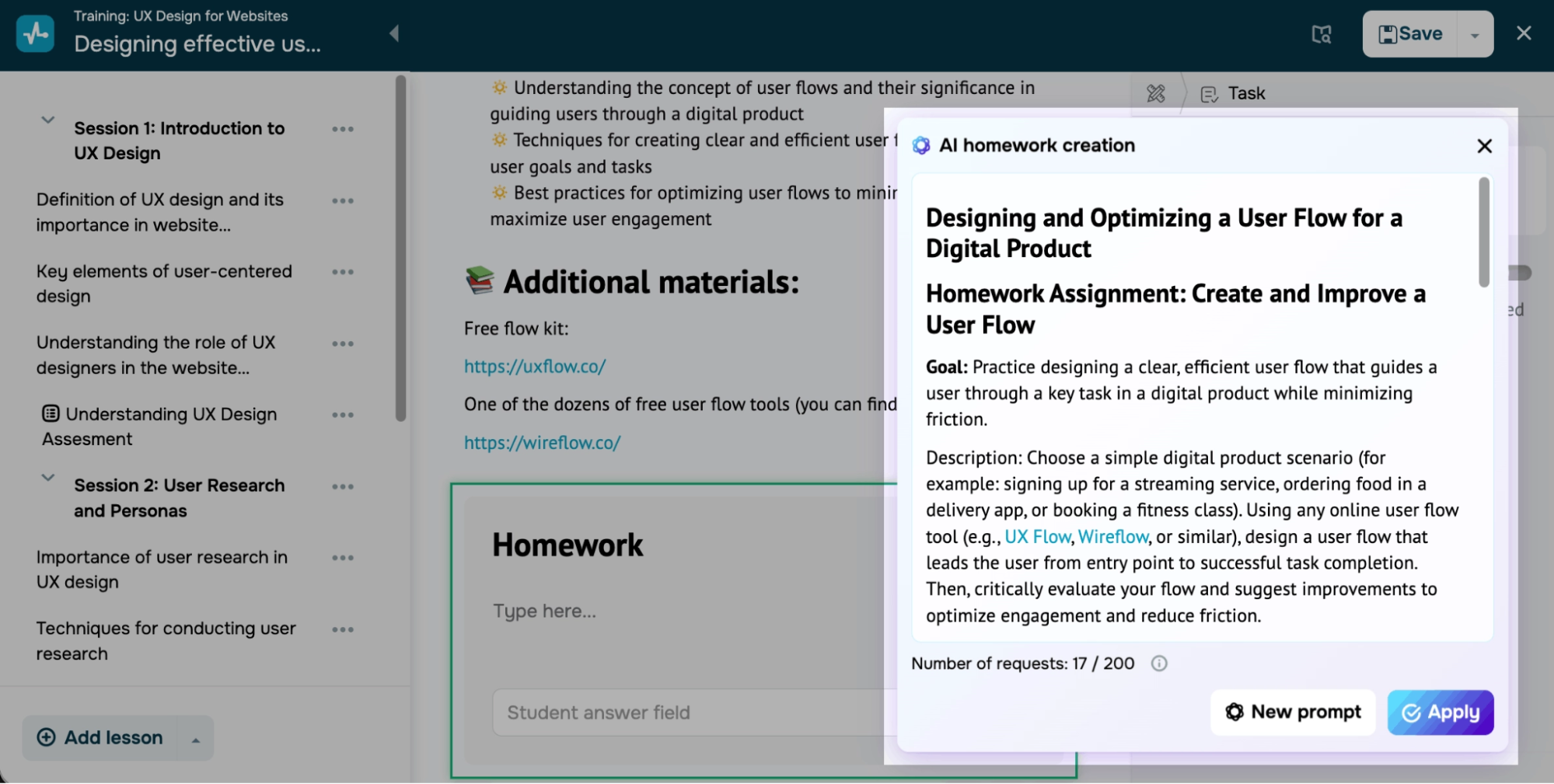 Using the AI course assistant to create an assignment in SendPulse
Here is a quick overview of SendPulse’s toolkit:
- clear visual curriculum and course editor;
- support for videos, slides, podcasts, eBooks, and other formats;
- quizzes, AI-powered assignments, and grades;
- template-based course websites;
- conditional and customizable course certificates;
- entire feedback loop with student ratings for lessons and quizzes;
- student-instructor chats and groups;
- watermarks and role-based access for data protection;
- built-in payments, paid tiers, promo codes, and premium content;
- event invitations and reminders;
- insights into student activity, payments, engagement, and completion;
- enrollment via website or chatbots on WhatsApp, Instagram, etc.;
- built-in CRM for tracking student data, payments, and chats;
- native email automation tools and AI chatbots;
- course payments via Stripe, Klarna, PayPal, etc.;
- mobile app for iOS and Android included;
- 24/7 multilingual support via live chat.
Limitations. SendPulse’s course builder covers the essentials well, including lessons, tests, assignments, certificates, and drip scheduling, but you may need to look elsewhere if you’re after highly interactive, gamified learning experiences.
Pricing. There’s a free plan with up to 200 students, one course, and a single instructor seat. SendPulse’s paid plans start at $36 per month for 1,000 students and unlimited courses. Yearly plans are up to 50% cheaper. You can craft a custom pricing plan by selecting individual tools from the platform’s toolkit. There are no additional transaction fees besides the one charged by Stripe or other payment providers. Check SendPulse’s official pricing page for details.
SendPulse vs Thinkific. SendPulse is an AI-driven sales and marketing platform with an online course builder folded in, rather than a course platform with marketing features bolted on like Thinkific. It’s a superior choice if you’re an educator who needs lead nurturing and multi-channel outreach as much as the course content. Pricing-wise, SendPulse is also far more realistic for small-scale educators.

Power up your business with smart tools
From solo creators to global brands, thousands of customers trust SendPulse to run email campaigns, chatbots, automations, and more — all in one place.
Get started for free
Teachable
G2: 3.8 ⭐ | Capterra: 4.2 ⭐
Teachable is an eLearning platform that lets creators build, price, and sell online courses, coaching, memberships, and other digital products. Its feature list is geared toward helping educators turn their passion into a lucrative business.
To check how quickly a course could be built, we created a Teachable school from scratch. After a short onboarding survey, Teachable’s AI generated a complete course outline, including sections and lesson titles, using only a course name and a one-line description. This gave us a useful starting point without having to structure the curriculum manually.
Teachable’s focus on selling is also visible in the lesson editor. Alongside standard content blocks for videos, PDFs, and quizzes, the “Add content” panel includes upsell and referral blocks for promoting other offers. One limitation we noticed with a new school is that email templates can’t be customized without contacting support.
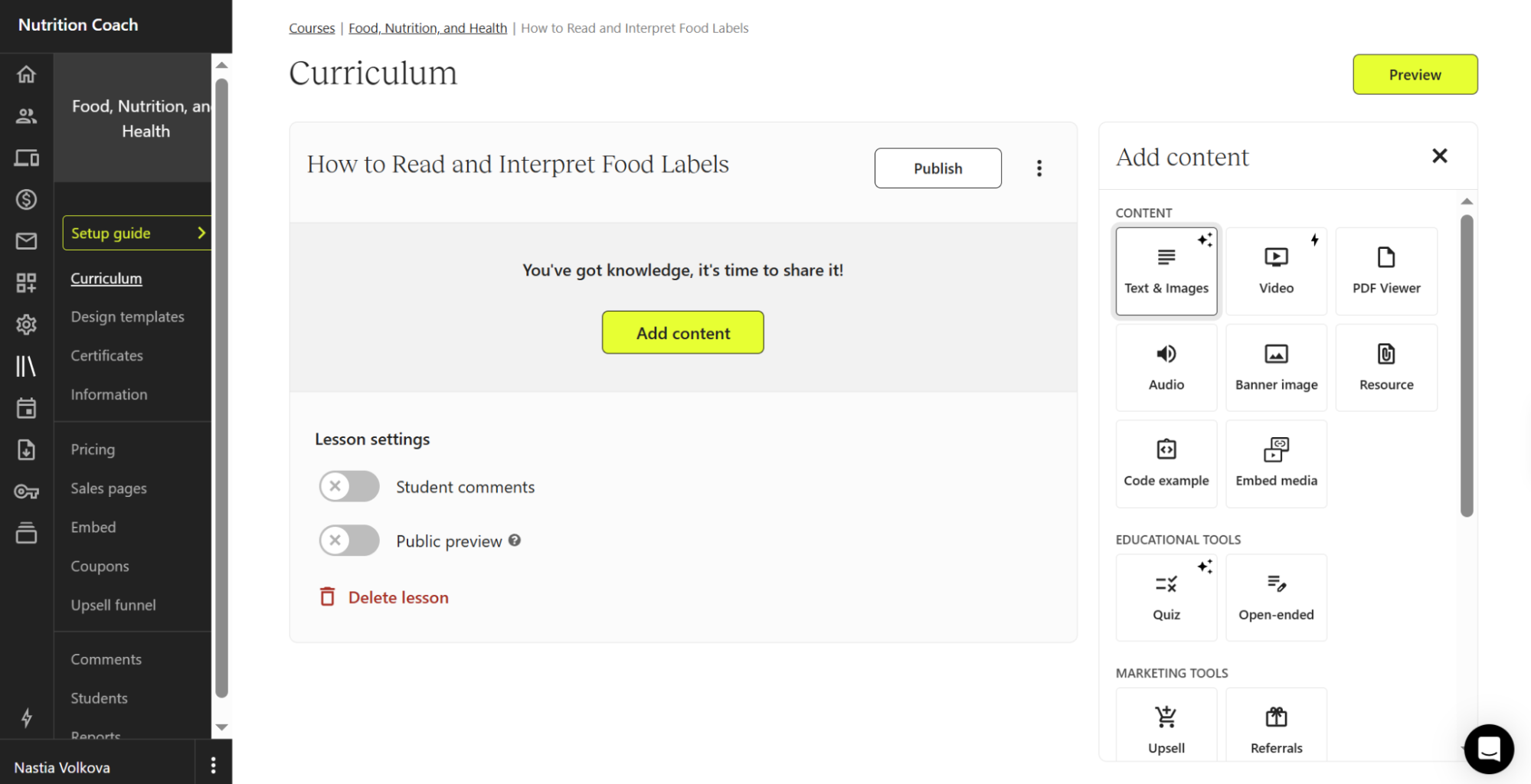 Adding a lesson in Teachable — content, quiz, upsell, and referral blocks all live in one panel
This is what Teachable offers when it comes to course building and monetization:
- drag-and-drop course builder with AI creation and translation tools;
- AI curriculum, quizzes, summaries, and product pages;
- templated and custom completion certificates;
- subscriptions, bundles, and diverse lead magnet formats;
- advanced student experience customizations and custom domains;
- email marketing features and lead capture forms;
- responsive, SEO-friendly white-label course websites;
- drip content support, automated upsells, and add-ons;
- student referrals for driving revenue;
- tracking pixels and affiliate marketing;
- 35+ local payment methods and local tax handling at the checkout;
- Buy Now, Pay Later and other flexible payment options;
- intuitive dashboard and mobile app for students;
- course, sales, and student progress reports;
- Zapier, ConvertKit, Google Analytics, and Segment integrations;
- real-time support and assisted migrations.
Limitations. Teachable severely limits the number of third-party integrations — only one for Starter, three for Builder, and five for Growth users — unless you’re on a custom plan. Another crucial limitation is that certificates and white-labeling are only available to Growth and custom plan users.
Pricing. The platform offers a 7-day free trial. Teachable’s pricing plans start at $39 a month for 100 active students and 5 products. Annual billing gives you 22% off. There is a 7.5% transaction fee on the Starter plan and zero fees on higher tiers. Standard processing fees like 2.9% via Teachable Payments may still apply. Check Teachable’s official pricing page for details.
Teachable vs Thinkific. Teachable stands out for its checkout-focused sales tools and white-glove service. The platform is slightly more creator-focused, allowing solo experts to easily launch high-value, one-on-one coaching products and have Teachable manage all the tax-related aspects when selling to an international audience.
Kajabi
G2: 4.1 ⭐ | Capterra: 4.3 ⭐
Kajabi is a premium course and community-building solution for experts intended to grow their knowledge business and thought leadership exponentially.
Kajabi is one of the platforms we didn’t set up hands-on. It has no free plan, and even the 14-day trial places an authorization hold ($179 for the monthly plan or $1,716 for the annual one). Per Kajabi’s own docs, several features stay locked until you’re paying, including bulk contact import and site-wide email template editing.
Still, recent reviewers say the setup process is smooth. For example, a 2026 G2 reviewer describes it as quick and user-friendly.
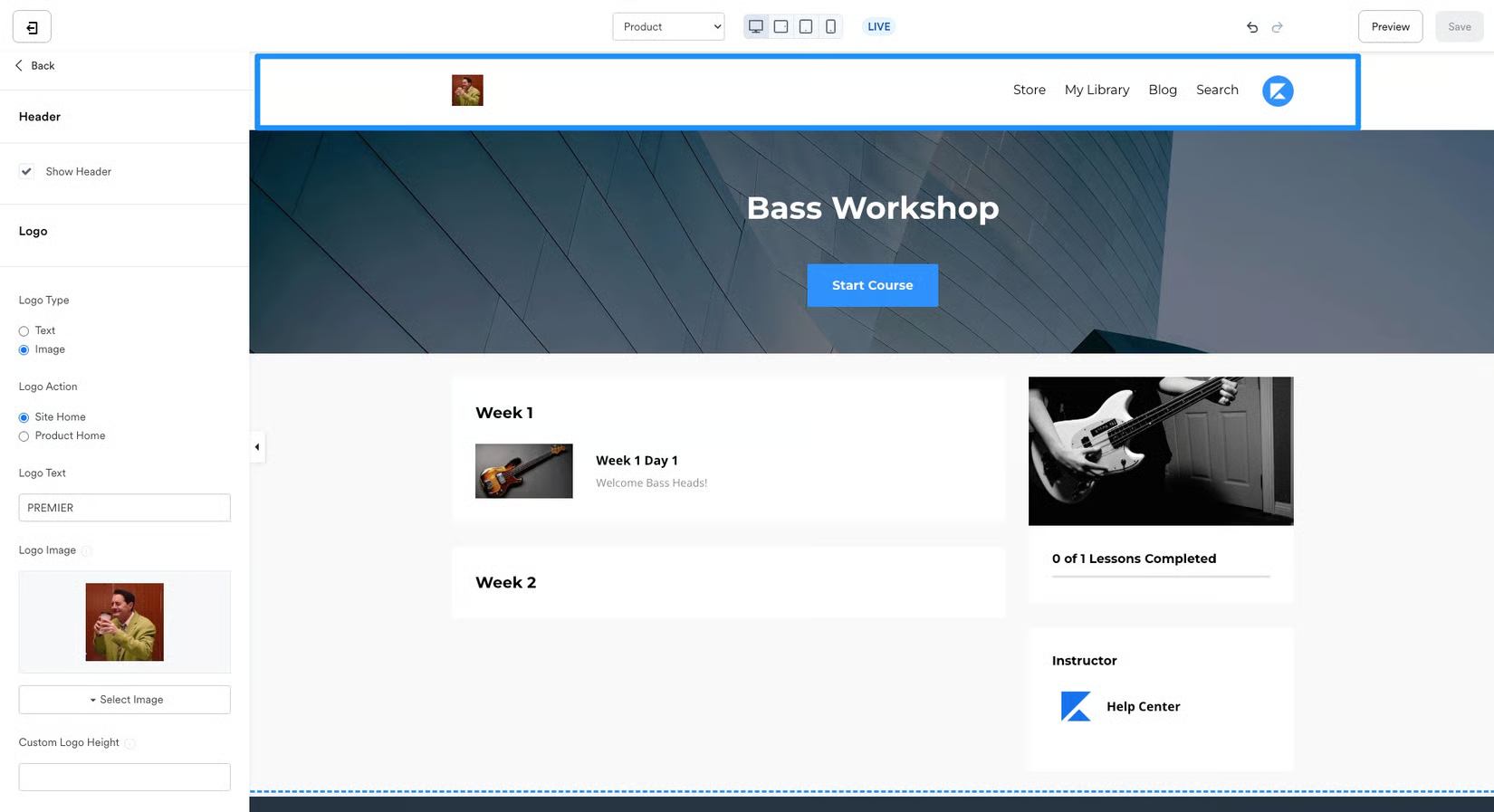 Creating an online course with Kajabi; source: Kajabi
Among its core features are:
- visual course editor and scalable curriculum design;
- drip content and scheduled releases;
- seamless, trigger-based email sequences and other automations;
- contact forms and course landing pages;
- trainable AI expert agents;
- student progress tracking, knowledge checks, and completion insights;
- one-time, subscription, and payment plan pricing;
- memberships, coaching sessions, and paid newsletters;
- podcasting with publishing across Apple, Spotify, Google, and more;
- built-in community spaces with dashboards, activity feeds, and updates;
- Creator Studio for repurposing videos into social media clips;
- coupons, promotional offers, and upsells;
- native ad platform Amplify for co-promotion;
- payments via Google Pay, Klarna, all major credit cards, etc.;
- AI Cofounder for strategic content planning, creation, and pricing guidance;
- live Q&A sessions with Kajabi experts;
- customizable analytics dashboard and reports;
- branded mobile app;
- API access and integrations with your existing site, CRM, and marketing stack;
- 24/7 chat and email support.
Limitations. For many creators, the main concern with Kajabi is its steep pricing, which reflects the platform’s state-of-the-art feature set. Kajabi focuses on high-earning creators, which may feel alienating to users who are just starting out.
Pricing. Kajabi offers a 14-day free trial. Paid plans start at $179 per month for 2,500 contacts and 5 products. Annual billing can save you 20%. On top of that, there are transaction fees, which vary from 0.5% to 2.9% + $0.30, depending on the payment method. Check Kajabi’s official pricing page for details.
Kajabi vs Thinkific. When it comes to turning students into a lifetime revenue source, Kajabi beats Thinkific and other competitors by providing an unmatched sales and marketing ecosystem, from streamlined opt-ins and re-engagement emails to affiliates and promotion partner search.
Podia
G2: 4.4 ⭐ | Capterra: 4.6 ⭐
Podia is a community-first online course platform that also allows creators to build personal websites, organize and promote events, launch newsletters, publish fully featured blogs, and sell coaching sessions.
The platform is easy to start with, offering a 30-day trial that doesn’t require a credit card. There’s no lengthy onboarding survey or AI setup to work through. You can go directly to the course editor and start adding lessons using a Notion-style “/” menu for images, GIFs, videos, files, audio, and other content.
To set up your course site or product page, you choose a color palette and a starting template, like a blank site, email landing page, link page, or full website. Podia then generates the initial layout for you to customize.
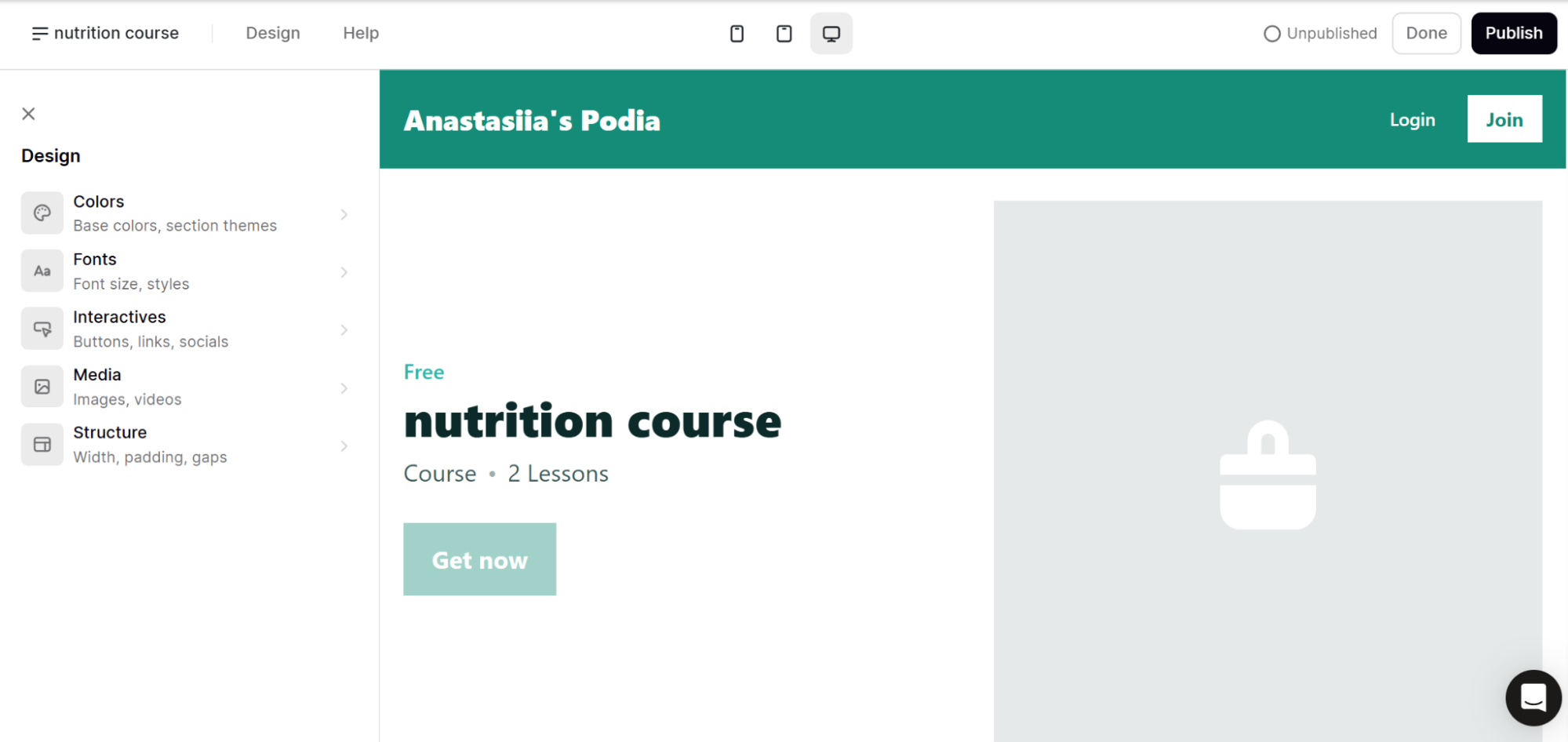 Podia auto-builds the course sales page leaving you to restyle it in a pared-down design panel
Let’s go through Podia’s key features:
- intuitive lesson editor and embeddable external content;
- drip lessons, quizzes, and customizable certificates;
- automated email check-ins, promotions, and reminders;
- mailing list segmentation, tags, email templates, and forms;
- custom domains, SEO settings, and built-in live chat for websites;
- student-facing progress tracking, dashboard, and lesson comments;
- cohort-based courses, bulk licenses, and limited seats;
- bulk customer import (CSV);
- communities with topics, group chats, member profiles, DMs, and tiers;
- downloadables (any file type) and product bundles;
- webinars, ticketing, and replay hosting;
- free migrations for paid plan users;
- product sales pages, coupons, upsells, and payment plans;
- tax support, 20+ currencies, and payments via Stripe, PayPal, etc.;
- revenue tracking, email marketing analytics, and course completion tracking;
- affiliate programs and easy payouts;
- integrations with major email, analytics, and payment tools;
- email and chat support.
Limitations. Some users find Podia’s customization options limited and wish for more content delivery and payment options. Other reviewers point out that Podia’s cheapest plan with its 5% fees only makes sense at very low revenue. While the platform advertises unlimited students and sales across all plans, email subscribers are still capped by tier.
Pricing. There’s a 30-day free trial. Podia’s pricing plans start at $49 per month for up to 100 email subscribers and 50 products. Annual billing brings the cost down. The cheapest Mover plan comes with a 5% transaction fee, while higher-tier plans have zero transaction fees. Check Podia’s official pricing page for details.
Podia vs Thinkific. Podia occupies the sweet spot between a pure course platform and a full business suite, removing the need to stitch together separate tools. On the other hand, Podia’s course builder is simpler than those of Teachable or Thinkific.
LearnWorlds
G2: 4.7 ⭐ | Capterra: 4.7 ⭐
LearnWorlds is an AI-first LMS for businesses, creators, coaches, nonprofit organizations, and enterprises. Companies use it for employee onboarding, sales training, and customer education alike, but DTC creators and solo businesses selling directly to consumers benefit from the platform just as much.
During onboarding, LearnWorlds asks about your organization’s size and whether you plan to train customers or partners. The platform also offers a catalog of more than 180 ready-to-license courses.
The starter templates looked somewhat dated and generic to us, but the AI course builder made a much better impression. Instead of just entering a single prompt, you can define objectives, audience, tone, instructional approach, and the specific activity types you want to include, such as videos, SCORM, exams, live sessions, and certificates. When testing it, we got a structured outline with six sections and 26 activities you populate.
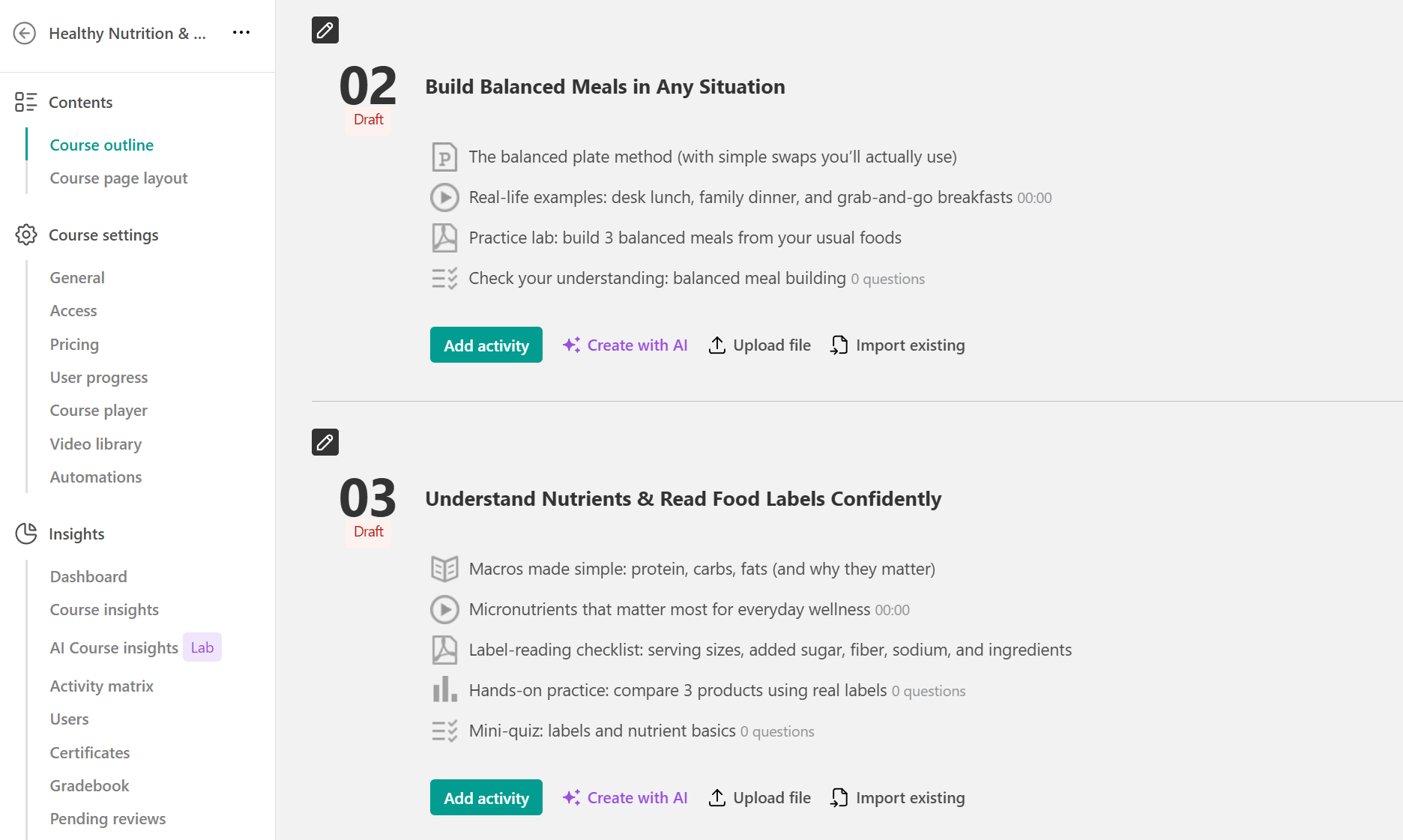 LearnWorlds’ AI varies the format within each section it generates
Here’s an overview of LearnWorlds’ capabilities:
- drag-and-drop interface with AI assistance built in at every stage;
- interactive elements like questions, CTA buttons, pop-ups, and reactions;
- AI summaries and engagement checkpoints;
- diverse digital products, webinars, and coaching sessions;
- mobile-ready, watermarked videos;
- course hub, exams, assessments, and certificates;
- templates, customizable triggers, and conditions for email flows;
- multi-step automated journeys;
- AI-driven personalized learning paths;
- SCORM, LTI, live sessions, and drip content;
- bundles and subscriptions;
- sequential navigation, prerequisites, and completion rules;
- fully white-labeled websites;
- custom user roles and permissions;
- detailed analytics and scheduled reports;
- Stripe-powered checkout with tax and invoice handling;
- eLearning mobile app builder;
- broad marketing, CRM, and analytics integrations via native connectors and Zapier;
- personalized setup and email support.
Limitations. LearnWorlds might be overkill for small-scale educators as it’s better suited for complex or highly specific formal training setups. Also, as some reviewers point out, integrating LearnWorlds with Stripe effectively locks you in with the vendor, as directly transferring the school to a new Stripe account isn’t possible.
Pricing. The platform offers a 30-day free trial. Paid plans start at around $29 a month for 1,000 active learners. The lowest tier comes with a $5 fee per paid enrollment. Extra AI credits, the branded mobile app, and extra emails are available as add-ons. Check the LearnWorlds official pricing page for details.
LearnWorlds vs Thinkific. Thinkific wins on simplicity, while LearnWorlds is built for the long haul. The latter offers interactive video, in-video quizzes, branching content, and AI at almost every step, which means your business should ideally be past the “just launching” phase when you migrate. The amount of control over branding and course quality makes it more relevant for businesses managing multiple clients or learner groups.
Mighty Networks
G2: 4.5 ⭐ | Capterra: 4.5 ⭐
Mighty Networks positions itself as a community platform for hosting engaging learning and networking experiences. While it also supports online courses, they are meant to live inside a community and not as an isolated product.
Getting started is quick. Onboarding consists of a few focused questions with preset answers, and the built-in AI assistant, Cohost, can help with community strategy and pricing. You see that community-first setup in how courses are built: a standalone course is a single-feature space, while a multi-feature cohort course combines lessons with a feed, chat, and events for a group.
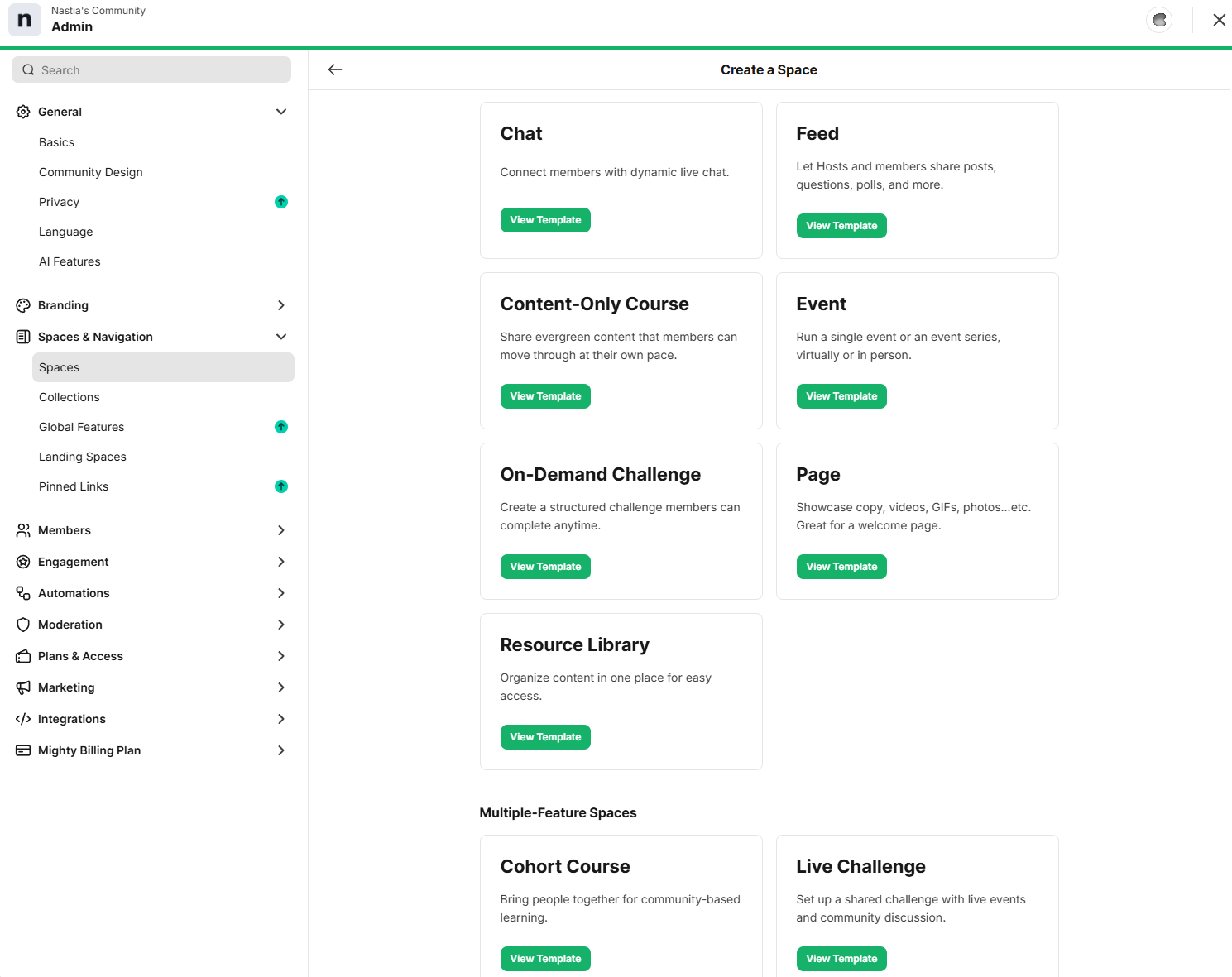 Creating a Space in Mighty Networks — a course can stand alone or bundle a feed, chat, and events
The course-building tools are more basic, though. During our test, an in-product research survey popped up while we were creating the course, which felt intrusive. Recent G2 reviewers mention a learning curve when getting started and some confusion around terms such as “Spaces” and “Networks.”
Let’s look at the most popular features of this Thinkific alternative:
- courses with clear sections, lessons, quizzes, and certificates;
- drip content and scheduling;
- AI Cohost for guidance, strategizing, and community management;
- feed-based and chat-based communities with polls and questions;
- paid events and live sessions with reactions;
- automated flows for re-engagement, upsells, milestones, and more;
- challenges, resources, habit trackers, and event replays for members;
- detailed member profiles;
- DMs, text and voice notes, and group introductions;
- custom web pages with checkouts;
- flexible payment options, promo codes, and recurring payments;
- supported embeds from 2,000+ apps;
- gamification features like streaks, recognition, and leaderboards;
- rich dashboards and revenue tracking;
- native mobile apps and API access;
- priority support for higher tiers.
Limitations. Mighty Networks’ interface is designed to mimic social media, which some users found confusing for their audiences. According to multiple reviews, running a hyperactive group on this platform might be a challenge, and customer support on lower tiers isn’t instant.
Pricing. A free 14-day trial is available. Paid plans start at $95 per month for unlimited members and three host seats. Choosing annual billing gets you two months free. Transaction fees range from 0.5% to 2%, depending on the tier. Check the Mighty Networks official pricing page for details.
Mighty Networks vs Thinkific. Compared to Thinkific, Mighty Networks is community-first, with courses living inside branded spaces alongside discussions, chat, and events. Its native mobile app and social features go deeper than Thinkific’s, but its course builder is more basic.
Skool
G2: N/A ⭐ | Capterra: N/A ⭐
Skool is a community-first platform that combines a community feed, a course area, an event calendar, leaderboards, member profiles, and native video hosting.
Using Skool feels more like being on a social network than using regular course software. The interface is easy to use, and most of what you do involves browsing, posting, and connecting with other members.
Getting started was not as smooth. After signing up, we had to fill out our profile with a photo and bio, and there was no clear way to skip this step. When we clicked “Create a community,” we were taken to the plan selection page and asked for payment details, even though we had already chosen “Start a trial” during registration. For a platform that aims to be simple, the process from signing up to starting a trial was more confusing than expected.
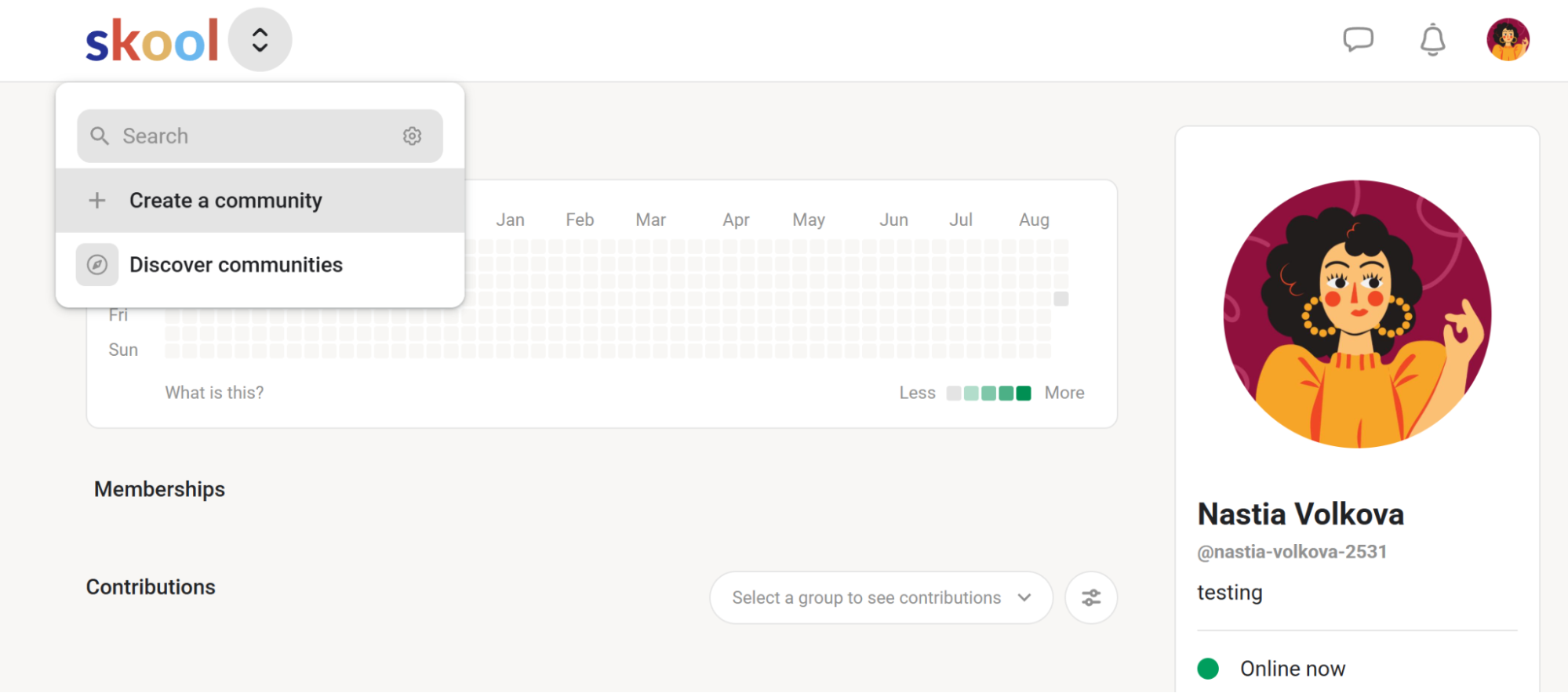 Clicking “Create a community” routes you into a card-required trial
Here are Skool’s key features at a glance:
- searchable communities categorized by niche;
- courses with pages, videos, resources, and searchable transcripts;
- subscription memberships or one-time course purchases;
- unlimited members, courses, videos, and live calls;
- posts, comments, categories, likes, mentions, rich media, polls, etc.;
- calendar for scheduling group events;
- gamification features, member profiles, and chat;
- email broadcasts;
- built-in community-wide search;
- custom URLs;
- auto affiliate program;
- single analytics dashboard;
- community and email support.
Limitations. Skool users online praise the minimal setup but mention the lack of any serious promotion tools, which makes it hard to grow a community from zero and build a credible appearance on the platform.
Pricing. There’s a 14-day free trial. There are two paid plans: Hobby at $9 a month with a 10% transaction fee, and Pro at $99 a month with a 2.9% transaction fee. You can get two months for free by paying annually. Check Skool’s official pricing page for details.
Skool vs Thinkific. Thinkific is a course-first platform, while Skool clearly prioritizes community building and keeping members active and talking. The latter has no in-depth email automation, CRM integrations, or advanced reporting, but for the right use case, that stripped-down simplicity is an advantage.
Systeme.io
G2: 4.8 ⭐ | Capterra: 4.8 ⭐
Systeme.io is an all-in-one business platform that combines sales funnels, a website and blog builder, email and SMS marketing, automations, a CRM tool, online courses, bookings, and affiliate management in a single dashboard.
Onboarding is quick, with only a couple of questions before you reach the dashboard. When you start building a course, you’ll notice that Systeme.io uses the same drag-and-drop editor for lessons as it does for pages and blogs. You get access to the same blocks, including opt-in forms, pricing, and testimonials, along with elements like columns, media, and countdowns. As a result, building a lesson feels similar to creating a marketing page. The editor is flexible and consistent across the platform, although a bit different from a dedicated course builder.
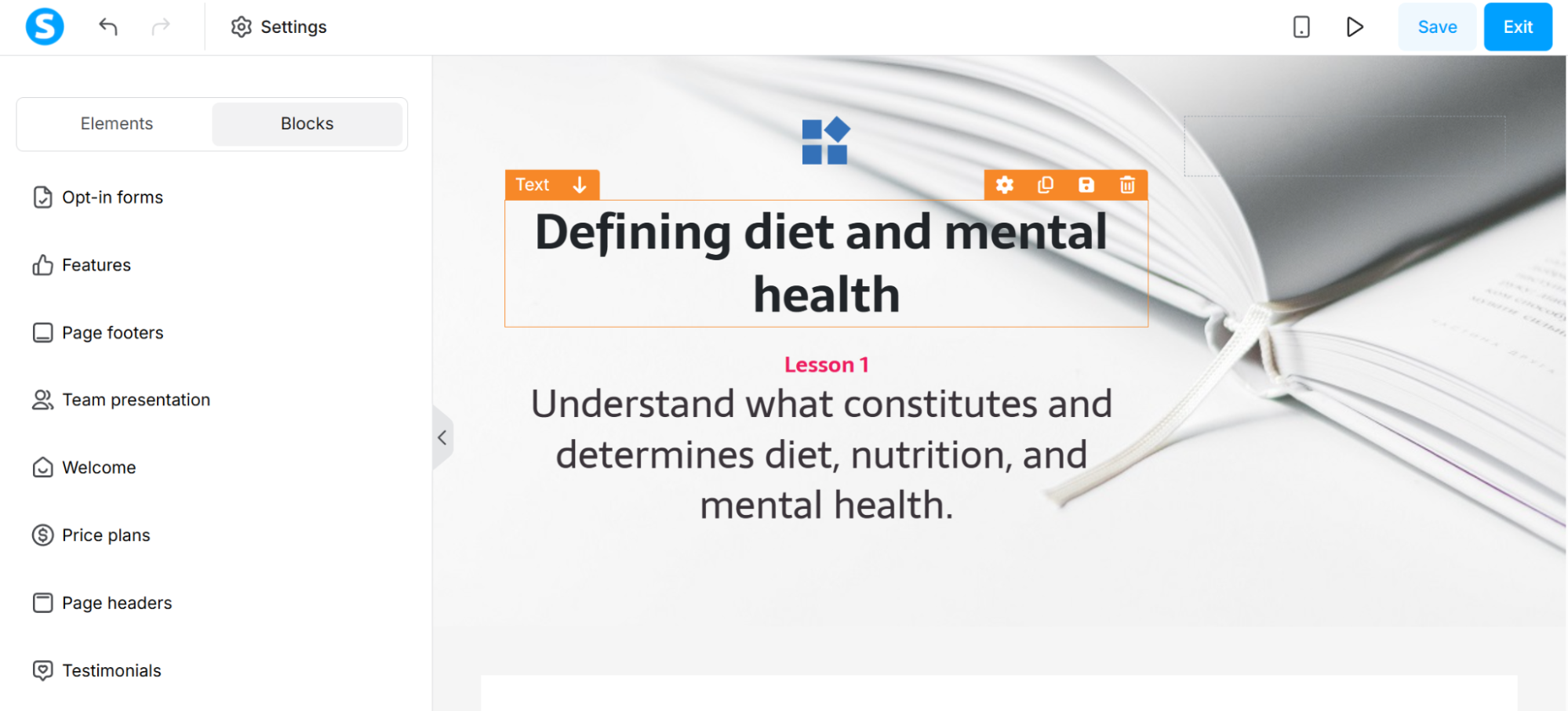 Building a course lesson in Systeme.io with the same blocks used for pages
Below are the most relevant features of this Thinkific alternative:
- native course delivery with modules, lessons, drip release, and course bundles;
- student progress tracking;
- drag-and-drop funnel builder with templates;
- full email marketing system built around newsletters, automated campaigns, and detailed send statistics;
- tag-based contact segmentation and behavior-triggered automation rules;
- built-in communities with social engagement features;
- physical product sales with coupon support and flexible pricing plans;
- auto affiliate program management with commission tracking;
- basic website and blog builder;
- evergreen webinar funnels on higher-tier plans;
- booking for one-on-one sessions and calls;
- built-in CRM pipeline;
- unlimited email sends on every paid plan, with no per-contact email fees;
- native funnel opt-ins, course access, and affiliate commissions;
- 24/7 email support.
Limitations. Systeme.io’s biggest constraint is its automation depth. The platform is missing complex, multi-channel workflows, and its CRM appears rather rudimentary.
Pricing. There’s a permanent free plan covering 1 course and 500 students. Paid plans run from $17 a month for 5 courses and unlimited students. All paid plans include 0% transaction fees and unlimited email sends. Annual billing saves the equivalent of two months and comes with a free migration. Check Systeme.io’s official pricing page for details.
Systeme.io vs Thinkific. Systeme.io, with its sub-accounts, is a good fit for agencies and consultants who manage multiple clients, whereas Thinkific mostly targets solo creators. Each Systeme.io sub-account is a fully isolated workspace with its own funnels, contacts, emails, and courses, and it’s all covered under a single Unlimited plan subscription rather than per-client fees — Thinkific has no comparable multi-client architecture.
LearnDash
G2: 4.2 ⭐ | Capterra: 4.6 ⭐
LearnDash is a self-hosted, WordPress-first LMS plugin that provides a drag-and-drop course builder, an advanced quiz engine, drip-fed content, and cohort management directly on a site you own and control.
We didn’t test LearnDash hands-on. Unlike the other platforms in this comparison, it doesn’t offer a trial you can access immediately after signing up. You need to install the plugin on your own WordPress site or use LearnDash Cloud if you prefer a managed option. Setting up a WordPress site specifically for this review was out of scope for this test, so this section is based on LearnDash’s documentation and user reviews rather than our own course-building experience.
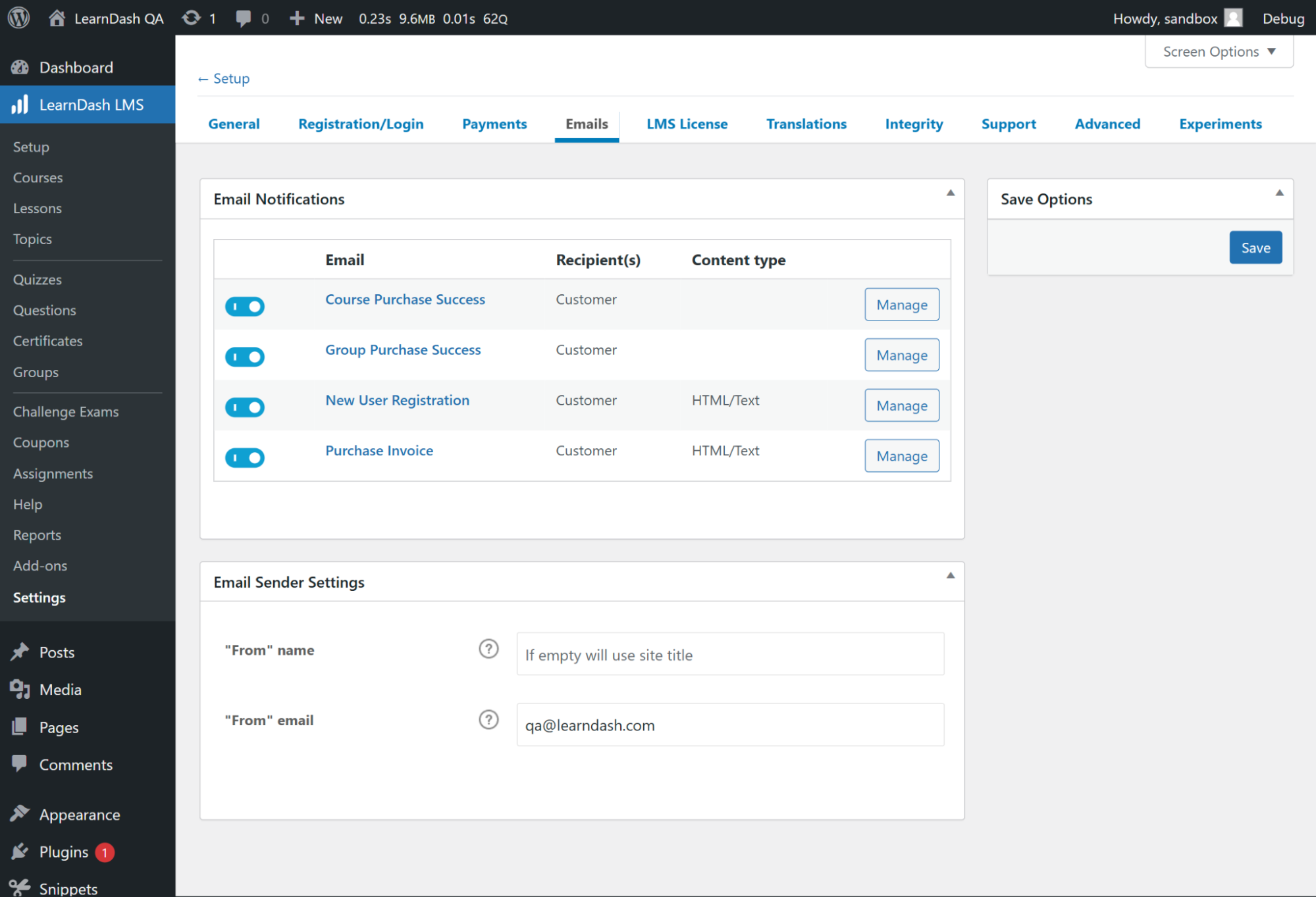 The main dashboard of LearnDash; source: LearnDash
LearnDash’s feature list includes:
- drag-and-drop course builder with lessons and topics;
- advanced quiz engine with eight question types;
- AI-generated course outlines;
- drip-feed content release on a scheduled timeline;
- course prerequisites, points, badges, and gamification;
- customizable, downloadable certificates;
- group and cohort management with leader/admin roles;
- one-time or recurring purchase models, plus course bundles;
- access to the WordPress plugin ecosystem for payments, SEO, and design;
- built-in discussions, assignments, and progress tracking;
- revenue and sales reporting;
- multilingual support via documentation and tickets.
Limitations. For long-time WordPress users, getting acquainted with LearnDash doesn’t pose a big challenge, but for first-timers, the learning curve is real. There’s no built-in video hosting, so courses require pairing with an external service like Vimeo, and there’s no native mobile app.
Pricing. There’s no free plan, though a demo is available. The core LearnDash LMS plugin costs $259 per year for one site, and a fully managed hosting option (StellarSites Learning) is also available. Membership and Premium LMS plugins can also be purchased as add-ons. Check the LearnDash official pricing page for details.
LearnDash vs Thinkific. Thinkific is a hosted, all-in-one platform that can be set up within a couple of hours. LearnDash asks for WordPress and a willingness to manage your own hosting stack, but pays that back with full ownership of your data, no ongoing transaction fees, and deeper customization possibilities.
Other Thinkific alternatives worth a look
Our top picks cover most needs, but a handful of other tools stand out in specific niches. Each of these alternatives is worth a look:
- Circle — a community-first platform, more polished and professional than Skool or Mighty Networks;
- Udemy Business — a subscription to a ready-made course library for training employees;
- Uscreen — a video-first membership and streaming platform, best for creators whose product is really video;
- 360Learning — a corporate employee-training LMS with collaborative authoring.
How the top Thinkific alternatives compare head-to-head
No single platform is best in every category, so the right Thinkific alternative depends on what you want to teach, how you plan to sell it, your audience, and your budget.
Best for scaling an all-in-one business — Kajabi vs Teachable vs SendPulse
Kajabi is the most expensive of the three, starting at $179/month, but it’s also one of the most complete. Courses, funnels, email automation, and a website builder are all included. The higher price makes sense only if you’ll actually use the marketing side, not just the course hosting.
Teachable has a lower starting price of $39/month and wins on checkout conversion with in-lesson upsells and order bumps, but its email automation is more limited, which may push serious sellers toward a dedicated tool.
SendPulse delivers optimal value at a reasonable price of $36/month. It’s an AI-driven marketing platform that combines email, chatbots, CRM, and course-building tools, and it’s the strongest choice if your focus is on cross-channel nurturing and acquisition rather than solely building educational products.
Best for community-led courses — Mighty Networks vs Skool
Both platforms treat community as the product and courses as a feature inside it, but they display different approaches.
Mighty Networks provides a broader set of community tools, including native livestreaming, gamification, mobile apps, and Spaces that can combine different types of content and interaction. That flexibility comes at a higher starting price of $95/month.
Skool strips things down to a feed, a classroom, leaderboards, and chat, with no email automation or CRM integrations at all, but starts at just $9/month and gets a community engaged and talking with almost no setup.
Best for interactive and B2B training — LearnWorlds vs Kajabi
Both are premium platforms, but they serve different priorities.
LearnWorlds puts more emphasis on the learning experience itself. Interactive video, in-video questions, branching scenarios, SCORM support, assessments, and white-label mobile apps make it better suited to educators and businesses running customer, employee, or more structured training programs. Those capabilities may be more than a creator needs for a relatively simple course.
Kajabi optimizes for the business around the course, with funnels, email automation, and monetization tools built into the platform. It is a better fit when marketing and selling are just as important as delivering the course itself.
Best for a tight budget — Systeme.io vs Podia vs SendPulse
Systeme.io has a permanent free plan that includes funnels, email marketing, and one course, with no transaction fees. This gives you enough to test and sell a course with no upfront cost.
Podia’s cheapest paid plan starts at $49/month and bundles courses, digital products, and a website builder, though a 5% transaction fee applies until you upgrade past Mover.
SendPulse’s free plan is unusually generous for outreach, with 15,000 emails a month and up to 200 students. That makes it a perfect match for anyone interested in list-building and multi-channel marketing more than the course builder itself.
Best for WordPress and full ownership — LearnDash vs hosted platforms
LearnDash sits in a fundamentally different category. Rather than renting space on someone else’s platform, you own your courses, student data, and infrastructure outright on your own WordPress site, for a flat $259/year with no ongoing transaction fees.
The tradeoff is that you inherit WordPress’s maintenance burden, need an external video host, and get a fairly basic default student dashboard without added design work. Hosted platforms like Thinkific, Teachable, or Podia trade that ownership for convenience, but recurring monthly costs and platform-imposed limits may limit your growth down the line.
Summary
Whichever platform catches your eye, try not to choose based only on features. Shortlist the two or three that match your budget and teaching style, then test them out with their free plans or trials. Sometimes a course builder that looks great on paper feels very different when you use it. Let your experience with the trial help you decide.
And since you’re reading this review on the SendPulse blog, one is worth trying first: SendPulse combines a course builder with email, chatbots, and a CRM system, so you can create and promote your courses all in one place — and the free plan lets you test it at no cost.
Thinkific alternative FAQ
Which is better, Thinkific or Kajabi?
It depends on budget and needs. Thinkific is cheaper and simpler for course-first creators; Kajabi costs more but offers more sophisticated marketing, funnel, and AI tools for creators who want everything in one place.
What is the best alternative to Thinkific?
There’s no single “best” option because it depends on your use case. Consider SendPulse for strong marketing tools, including chatbots and a built-in CRM; LearnWorlds for compliance-ready or B2B training; Skool for community-first engagement; and Systeme.io for funnels plus courses.
Is Thinkific or Teachable better?
Neither is universally better. Thinkific has stronger native email automation and more integrations, while Teachable has better built-in sales tools like in-lesson upsells and order bumps.